

Smart plugs tend to be the first smart-home upgrade most people actually use, because they take the gadgets you already own, lamps, fans, coffee makers, holiday lights, and put them on autopilot. The trick is finding the right shape for your outlet situation, the right load rating for what you’re powering, and the right app ecosystem to slot into. This list walks through nine options worth your attention, from simple two-packs to weatherproof outdoor models and a heavy-duty energy monitor for the heavier stuff in the garage.
How The Shortlist Stacks Up

KSLNRGY Smart Plug Device, Plug-and-Play (2PCS)

Govee Dual Smart Plug 2 Pack, 15A
Geeni Switch + Charge Smart Wi-Fi Plug

YoLink Smart Energy Plug 15A YS6614

WILAWELS Wireless Remote Control Outlet

Geeni Outdoor Duo Wi-Fi Smart Plug

Geeni Dot Plug 2-Pack
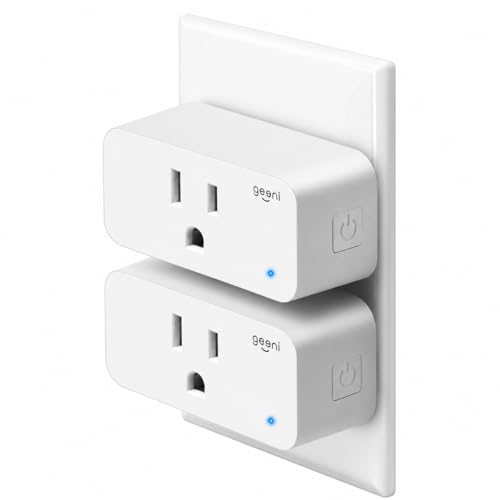
Geeni Smart Plug Mini 15A, 2-Pack

Geeni Indoor/Outdoor Smart Plug, 1 Socket
More Details On Our Top Picks
The KSLNRGY 2-pack is the most stripped-down option on this list, and that is the entire appeal. Each unit drops into a standard US wall outlet, talks to your existing 2.4 GHz Wi-Fi, and asks for almost nothing in the way of setup. You will not find energy monitoring, USB ports, or a sprawling ecosystem here, but you also will not find a learning curve.
For someone renting a room or a small apartment, the compact ABS housing keeps neighboring outlets usable, which matters more than people realize until they buy a chunkier plug and lose half the wall. The two-pack format also means you can stage a lamp and a fan in the same corner without buying twice.
The Upside
- No-hassle pairing that takes a couple of minutes per plug
- Lightweight body that stays out of the way of the second socket
- ABS housing keeps the unit feeling solid for everyday indoor use
- Two-pack format spreads the cost across more than one room
Things To Consider
- No USB ports, so phone and tablet charging still needs a separate brick
- Lacks energy monitoring for anyone watching kilowatt-hours
Right Fit For
First-time smart-plug shoppers who want the simplest possible path to voice and app control without paying for features they will not touch.
Consider Something Else When
The Geeni Switch + Charge Smart Wi-Fi Plug suits anyone who needs a 2-USB charging stage at the same outlet, especially nightstand setups.
Govee’s dual design solves the most common smart-plug complaint: losing the second socket. Two side-by-side outlets sit in the footprint of a single standard plug, turning a normal duplex into four controllable sockets across the two-pack. You also get a 15A rating, which covers most household appliances short of a space heater running flat-out.
Bluetooth fallback is the quiet feature worth flagging. When the Wi-Fi hiccups, the Govee Home app can still reach the plug locally, so a router reboot does not lock you out of the lamp across the room. For most apartments, the only real limit is the 2.4 GHz network requirement, so anyone running a 5 GHz-only setup will need to check their router first.
Real Benefits
- Horizontal layout doubles a single wall outlet without blocking the second socket
- 15A capacity handles heavier lamps, fans, and small kitchen gear
- Bluetooth backup keeps control working through brief Wi-Fi drops
- Voice integration with both major assistants straight from the box
Points To Note
- Requires a 2.4 GHz Wi-Fi network, no 5 GHz support
- A Govee Home app account is required to use the voice features
Feature Snapshot
Made For
Renters and small-space dwellers who want to stretch a single outlet into four smart sockets without rewiring anything.
Look Elsewhere When
Anyone placing a single plug on a kitchen counter might prefer the KSLNRGY Smart Plug Device for its slightly simpler single-outlet footprint.
The Switch + Charge earns its name by combining a single smart outlet with two USB ports on the front, so one wall plate becomes a small charging hub. A bedside table that previously held a lamp plus a phone brick can collapse to one device, which is the kind of clutter reduction that compounds in a small bedroom.
It runs through the Geeni app over your existing 2.4 GHz Wi-Fi with no separate hub, which keeps the gear count down. For most people, the practical ceiling is a single high-draw appliance on the smart outlet, since the USB side handles the slow-and-steady stuff. One thing worth weighing: owners in older homes with crowded outlets sometimes find the body a little wide for tight baseboards.
A Few Highlights
- Three devices from one wall outlet, smart plus two USB
- Hub-free setup through the Geeni app over 2.4 GHz Wi-Fi
- Schedules for the smart outlet help automate lamps or heaters
- Voice integration with the major assistants
Honest Caveats
- Body width can crowd tight baseboard outlets in older homes
- Only the main outlet is app-controlled, the USB ports stay on
Best Suited To
Bedrooms, dorm rooms, and home offices where phones, tablets, and a lamp all live in the same wall plate.
Skip It When
Anyone running two or more heavy appliances from a single outlet should step up to the YoLink Smart Energy Plug 15A for its higher load headroom.
YoLink goes where most smart plugs cannot, using LoRa, a long-range, low-power radio that pushes signal across roughly a quarter mile in open air, to talk to its hub. That makes the YS6614 a fit for detached garages, basements, and outbuildings where your home router would normally give up. The 15A rating and overload protection open the door to fans, dehumidifiers, and pumps that would overpower a typical 10A plug.
Real-time energy monitoring and exportable reports are the second half of the pitch. You can see exactly what that window AC is drawing in July, or how often the shop vac cycles on a Saturday. The trade-off is a required YoLink hub, which adds a small box to your network and an upfront cost beyond the plug itself. For a single-room apartment, that extra layer is overkill.
Useful Touches
- LoRa range reaches detached structures that Wi-Fi cannot
- 15A capacity handles fans, dehumidifiers, and pumps
- Live energy monitoring with exportable usage history
- Cycle scheduling for appliances that need on-off-on patterns
Less Ideal Details
- Requires a YoLink hub, which is an extra purchase for first-time users
- Overkill for anyone staying inside a single home Wi-Fi footprint
Quick Facts
Who Should Grab It
Homeowners with a detached shop, greenhouse, or basement workshop who need reliable control and energy data far from the main router.
Not Your Match When
A renter in a studio should look at the Govee Dual Smart Plug 2 Pack for a hub-free, lower-fuss starting point.
The WILAWELS kit takes a different route entirely, skipping Wi-Fi and the app store in favor of a 100 ft RF remote that talks directly to the plug. For a household where smartphones and voice assistants feel like overkill, a wall-mountable button that toggles a lamp or a fan across the room is genuinely refreshing.
It is also a strong fit for accessibility. A single hard button on the bedside table can give a senior or someone with limited mobility control over a hard-to-reach outlet. The honest read: you lose scheduling, voice control, and energy data, and the remote needs occasional battery attention over years of daily use.
What Earns Its Place
- Single hard button replaces fumbling for a switch across the room
- 100 ft RF range passes through walls and closed doors
- No Wi-Fi, no app account, no hub to maintain
- Helpful for accessibility and low-tech households
Small Caveats
- No scheduling, voice control, or energy reporting
- Remote batteries will need replacement over years of daily use
Whose Shelf It Belongs On
Anyone who wants physical-button control without a phone in the loop, especially bedrooms, reading nooks, and accessibility-first setups.
A Better Fit Elsewhere
Households that want morning routines and away-from-home control will get more mileage from the Geeni Dot Plug 2-Pack with its app and voice integration.
Holiday lights, patio string lights, and a fountain running on a summer timer all share a need: a smart plug that does not quit at the first rain. The Outdoor Duo brings two independently controlled sockets inside a weatherproof shell, and each one can run its own schedule through the Geeni app.
For most homes, that is the difference between a tangle of mechanical timers and a single app screen that handles Halloween lights and the patio fan separately. The catch, depending on your router placement, is that the Wi-Fi signal at the back of the house can be weak. In our view, anyone mounting this at the far end of the yard should test signal strength first or plan on a Wi-Fi extender.
A Favorable Mix
- Two outdoor sockets with independent scheduling and voice control
- Weatherproof housing rated for year-round exterior use
- Replaces a stack of mechanical timers with one app screen
- Voice integration with both major assistants
Some Limits To Know
- Far-end outlets may need a Wi-Fi extender for reliable signal
- Bulkier than indoor plugs, so indoor use feels wasteful
Feature Card
Right Fit For
Patios, porches, and yards running holiday lights, string lights, or low-voltage water features through the seasons.
Swap It Out When
Anyone only needs one outdoor socket should consider the Geeni Indoor/Outdoor Smart Plug, 1 Socket for a tighter footprint.
The Dot earns its name by being small. The body barely peeks out of a standard wall outlet, which means the second socket stays usable on almost any faceplate. Inside that compact shell sits a fire-resistant housing, which is the kind of safety detail that matters more when a plug sits behind a couch for years on end.
Schedules and timers run through the Geeni app, so the same pair of plugs can handle a morning coffee routine and a sunset lamp scene without crossing wires. Compared to the Govee Dual Smart Plug, you trade the second controlled socket for a smaller per-plug body, which is a real win behind furniture or in a tight kitchen nook.
Everyday Wins
- Compact round body keeps both outlets on a duplex faceplate usable
- Fire-resistant housing adds a layer of long-term safety
- App schedules cover both sunrise lamps and bedtime fans
- Two-pack value spreads across multiple rooms
Practical Considerations
- Single outlet per plug, so power users may want the Govee dual design instead
- No energy monitoring for tracking kilowatt-hour use
Who It Suits Best
Anyone outfitting several rooms at once who values a tiny footprint and reliable app scheduling over energy tracking.
Where Another Pick Suits Better
Power users with two appliances on the same plate should look at the Govee Dual Smart Plug 2 Pack to control both from a single body.
The Mini leans into a simple idea: put a 15A rating in a small body and let the app do the rest. The white shell blends into most trim, which matters in rentals where a chunky black plug against ivory walls draws the wrong kind of attention.
For most voice-first households, the routine is just a sentence: ask Alexa to turn on the lamp or the coffee maker and move on. The Mini handles that handshake cleanly. The honest read is that energy monitoring and USB charging are absent, so households running a heavier smart-home setup may still want the Geeni Switch + Charge for the bedside table.
Reasons It Performs
- 15A capacity in a compact shell covers most home appliances
- UL listing adds a layer of safety credibility for indoor use
- Voice control pairs cleanly with both major assistants
- Hub-free setup through the Geeni app
Where It May Fall Short
- No USB ports for direct phone and tablet charging
- No energy reporting for kilowatt-hour tracking
Who Will Love This
Renters and voice-first households who want a discreet, capable plug for lamps, fans, and small kitchen gear.
Another Choice May Suit
Bedside-table users who want USB charging in the same outlet should pick the Geeni Switch + Charge Smart Wi-Fi Plug instead.
Sometimes a yard, garage, or porch only needs one smart socket, and the Geeni Indoor/Outdoor Smart Plug fills that slot without the bulk of a dual-outlet model. The weatherproof cover handles splashes and sun, and the 2.4 GHz Wi-Fi connection works with the same Geeni app you may already use on the indoor plugs.
For a single fountain pump or one string of patio lights, this is the most efficient pick in the outdoor category on this list. You may find the single-socket design limiting if you plan to expand later, at which point stepping up to the Geeni Outdoor Duo is the natural next move.
The Value In It
- Weatherproof single socket suits targeted outdoor needs
- App timer handles sprinkler and fountain schedules
- Voice integration with the major assistants
- Compact body stays out of the way in tight spots
Trade-Offs To Consider
- Only one controllable socket per plug, so expansion requires a second unit
- Far-end placement may need a Wi-Fi extender for steady signal
Spec Overview
Perfect Match For
Anyone who needs one reliable outdoor socket for a fountain, single string of lights, or holiday display on a low-traffic corner of the house.
Reach For A Different Pick When
Two or more outdoor devices in the same spot are easier with the Geeni Outdoor Duo Wi-Fi Smart Plug and its dual weatherproof sockets.
What To Weigh Before Picking Wifi Smart Plugs
Load rating is the first thing to check. A 10A plug covers lamps and fans, while a 15A plug handles space heaters, dehumidifiers, and most small kitchen gear. Pick the rating to match the heaviest appliance on the outlet, not the lightest.
Wi-Fi band matters more than people expect. Most smart plugs only talk to 2.4 GHz networks, the longer-range, lower-speed band your router almost certainly supports. Anyone running a 5 GHz-only mesh will need to confirm 2.4 GHz is enabled before pairing anything.
App ecosystems add up over time. Mixing brands is fine for one or two plugs, but a household with ten or more benefits from sticking with one app. Geeni’s app handles most of this list, which keeps routines and timers in one place.
Physical footprint decides real-world usability. A chunky plug eats the second socket on a duplex outlet. Compact designs like the Geeni Dot and the KSLNRGY leave the second socket free, while dual-outlet models like the Govee turn one socket into two.
Indoor and outdoor ratings are not interchangeable. A weatherproof cover and a sealed shell are what separate a patio plug from a kitchen plug. Outdoor models cost more and are heavier, so only buy them where they will actually live outside.
Key Considerations Across These Picks
Common Shopping Slip Ups
The most common misstep is buying a 10A plug for a 15A appliance like a space heater or window AC. The plug will not break, but it will cycle unpredictably or trip its own protection. Match the amperage to the device.
Another slip is assuming every smart plug works with a 5 GHz network. They almost never do. Confirm 2.4 GHz is on, and confirm the home router reaches the outlet you have in mind. A plug with poor signal will appear to work for a week and then start dropping off at the worst times.
Where The Extra Money Goes
Stepping up to a weatherproof outdoor model adds sealed housing, a gasket cover, and outdoor-rated internals. That is what you pay for, and it is worth it for any plug that lives under an eave or in an open yard.
Higher-tier plugs also tend to ship with energy monitoring and overload protection. For a household watching kilowatt-hour use on a window AC or a server closet, those features earn their keep. For a single lamp on a schedule, the basic tier is plenty.
Frequently Asked Questions
Do smart plugs use a lot of electricity on their own? The idle draw is small, typically well under one watt, so leaving them plugged in year-round adds only a small amount to a power bill over a full year.
Can a smart plug control a window air conditioner? Most 15A plugs can handle small window units, but check the AC unit’s nameplate amperage first and stay under the plug’s rated load to avoid nuisance trips.
Do these plugs work without internet? App control over the local network often still works during a short outage, but voice assistants and away-from-home control need an active internet connection.
Are two-packs worth it over single plugs? For most households, yes. Two-packs spread the per-plug cost down and let you stage a bedroom and a living room in the same order.
Can I mix brands in the same app? Some apps accept third-party devices, but routines and timers are most reliable when you stick with one brand across the home.
