

Adding a smart plug to a Google Home setup turns ordinary lamps, fans, and coffee makers into voice-controlled helpers. You’re not rewiring anything; the plug sits between the wall outlet and the device, then chats with your router and your Google speaker.
The trick is choosing plugs that actually pair cleanly with Google Assistant, keep a steady connection, and handle the appliances you plan to plug in. These nine picks cover the most common situations, from a quick two-pack for a bedside lamp to a heavy-duty energy-monitoring set for a basement workshop.
A Fast Comparison Of The Options

Govee Dual Smart Plug 2 Pack, 15A WiFi Bluetooth Outlet
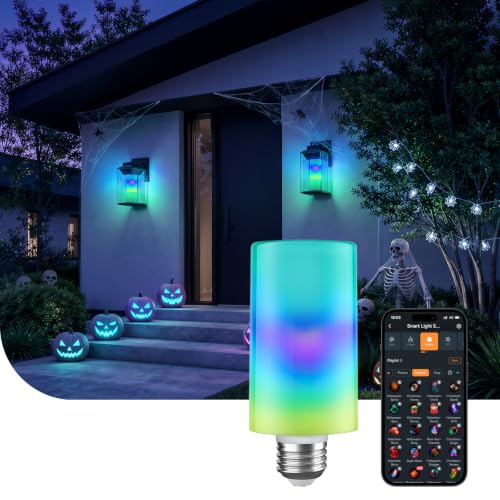
Linkind Smart Light Stick, Color and White Smart Light Bulb, 850lm

YoLink Smart Energy Plug 15A, 4-Pack with Hub

Linkind Matter Smart Plug for Google Home

Linkind Matter Smart Light Bulbs for Multi-Platform Use

Wyze Smart Plug 2.4GHz Wi-Fi Outlet, 2-Pack
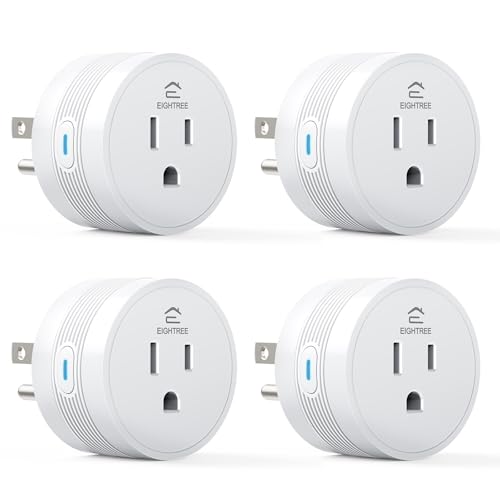
EIGHTREE 15A Smart Plug, 4-Pack for Google Home

EIGHTREE 5GHz Smart Plug, 4-Pack for Google Home

EIGHTREE 5GHz 15A Smart Plug, 4-Pack
The Picks, Examined More Closely
Older apartments and dorm rooms tend to leave you with one outlet per wall and nowhere to plug in a lamp, a fan, and a phone charger at the same time. The Govee Dual Smart Plug solves that with two side-by-side controlled sockets that fit into a single wall plate, giving you four controllable outlets from two fixtures.
Setup runs through the Govee Home app over a 2.4 GHz Wi-Fi signal (5 GHz isn’t supported here), and Bluetooth helps the initial pairing go faster. Once linked, voice commands through Google Assistant or Alexa handle on and off, and you can rename each outlet for rooms like “bedside left” or “desk lamp” so routines actually sound natural when you ask.
Useful Highlights
- Two independently controlled outlets from one wall socket, ideal for tight bedroom setups
- Bluetooth fallback during setup, which most standalone Wi-Fi only plugs lack
- 15A rating covers heaters and small kitchen appliances without tripping
- Govee Home app supports timers and sunrise/sunset automations
Things To Consider
- Requires a Govee Home account, so it’s not the best fit if you prefer app-free setups
- 5 GHz routers won’t connect directly; you may need to split bands in your router settings
Feature Snapshot
Right Fit For
Renters and dorm dwellers who have fewer wall outlets than they need and want to control two devices per socket.
Consider Something Else When
Pick the EIGHTREE 5GHz Smart Plug if your router only broadcasts on 5 GHz or you want to skip the Govee account requirement entirely.
Smart bulbs handle what a smart plug cannot: dimming and color changes without buying extra hardware. The Linkind Smart Light Stick drops into a standard E26 socket and outputs 850 lumens, which is enough for a medium-sized bedroom lamp or a kitchen pendant.
It pairs with Google Home for voice control of power, brightness, and color, though you will use the AiDot app for the more granular scenes and schedules. Unlike traditional dimmer switches that often cause buzzing or flicker, this bulb is built to dim smoothly through the app and voice commands alone.
A Strong Showing
- Color and tunable white in one bulb, so you can shift from warm reading light to party hues
- 850-lumen output covers a typical lamp without flooding the room
- Standard E26 base fits most table lamps and ceiling fixtures you already own
Points To Note
- Will flicker if wired to a traditional wall dimmer, which is common in older homes
- Connects only to 2.4 GHz networks, so 5 GHz-only routers need adjustment
Who It Suits Best
Anyone who wants voice-controlled mood lighting without rewiring switches or buying a hub.
Where Another Pick Suits Better
Pick the Linkind Matter Smart Plug instead if you need to control a non-bulb appliance like a fan or a string of plug-in lights.
Standard Wi-Fi plugs lose signal the moment they reach a garage, a basement, or a detached workshop. YoLink sidesteps that by using LoRa (long-range radio), claiming up to a quarter mile of open-air range from the included hub. For homeowners with outbuildings, this is the difference between working control and frustration.
The plug itself runs up to 15 amps, so dehumidifiers, pond pumps, and shop fans are all fair game. Real-time energy monitoring shows live wattage in the app, and historical data can be exported for trend tracking. A unique cycle schedule feature repeats an on/off pattern across specific days, which is genuinely useful for hydroponic pumps or aquarium equipment.
What Stands Out
- LoRa range reaches detached spaces where 2.4 GHz Wi-Fi struggles
- Cycle scheduling handles repetitive on/off patterns beyond basic timers
- Live and historical energy data helps identify power-hungry appliances
- 15A rating covers high-draw appliances like dehumidifiers
Trade Offs
- Requires the YoLink hub, adding a piece of hardware to set up
- LoRa control can feel less instant than Wi-Fi for quick on/off commands from across the room
Spec Overview
Made For
Homeowners with detached garages, basements, or workshop setups where standard Wi-Fi plugs drop off.
Look Elsewhere When
The Wyze Smart Plug is a better fit if every outlet you want to control sits comfortably within normal Wi-Fi range.
Matter is the new universal language for smart home devices, and the Linkind Matter Smart Plug speaks it fluently. That means the same plug works with Apple Home, Alexa, Google Home, and SmartThings without juggling manufacturer-specific apps. For households where one partner uses Siri and another uses Google Assistant, this is a quiet but real win.
Setup does require a Matter-compatible hub, such as a HomePod, Echo Dot, Nest Hub, or SmartThings Hub. Once added, the plug shows up in every compatible app and responds to whichever voice assistant you happen to talk to first.
What Works In Its Favor
- Matter certification works across Apple, Google, Alexa, and SmartThings
- Eliminates the need to install yet another proprietary app for one plug
- Voice routines travel with you across ecosystems as your setup evolves
Small Caveats
- Useless without a Matter hub, so factor that into your budget if you don’t already own one
Best Suited To
Mixed-platform households that want one plug to play nicely with whichever assistant handles the request.
Swap It Out When
Pick the Wyze Smart Plug if you don’t have a Matter hub and don’t plan to add one anytime soon.
If you already picked the Linkind Matter Smart Plug and liked the multi-platform idea, the matching Matter bulb extends that logic to your lighting. It runs on standard 120V household current and pairs directly with Google Home, Apple Home, Alexa, and SmartThings through the same Matter hub.
For whole-home lighting routines, having bulbs and plugs on one protocol simplifies automations. You can group bulbs across rooms and trigger them by time, presence, or a voice command without bouncing between manufacturer apps.
Positive Takeaways
- Matter compatibility mirrors the Linkind smart plug for a consistent ecosystem
- Standard 120V fitment works in typical household fixtures
- Voice control and routines travel across Apple, Google, and Alexa
Honest Caveats
- Same Matter hub requirement as the plug, so it isn’t a standalone purchase
- For color and tunable white, the Linkind Smart Light Stick (Pick 2) may suit you better
Who Should Grab It
Shoppers outfitting multiple rooms who want bulbs and plugs on the same Matter foundation.
Reach For A Different Pick When
The Wyze Smart Plug is the simpler choice if your goal is appliance control, not lighting.
Wyze built its reputation on simple setup, and the Smart Plug carries that forward. The “Certified for Humans” label isn’t marketing fluff; the pairing process skips the usual account juggling and gets you to a working outlet in a few minutes.
Two plugs come in the pack, which works for the most common starter use case: a lamp and a fan in the living room. Schedules run through the Wyze app, and Google Assistant handles voice commands without extra setup. The trade-off is a 2.4 GHz-only connection, so dual-band routers need to broadcast both.
Noteworthy Benefits
- Streamlined pairing that doesn’t require technical confidence
- Two-pack covers the typical lamp-plus-fan starter setup
- Works alongside other Wyze cameras and sensors in one app
Practical Considerations
- 2.4 GHz only, which can be a sticking point on newer mesh routers
- Lacks the energy monitoring you get from the YoLink pick
Perfect Match For
First-time smart home users who want a plug that just works with their existing Google speaker.
A Better Fit Elsewhere
Pick the EIGHTREE 5GHz Smart Plug if your home router is 5 GHz-heavy and you don’t want to fiddle with band settings.
Most people don’t want one smart plug; they want to spread them across the kitchen, living room, bedroom, and office. A four-pack solves that in one purchase, and EIGHTREE keeps the per-outlet cost low without sacrificing the 15A rating that lets you run coffee makers, air fryers, and space heaters.
Setup uses the Smart Life app with Bluetooth-assisted pairing over 2.4 GHz Wi-Fi. Each plug is named individually so a single “turn off the kitchen” routine can address every appliance on the counter. Compared to the Govee Dual Smart Plug from Pick 1, these are single-outlet units but you get twice as many for the same general purpose.
Everyday Advantages
- 15A handling covers typical countertop appliances without worry
- Four outlets cover a whole-home starter rollout in one box
- Smart Life app groups plugs by room for simpler routines
Room For Improvement
- Only 2.4 GHz Wi-Fi, so this won’t suit 5 GHz-only networks
- Each outlet is single, unlike the Govee Dual Smart Plug that doubles up
Built With In Mind
Shoppers ready to deck out multiple rooms at once and who value quantity over compactness.
Not Your Match When
Pick the Govee Dual Smart Plug if your priority is getting the most outlets out of one wall socket.
Dual-band routers have quietly become the norm, and a smart plug that only listens on 2.4 GHz can be a hassle. This EIGHTREE pack supports both 2.4 GHz and 5 GHz Wi-Fi, which removes the usual router troubleshooting step entirely. Plug it in, the Smart Life app finds it, and you’re moving on to the next outlet.
You get four plugs in the box, each compact enough that two can share a standard duplex outlet. The compact shape matters when you’re working behind a TV stand or a nightstand with limited clearance.
The Helpful Details
- Dual-band Wi-Fi support sidesteps router compatibility friction
- Compact housing allows two plugs in a single duplex outlet
- Bluetooth-assisted pairing shortens the initial setup window
Where It May Fall Short
- 5 GHz benefits fade as you move further from the router
- No native energy monitoring, unlike the YoLink option
Whose Shelf It Belongs On
Owners of modern dual-band routers who want a no-fuss connection experience.
Another Choice May Suit
Pick the Wyze Smart Plug if you prefer a simpler app experience and don’t need dual-band support.
Where Pick 8 gave you dual-band convenience, this version adds the 15A capacity needed for space heaters, window AC units, and other heavier loads. Rated at 120V/15A (1800W), it can handle appliances that would trip a lower-rated plug.
The 5 GHz band delivers lower latency when you’re near the router, which makes routines feel snappier. For most reading nooks and kitchen counters, that’s a quiet upgrade worth noticing.
Good Reasons To Consider
- Dual-band Wi-Fi reduces connection drops on modern routers
- 15A/1800W rating handles space heaters and kitchen appliances
- Four plugs let you cover several rooms in a single purchase
Factors To Consider
- 5 GHz range drops with walls and floors; placement near the router helps
- No energy monitoring built in, which the YoLink pick covers
Key Attributes
The Right Fit
Voice-first households running heavy appliances like heaters or window units that need the full 15A allowance.
Skip It When
The Wyze Smart Plug is enough if you only need to control lamps and fans on a basic 2.4 GHz network.
What To Weigh Before Picking Wifi Plugs For Google Home
Match The Plug To The Appliance
A 10A plug can run a lamp all day without breaking a sweat, but it will struggle or trip when you ask it to drive a 1500W space heater. Always check the wattage of the appliance you plan to control and pick a plug rated comfortably above it. The YoLink and the two higher-rated EIGHTREE packs here handle 15A loads, while smaller plugs are fine for lamps and fans.
Decide How Far The Signal Has To Travel
Wi-Fi dies quickly in garages, basements, and detached buildings. Plugs that rely on 2.4 GHz and 5 GHz Wi-Fi (like the EIGHTREE 5GHz options) work great within the home. For detached spaces, the YoLink plug’s LoRa radio reaches further on a single hub, which is the difference between controlling your workshop and walking over to flip a switch.
Think About Your Voice Ecosystem Now And Later
Matter-compatible plugs, like the two Linkind picks, work across Apple, Google, and Alexa at once. If your household might shift between assistants, or you simply want one plug to behave well with whatever speaker you buy next, Matter is a quiet safeguard. If you only plan to use Google Home, a Google-compatible plug like the Wyze is plenty.
Count The Outlets You Actually Need
A two-pack covers a starter lamp-and-fan setup, while a four-pack covers whole-home rollout. If your wall sockets are limited, the Govee Dual Smart Plug doubles what you can do with one plate. Match the pack size to your real outlet map, not just the price-per-plug math.
Key Considerations Across These Picks
Where Shoppers Go Wrong
The most common slip is grabbing any smart plug and assuming it works with Google Home. Most do, but 5 GHz-only routers will reject 2.4 GHz-only plugs, and Matter plugs require a compatible hub you may not own. Check your router bands and your existing smart home hub before adding to cart, or you’ll spend a weekend troubleshooting instead of using voice control.
What The Higher Tier Buys
Spending more typically buys you one of three things: longer signal range (LoRa on the YoLink), heavier electrical capacity (15A on the EIGHTREE performance model), or cross-platform flexibility (Matter on the Linkind picks). For a one-bedroom apartment with lamps and a fan, the entry-level plugs earn their keep. For a detached garage, a multi-platform home, or any heater-rated appliance, the upgrade pays for itself in fewer headaches.
Frequently Asked Questions
Do all of these plugs work with Google Assistant?
Yes. Every pick on this list is listed as compatible with Google Assistant, though some also pair with Alexa, Apple Home, or SmartThings on top of that. The Matter options give you the widest flexibility.
Will a smart plug increase my electricity bill?
The plug itself uses a small amount of standby power, usually under one watt. The bigger savings come from using schedules and routines to stop drawing power from appliances left on standby, like a TV or a gaming console.
Can I use one plug for both a lamp and a fan?
Only the Govee Dual Smart Plug has two independently controlled outlets in one body. The other single-outlet plugs run one appliance per unit, so you’d need two plugs to do the same job.
Do I need a hub to use these with Google Home?
Most of these plugs connect directly to your Wi-Fi router without a hub. The Matter picks (Linkind) and the YoLink set both require their own hub for full functionality.
What’s the difference between 2.4 GHz and 5 GHz plugs?
2.4 GHz travels further through walls but is more crowded in apartment buildings. 5 GHz is faster and less congested but has shorter range. Dual-band plugs like the EIGHTREE 5GHz models handle both automatically.
Final Thoughts
The right pick depends less on the plug and more on what you want to control, where it lives, and how your home network is set up. Start with a two-pack for the rooms you actually use daily, and expand once the first plug proves itself. Your voice assistant does the heavy lifting once the hardware is in place.




