

Large homes punish ordinary routers. Signals crawl through drywall, get swallowed by long hallways, and weaken on the far side of the house where work calls and streaming actually happen. A solid mesh kit lifts the whole floor plan into reliable coverage, and the right mount keeps each node high, out of sight, and broadcasting cleanly. This shortlist mixes full mesh systems with the mounting hardware that makes them behave like proper infrastructure.
The Shortlist At A Glance

TIUIHU Wall Mount Bracket for NETGEAR Orbi Tri-Band Mesh WiFi 6 (2-Pack)

COOLWUFAN 2 Pack Outlet Wall Mount for eero 6 and Eero 6+

Koroao Metal Wall Mount Holder for Orbi Tri-Band Mesh WiFi 6 (2-Pack)
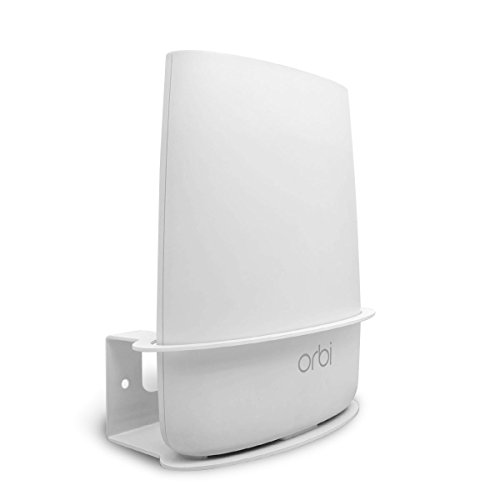
ALLICAVER Wall Mount Holder for Orbi Routers (Single)

Pefecon Outlet Wall Mount for Google WiFi AC1200

OkeMeeo Wall and Ceiling Mount for Google WiFi (3-Pack)

XLTTYWL Wall Mount for Netgear Orbi and Nighthawk WiFi 7 (White, 2-Pack)

eero 6+ Mesh WiFi System, Certified Refurbished (2-Pack)

Sootozy Wall Mount for Starlink Router and Mesh V2
Why These Options Stand Out
Two-story homes with several Orbi nodes scattered across rooms benefit from a wall mount that holds each one upright, secure, and away from foot traffic. The TIUIHU bracket fits the latest Orbi Tri-Band WiFi 6 lineup, covering everything from the RBS850 satellites down to the RBK753 packs, which makes it useful for households that upgraded in stages. Lifting a node about five feet off the floor tends to clean up signal travel in open layouts where furniture absorbs radio waves.
Compared to the Koroao mount later in this list, this one trades a heavier metal chassis for broader model coverage, so most Orbi households won’t need to double-check model numbers before installing.
The Upside
- Covers RBS850, RBK852, RBK853, RBS750, RBS751, RBK752, RBK753, AX4200, AX5700, and AX6000 variants, so most current Orbi owners are covered
- Two-pack lets you mount both router and satellite without buying separately
- Wall placement keeps the unit out of reach of children and pets
- Elevated position helps the signal clear couches and entertainment centers
Things To Consider
- Confirm your exact Orbi model before mounting, since the bracket only fits the Tri-Band WiFi 6 series
- Drywall anchors aren’t always included, so older plaster walls may need separate hardware
- Plastic construction is lighter than the Koroao metal option, which may feel less premium
Key Specs
Right Fit For
Households running a current Orbi Tri-Band WiFi 6 system who want a clean two-node wall install without extra drilling.
A Better Fit Elsewhere
Shoppers still on the older AC2200 or AC3000 Orbi hardware should reach for the ALLICAVER mount instead.
Renters and apartment dwellers often can’t drill holes, which makes an outlet-mounted eero holder the practical compromise. The COOLWUFAN 2-pack plugs straight into a standard wall outlet and holds the eero 6 or eero 6+ node without any tools, screws, or landlord negotiations. Each node ends up about shoulder height, which is high enough to clear most furniture without crowding the outlet itself.
Unlike the screw-in mounts above and below, this one stays portable. You can unplug it and bring it to a new place when leases change.
Positive Points
- No drilling, no anchors, no wall damage, which keeps leases intact
- Two-pack covers a router and one extender for a typical eero 6+ setup
- Direct outlet mounting means no extra power brick taking up the second socket on most outlets
- Moves easily between rooms or to a new address
Worth Noting
- Only fits eero 6 and eero 6+ nodes, so older eero models will not seat properly
- Outlet placement is fixed, which limits positioning compared to the OkeMeeo ceiling option
- Blocks the lower outlet on a standard duplex receptacle in most cases
Made For
Anyone running an eero 6 or eero 6+ mesh who rents their space or simply wants a tool-free install.
Where Another Pick Suits Better
Owners who already own a full eero 6+ two-pack system should pair the actual mesh kit, the eero 6+ two-pack, with this mount for the cleanest end result.
Households with large dogs, climbing cats, or toddlers tend to find plastic mounts bending within months. The Koroao metal bracket solves that with a heavier chassis that anchors firmly into wall studs or masonry. It supports the same Tri-Band WiFi 6 Orbi models, so the install lineup matches what TIUIHU covers, but the feel in the hand is markedly more substantial.
Placing the node higher on the wall also tends to improve signal reach in long, narrow homes where the living room sits at one end and bedrooms sit at the other.
Points In Its Favor
- Metal construction resists knocks, bumps, and curious pets better than plastic
- Two-pack supports router plus satellite installs out of the box
- Higher wall placement can help the signal clear thick furniture
- Stable on vertical surfaces, including drywall, brick, and wood paneling
Honest Caveats
- Heavier than plastic mounts, so drywall anchors need to be rated for the extra weight
- Limited to Tri-Band WiFi 6 Orbi hardware, so older RBS40 units won’t fit
Best Suited To
Pet households or busy family rooms where the Orbi node takes the occasional bump or paw swipe.
Not Your Match When
Anyone running an older AC-series Orbi system should look at the ALLICAVER single-pack mount, which targets that hardware specifically.
Not everyone runs the newest WiFi 6 Orbi hardware. Plenty of homes still rely on the AC2200 or AC3000 kits that shipped years ago, and those older, taller router shapes don’t fit newer mounts. The ALLICAVER bracket was designed specifically for RBS40, RBK40, RBS50, and RBK50 units, which makes it the right tool when the rest of the lineup on this list passes you by.
It’s a single-pack, which works fine if you only need one node mounted, but households with three or four satellites will need multiple orders.
Practical Pluses
- Made for legacy Orbi AC2200 and AC3000 routers that newer mounts don’t accommodate
- Metal build gives a more anchored feel than plastic brackets
- Wall placement lifts the older hardware above floor-level clutter
Points To Note
- Single-pack only, so multi-node homes need additional orders
- Won’t fit newer Tri-Band WiFi 6 Orbi models at all
Quick Facts
Perfect Match For
Anyone still using the older AC2200 or AC3000 Orbi router who needs a proper wall mount that actually fits the chassis.
Skip It When
Homeowners running newer Tri-Band WiFi 6 Orbi gear should grab the TIUIHU two-pack instead for broader coverage.
The Google Wifi AC1200 (2020 round plug model) has a habit of sitting on a side table with a tangle of cable behind it. The Pefecon outlet mount solves that by docking the puck directly over the wall outlet, routing the cable down the back so only a short length is visible. In hallways and entryways where the AC1200 node sits alone, this gives a noticeably cleaner look.
It’s a single-pack, so homes running three or four Google Wifi points will want to order accordingly or look at the OkeMeeo three-pack alternative below.
Reasons It Performs
- Tailored to the 2020 Google Wifi AC1200 round plug, which doesn’t fit older mounts
- Outlet-mount design hides most of the cord behind the unit
- No drilling needed, which keeps walls clean in rentals
Trade Offs
- Only works with the 2020 round plug version, not the 2016 square model
- Single-pack means multi-node homes need additional units
Built With In Mind
Homeowners running a single Google Wifi AC1200 node who want a tidy outlet install without visible cable mess.
Consider Something Else When
Households with three or more Google Wifi points should grab the OkeMeeo three-pack for better value.
Large homes with high entryways or vaulted ceilings benefit when a mesh node gets pulled up out of reach. The OkeMeeo three-pack supports both the 2016 and 2020 Google Wifi models, which is rare, and works on walls or ceilings. Mounting a node on the ceiling in a central hallway often means the signal radiates evenly to multiple rooms without bumping into walls or cabinets.
The reinforced bracket design keeps the puck stable overhead, which matters in homes with seismic movement or attic access panels that flex slightly under foot traffic.
What Pays Off
- Compatible with both 2016 NLS-1304-25 and 2020 AC1200 Google Wifi generations
- Three-pack covers a typical router-plus-two-satellite mesh in one order
- Ceiling option opens up positioning in tall foyers and hallways
- Reinforced bracket feels solid even when mounted overhead
Small Caveats
- Does not fit the Nest Wifi series, only the original Google Wifi pucks
- Ceiling mounting requires more planning around joists and outlet placement
Feature Snapshot
Whose Shelf It Belongs On
Multi-node Google Wifi households with vaulted ceilings or open-concept layouts who want maximum placement freedom.
Look Elsewhere When
Renters who can’t drill should instead consider the Pefecon outlet mount for a damage-free install.
WiFi 7 (the newest generation of wireless, succeeding WiFi 6 with wider channels and faster throughput) has started showing up in flagship Orbi and Nighthawk systems, and the hardware shape is different from anything earlier. The XLTTYWL bracket was built around that new chassis, so anyone investing early in WiFi 7 won’t have to retrofit an older mount. The white finish also blends cleanly with modern trim and ceiling paint.
The two-pack covers a router and one satellite, which is the standard starter layout for newer Orbi WiFi 7 systems.
Noteworthy Benefits
- Custom fit for Netgear Orbi Tri-Band Mesh and Nighthawk WiFi 7 hardware
- White finish pairs with most trim and ceiling colors
- Flush, secure mounting that keeps premium gear anchored
Room For Improvement
- Only fits WiFi 7 hardware, so older Orbi systems need a different bracket
- Two-pack limits larger three-node installs without another order
Who Should Grab It
Early adopters running Netgear’s WiFi 7 Orbi or Nighthawk gear who need a mount that matches the new chassis.
Reach For A Different Pick When
Anyone still on WiFi 6 Orbi hardware should grab the TIUIHU two-pack for broader model support.
This is the actual mesh kit, not a mount, and it belongs on the list because most of the picks above exist to support it or similar systems. The eero 6+ two-pack covers up to 3,000 square feet with WiFi 6, supports gigabit-class internet plans, and connects 75+ devices at once. For a medium to large home, that’s the kind of headroom that keeps Zoom calls stable while someone else streams in 4K.
Setup happens through the eero app, which walks through each node placement in plain language. Most people finish in under twenty minutes.
Notable Upsides
- Two-node mesh covers up to 3,000 square feet out of the box
- WiFi 6 with 160 MHz channel support for gigabit-class plans
- TrueMesh routing intelligently directs traffic to reduce dead spots
- App-guided setup makes the system approachable for non-technical households
Practical Considerations
- Refurbished unit, so the outer packaging may not match retail standards
- Two nodes may fall short in homes over 3,000 square feet, requiring an add-on extender
At A Glance
Who Will Love This
Medium-to-large home owners who want a complete two-node mesh system without buying each piece separately.
A Better Fit Elsewhere
Households that already own eero 6+ nodes and just need mounts should pick the COOLWUFAN outlet holder for a damage-free install.
Rural households running Starlink satellite internet face a different layout problem than city dwellers. The router sits next to the dish power supply, often on a shelf or counter, with cables that wander behind furniture. The Sootozy bracket docks the Starlink V2 router and mesh extender against a wall without needing to disconnect the network cable during install, which is a real time-saver on the first try.
ABS plastic (a tough, lightweight polymer used in most consumer electronics housings) holds up to sun exposure near windows, which matters in RVs and cabins where the router sits in a sunlit corner.
A Strong Showing
- Lets you install without disconnecting the network cable, saving time on first setup
- ABS plastic resists sunlight and abrasion in RV and cabin use
- Holds both the Starlink router and the V2 mesh extender cleanly
A Few Limitations
- Single-pack, so multi-room RV or cabin installs need additional brackets
- Tailored to the V2 hardware, so older Starlink router revisions may not align perfectly
Quick Facts
Right Fit For
Rural Starlink subscribers and RV owners who want the router mounted cleanly without a service interruption.
Consider Something Else When
Anyone on a fixed home internet plan with an Orbi or Google Wifi setup will find the TIUIHU or OkeMeeo mounts more useful for their gear.
Choosing Wifi Meshes For Large Home That Fit Your Layout
Coverage First, Speed Second
Square footage sets the floor for how many nodes you need, and that decision shapes everything else. A 3,000-square-foot home with a single router will struggle in back bedrooms no matter how fast the underlying connection. Most mesh kits label their coverage clearly, and adding an extra node early tends to pay off more than upgrading to a faster tier that still leaves dead zones. Run your count against the open floor plan first, then worry about speed.
Mounting Height And Material Matter
Mesh nodes perform noticeably better when lifted off the floor and away from metal furniture or appliance cabinets. Wall mounts around five feet up, or ceiling mounts in central hallways, let the signal radiate in every direction without bumping into the first obstacle. Metal brackets hold heavier nodes more securely over time, while outlet mounts suit renters who can’t drill.
Match The Mount To Your Mesh Generation
The single biggest mistake shoppers make is grabbing a generic mount that doesn’t fit their specific router shape. Older Orbi AC-series nodes need different hardware than Tri-Band WiFi 6 units, and the new WiFi 7 chassis is yet another shape. Cross-check your exact model number against the mount’s compatibility list before placing the order.
Balance Expandability Against Initial Coverage
Two-node mesh kits handle most medium homes, but a sprawling layout benefits from a system that accepts add-on extenders without forcing a full replacement. Look for ecosystems where you can drop in an extra node later for a stubborn back room rather than rebuilding the whole network.
Practical Notes For Picking The Right Setup
Where Shoppers Go Wrong
The most common mistake is buying a single-router setup and expecting it to cover a multi-floor home, then blaming the brand when the bedroom Wi-Fi drops. The second most common slip is choosing a beautiful outlet-mount for a rental, only to discover it blocks the second socket. Measure your layout and confirm your outlet configuration before committing to a mount style.
Why Top Tier Costs More
Premium mesh kits earn their higher cost through wider radio channels (160 MHz support lets more data pass per second), larger node memory for handling many simultaneous devices, and mesh routing software that adapts to traffic in real time. The upgrade pays off in homes with dozens of connected devices, frequent 4K streams, and video calls running alongside everything else.
Frequently Asked Questions
How many mesh nodes does a large home actually need?
A 3,000-square-foot home usually does well with two nodes, while 4,000 square feet or multi-floor layouts often need three. Open floor plans let a single node reach further, while dense walls shorten the practical range.
Can I mix mesh nodes from different brands?
Most mesh ecosystems work best when every node comes from the same brand, since they share proprietary routing protocols. Cross-brand setups typically fall back to a basic access-point mode without the smart handoff features.
Do wall mounts actually improve Wi-Fi performance?
Lifting a node off the floor and away from furniture clears the line-of-sight to other rooms, which usually improves signal strength. The gain is modest in open layouts and more noticeable in homes with thick walls or metal obstructions.
Is a refurbished mesh kit reliable?
Refurbished units are tested and certified to work like new, and they typically come with the same limited warranty as retail hardware, though packaging may differ. The internal components are the same, so performance matches a new unit.
Where should I place the first mesh node in my home?
The first node should sit near the modem in a central, elevated spot, ideally near where most daily internet use happens. Subsequent nodes go halfway between the first node and the rooms with weak signal, not in the dead zone itself.
Bottom Line
The mesh kit you choose matters more than the mount, but the right mount keeps the kit performing well for years. Match the node shape to the bracket model, lift each node above the floor, and add an extra satellite before chasing faster speeds. A stable, well-placed mesh setup turns a frustrating large home into a place where the Wi-Fi just works, room to room, day to day.




