

A lamp you forgot to turn off, a coffee maker you wish was warm by the time you shuffle into the kitchen, a fan that runs on a schedule when you’re not home. That quiet, recurring frustration is where smart plugs earn their keep. The right pick turns a “dumb” appliance into a scheduled, voice-controlled, app-managed helper without rewiring a single outlet. Whether you’re building a quick entry into smart home tech or filling out a more advanced setup, the picks below cover everyday basics, Matter-compatible upgrades, energy-tracking heavy hitters, and a few related tools that round out a smarter home.
An Overview Of The Picks

Smart Plug Device, Plug-and-Play for Home and Office (2PCS)
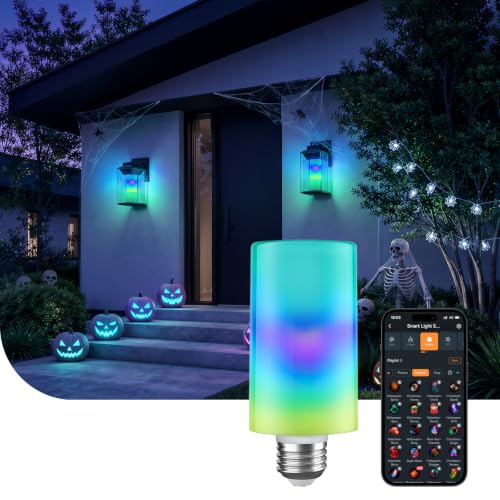
Linkind Smart Light Stick 850lm Bulb

YoLink Smart Energy Plug 15A YS6614

WILAWELS Wireless Remote Control Outlet Plug

Linkind Matter Smart Plug

Linkind Matter Smart Light Bulbs

GHome Smart Fingerprint Door Lock 4-in-1

GHome WiFi Smart Plug

GHome Smart Fingerprint Front Door Lock
More Details On Our Top Picks
The two-pack from KSLNRGY lands squarely in “set it and forget it” territory. You slide each unit into a US-standard outlet and a lamp, fan, or small kitchen appliance is suddenly app-ready without touching a screwdriver. ABS housing keeps the body light enough that it doesn’t strain a wall outlet, which matters in older buildings where the receptacle feels loose under weight.
For renters, dorm rooms, and small offices, this kind of friction-free setup is the entire point. There’s no hub to pair, no account ecosystem to wrestle with, and no rewiring if you move. Most owners find two units cover a living room and bedside lamp without buying more.
Well-Handled Touches
- Pair of plugs covers a bedroom and a living space in one purchase.
- Compact housing won’t block the second outlet on most wall plates.
- Compatible with standard US outlets, so it travels between apartments without adapters.
- No hub or extra bridge required for basic on/off control.
Points To Keep In Mind
- Source details on load capacity are thin, so high-draw appliances like space heaters warrant caution.
- ABS plastic, while light, tends to yellow over years in direct sunlight.
- No advanced features such as energy monitoring or cycle scheduling.
Made For
First-time smart home shoppers and renters who want a simple way to schedule a lamp or coffee maker without committing to a hub-based ecosystem.
Consider Something Else When
Homeowners running a 15A appliance like a dehumidifier should look at the YoLink Smart Energy Plug 15A, which lists a clear current rating and energy reporting.
The Linkind light stick splits the difference between a novelty color bulb and a serious everyday white. At 850 lumens it lands close to a 60-watt incandescent, which is enough to read by, but the color wheel in the app lets you drop the room to a deep amber for movie nights. The T19 stick form factor slips into tighter lampshades where a traditional A19 bulb sticks out awkwardly.
For people who already own a 2.4GHz router and don’t want yet another hub on the shelf, this is a friendly starting point. Unlike the plug-and-play unit reviewed above, this one lives inside the fixture, so the “smart” part disappears into the room rather than dangling from the wall.
Points In Its Favor
- 850-lumen output handles task lighting in a desk or reading nook.
- Tunable white plus color from a single bulb simplifies the fixture choice.
- Standard E26 base fits the lamps and ceiling sockets already in your home.
Honest Caveats
- 2.4GHz-only Wi-Fi means a crowded router can delay app responses.
- Not compatible with traditional dimmer wall switches, which may flicker or buzz.
- Doesn’t work inside Tuya or Smart Life routines, limiting cross-ecosystem use.
Feature Snapshot
Who It Suits Best
Anyone who wants both warm reading light and accent color from one bulb, without adding a hub to the network.
Look Elsewhere When
Households invested in Matter ecosystems should consider the Linkind Matter Smart Light Bulbs, which talk directly to Apple Home and other Matter hubs.
Most smart plugs quietly assume you’ll be powering a lamp. The YoLink YS6614 doesn’t make that assumption. Rated for 15 amps and built around long-range LoRa communication, it’s designed for the heavier loads that trip up ordinary Wi-Fi plugs, things like fans, dehumidifiers, and pond pumps where the outlet is far from the router. Cycle scheduling goes beyond a basic timer by letting you set repeating on/off windows for equipment that needs to run intermittently rather than on a fixed clock.
Real-time energy monitoring with exportable reports is the quieter superpower here. If you’ve ever wondered which appliance is quietly running up the bill, this plug surfaces that data. Compared to the GHome plug covered later, this one trades Wi-Fi convenience for raw reach and load capacity.
Key Advantages
- Up to 15A handling suits fans, dehumidifiers, and pumps, not just lamps.
- Quarter-mile LoRa range reaches detached garages and outbuildings where Wi-Fi struggles.
- Cycle scheduling supports repeating intervals, useful for irrigation or ventilation gear.
- Live energy data plus exportable historical reports help track consumption trends.
- Overload protection reduces the risk of nuisance tripping on a shared circuit.
Trade-Offs To Consider
- Requires a YoLink hub, which adds to the upfront cost and shelf space.
- LoRa setup is more involved than a basic Wi-Fi pairing flow.
- Form factor is larger than a typical wall plug, blocking adjacent outlets.
Feature Rundown
Whose Shelf It Belongs On
Homeowners with detached workshops, basements, or outdoor equipment who want both serious load handling and meaningful energy data.
A Better Fit Elsewhere
Anyone who only needs basic lamp control should stick with the KSLNRGY plug-and-play two-pack and avoid the hub commitment entirely.
Not everyone wants another app, account, and Wi-Fi password to manage a lamp. The WILAWELS remote outlet skips all of that. It uses a simple RF (radio frequency) signal at a claimed 100-foot range, paired with two handheld remotes that look like key fobs. The wall outlet stays exactly where it is, and you gain a bedside button to click for “off” without crossing a dark room.
For older adults, anyone with mobility limits, or renters who can’t install anything permanent, this kind of plug-and-press remote is genuinely useful. The trade-off is no scheduling or voice control, so it’s a complement to a Wi-Fi plug rather than a replacement.
Notable Gains
- RF pairing means no Wi-Fi network or app account is needed.
- Two remotes ship in the box, handy for a bedside table and a hallway.
- 100-foot claimed range works through interior walls for typical homes.
- Helpful accessibility tool for anyone who struggles to reach a wall switch.
Possible Compromises
- No scheduling, timer, or app-driven automation.
- RF remotes are line-of-sight friendly but not always responsive through dense masonry.
- One outlet means a single device per unit; multi-plug setups need more units.
The Right Fit
Households wanting a tactile, button-based remote for a lamp or fan, especially in bedrooms used by older family members or guests.
Swap It Out When
Voice-first households should consider the GHome WiFi Smart Plug, which responds to Alexa and Google Assistant with no remote needed.
Matter is the standard that finally lets a smart plug play nicely across ecosystems. The Linkind Matter Smart Plug is built for households that bounce between an iPhone for Apple Home, an Echo for Alexa, and a Nest hub for Google Home. Instead of juggling three apps, you control it from whichever one you already use, assuming a Matter-certified hub is on the network.
This is the plug for someone whose existing setup is fragmented. Setup is shorter than older app-based plugs because Matter handles the cross-platform plumbing. For an Apple Home household that wants Siri to flip a lamp, it’s the cleanest path short of buying full Apple-native hardware.
What Pays Off
- Single plug works across Apple Home, Alexa, Google Home, and SmartThings.
- Matter pairing skips the multi-app shuffle each new device normally requires.
- Voice control through Siri, Alexa, and Google Assistant without separate skills.
Things To Weigh
- Requires a Matter hub like HomePod, Echo Dot, or Nest for full functionality.
- No energy monitoring, so users chasing consumption data will need a different plug.
Quick Facts
Built With In Mind
Households already invested in Matter-certified hubs who want one plug that plays nicely with every voice assistant on the kitchen counter.
Reach For A Different Pick When
If energy tracking matters more than ecosystem reach, the YoLink Smart Energy Plug 15A gives live consumption data with exportable reports.
Sometimes the smartest move is skipping the plug entirely. These Linkind Matter bulbs drop into standard 120V sockets and inherit all the routines and voice commands the rest of your Matter setup already knows. For rooms where the only “smart” need is lighting, this saves a wall outlet for something else.
For people deep in Apple Home who don’t want a bridge device for every fixture, this is a clean answer. The catch is the same as other Matter gear: a hub is required, so this isn’t the bulb for someone who hasn’t bought into the ecosystem yet.
The Value In It
- Frees up outlets by handling smarts inside the bulb itself.
- Matter certification keeps Apple Home, Alexa, and Google Home in sync.
- Standard 120V compatibility fits common US fixtures without rewiring.
Small Caveats
- Requires a Matter-certified hub, adding to the overall system cost.
- Bulbs must stay powered for smart control; switched-off fixtures won’t respond.
Who Should Grab It
Matter-first households that want consistent lighting behavior across rooms without stacking smart plugs behind every lamp.
Not Your Match When
Renters who can’t commit to swapping bulbs in permanent fixtures should look at the WILAWELS Remote Control Outlet Plug, which doesn’t touch the lighting hardware at all.
A smart plug changes how a lamp behaves. A smart lock changes how a door behaves. The GHome fingerprint knob is the more unusual pick in this roundup, included because smart home convenience isn’t only about electricity. Four unlock methods, fingerprint, keypad code, app control, and a mechanical key, give the lock redundancy that pure keypad locks lack. A fingerprint that occasionally fails still leaves a code as backup.
For an interior office, a garage side door, or a bedroom you want to keep private from younger kids, this kind of knob is a low-commitment upgrade. Most owners install it themselves in well under an hour with a screwdriver.
Strong Points
- Four unlocking methods mean a fingerprint misread doesn’t lock anyone out.
- Auto-lock feature helps forgetful moments, especially in shared homes.
- Mechanical key backup works even if the electronics fail.
- App control within Bluetooth range for quick sharing with guests.
Practical Considerations
- Bluetooth-only app control limits remote unlocking away from home.
- Fingerprint readers can struggle with very dry or wet fingertips.
- Not intended as a primary exterior security lock for every entry.
Feature Snapshot
Perfect Match For
Bedrooms, home offices, and interior doors where convenience matters more than perimeter-grade security.
Where Another Pick Suits Better
Front door entries that need remote unlock and self-learning fingerprint storage fit the GHome Smart Fingerprint Front Door Lock better.
Voice-first homes need plugs that answer cleanly to “Alexa, turn on the fan.” The GHome WiFi Smart Plug leans into that workflow. Pairing uses both Bluetooth and 2.4GHz Wi-Fi, which speeds the first-time connection and keeps reconnections stable after a router reboot. Most owners find the initial setup short, often under two minutes per plug.
Compared to the KSLNRGY two-pack reviewed earlier, this one is a single unit and adds tight Alexa and Google Assistant integration. For someone whose smart home revolves around a kitchen Echo, this is the more directly useful pick.
Everyday Wins
- Quick pairing through Bluetooth plus 2.4GHz Wi-Fi cuts setup friction.
- Reliable response to Alexa and Google Assistant voice commands.
- Schedules and timers run locally in the app, useful for predictable routines.
Soft Spots
- 2.4GHz-only networking rules out homes running 5GHz-only routers.
- Single-unit pack means multi-room setups need additional purchases.
- No energy data or cycle scheduling for advanced automation.
Best Suited To
Voice-first households with an Alexa or Google Assistant already on the counter who want a single, reliable plug to anchor their routines.
Skip It When
Apple Home users with a HomePod should pick the Linkind Matter Smart Plug for cleaner Siri integration across the rest of the system.
The front door version of GHome’s fingerprint lock adds an AI self-learning reader that gets faster the more you use it. After the first few dozen opens, the lock learns the specific ridges and pressure of your finger, reducing misreads over time. For busy families and rental hosts, that responsiveness matters more than any single spec on the box.
Designed for front doors, garages, side entrances, and short-term rental properties, this is the heavier-duty cousin of the interior knob reviewed above. The same multi-method redundancy applies: fingerprint, code, app, and a physical key keep access working when one path fails.
A Few Strong Suits
- AI-learning fingerprint sensor improves recognition accuracy the more it is used.
- Auto-lock helps short-term rentals avoid accidental unlocked doors.
- Four access methods provide backup if one is unavailable.
- Suitable for front doors, garages, and rental property entries.
Small Limitations
- App-based remote unlock typically requires a paired bridge or hub.
- Exterior exposure means battery life matters; owners commonly report planning around routine swaps.
- Physical installation on some doors may need minor adjustments for fit.
Spec Overview
Who Will Love This
Rental hosts juggling turnover and busy families tired of lost keys who want a finger-swipe alternative to fobs and codes.
Where A Sibling Pick Shines
For interior doors like bedrooms and home offices, the GHome Smart Fingerprint Door Lock 4-in-1 is a lighter, less expensive fit.
Factors To Consider When Choosing Uses Of Smart Plugs
Match The Plug To The Load
Smart plugs advertise on/off control but not every one handles the same current. A 10A-rated plug runs a lamp or fan; a 15A-rated plug handles dehumidifiers, space heaters, and aquarium gear. Pairing the wrong plug to a heavy appliance is one of the quickest ways to trip a breaker or wear out the relay inside the device. Check the spec sheet against the wattage on your appliance’s label before committing.
Wi-Fi Or Hub: Pick The Path You Can Actually Maintain
Wi-Fi plugs connect directly to a home router and need nothing else. Hub-based plugs, like the YoLink, use protocols like LoRa or Matter that reach further but require an extra box on the shelf. Wi-Fi is easier for renters and small spaces; hub systems pay off for larger homes, outbuildings, and anyone chasing serious automation.
Ecosystem Compatibility Comes First
Smart home tech lives or dies on ecosystem fit. A Matter plug works across Apple Home, Alexa, and Google Home, while non-Matter plugs often lock you to a single app. Voice assistant support should match the speaker already on your kitchen counter, not the one you might buy someday.
Schedules, Timers, And Energy Data
Basic scheduling covers “lamp on at sunset.” Cycle scheduling covers “pump on for 20 minutes every two hours.” Real-time energy monitoring shows what each appliance costs to run. Buyers chasing convenience only need the first; anyone watching a utility bill benefits from the last.
Key Considerations Across These Picks
Mistakes Worth Dodging
The most common slip-up is buying a Wi-Fi smart plug for a 5GHz-only network. Most plugs speak 2.4GHz, and a 5GHz router alone will leave the device invisible during setup. Another trap is overlooking what counts as a “high-power” appliance: small heaters, dehumidifiers, and pumps easily exceed a 10A plug’s rating even when they look harmless on the shelf.
Skipping ecosystem checks is the third. A plug that’s “smart” but works only with an obscure app ends up controlled from one more phone screen, which usually means you stop using it within a month.
When Paying More Pays Off
The price jump between a basic plug and a hub-based or energy-tracking plug pays off when you actually use the extra features. A $10 plug that schedules a lamp is enough for most homes. Spending more earns you 15A handling, energy data, and Matter cross-ecosystem support. The honest read is that the upgrade only makes sense if your routine leans on those features.
Frequently Asked Questions
Do smart plugs work without Wi-Fi?
Wi-Fi-based plugs need a router, but RF remote plugs like the WILAWELS work without any network at all. Hub-based systems need their own bridge hardware, though that bridge may use LoRa or another protocol instead of standard Wi-Fi.
Can a smart plug save energy?
A smart plug only saves energy if it actually turns something off. Scheduling a phantom-load appliance, like a TV in standby, to cut power completely can reduce its standby draw. Real-time energy monitoring on a plug like the YoLink shows where the savings opportunities sit.
Are smart plugs safe for older wiring?
Most smart plugs are built for modern US outlets and standard indoor wiring. Older homes with two-prong outlets need a different approach, since many smart plugs require a grounded three-prong socket. Match the plug to the outlet type before assuming it fits.
What is Matter, and why does it matter?
Matter is a smart home standard that lets devices from different brands work together through a shared protocol. Instead of one app per brand, a Matter device talks to whichever hub ecosystem you already use, which is why the Linkind Matter Smart Plug works with Apple Home, Alexa, and Google Home simultaneously.
How long do smart plugs typically last?
Internal relays and Wi-Fi chips age over time, and a smart plug in heavy use can show wear in a few years. Lifespan depends heavily on the load and the build quality, with commercial-grade plugs typically outlasting basic consumer units under continuous use.
Bottom Line
Smart plugs earn their place by solving small, recurring annoyances. Start with the KSLNRGY two-pack if you’re testing the waters, the YoLink plug if you need serious load handling, or the Linkind Matter Smart Plug if your home already runs on a hub ecosystem. Pick the tool that matches your actual routine, and the rest of the smart home tends to follow.
