

Smart switches earn their keep in the small moments: the hallway light that turns off on its own when you leave, the bedside lamp that drops to 30% for late-night feedings, the porch fixture that follows the sun year-round. The right pick depends on your wiring, your hub situation, and how deep you want to go with Home Assistant. This lineup covers the main paths: hub-based dimmers from a long-established brand, relay modules for hands-on tinkerers, and WiFi-native wall switches that skip the hub altogether.
A Closer Look At The Lineup
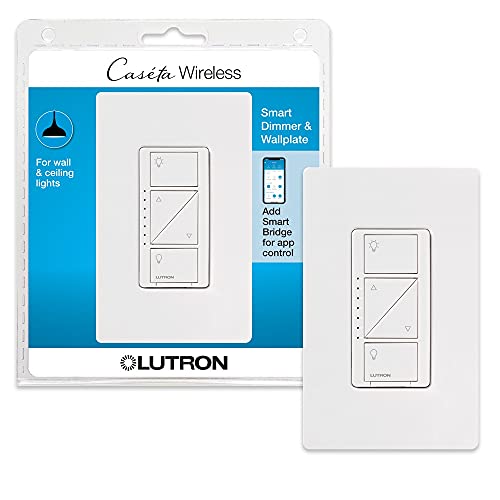
Lutron Caseta Smart Dimmer Switch with Wallplate

Lutron Caseta Smart Dimmer Switch No Neutral

Lutron Caseta Smart Lamp Dimmer Starter Kit

Shelly 1 Gen4 Relay Switch with Dry Contacts

Shelly 1 Gen4 Relay Switch 2-Pack
GHome 3 Way Wi-Fi Smart Switch 2-Pack

GHome 3 Way Wi-Fi Smart Switch 4-Pack

GHome Single Pole Smart Switch 4-Pack
A Breakdown Of The Leading Choices
Lutron’s Caseta line is the safe harbor for homeowners who want smart lighting without babysitting it. This dimmer kit ships with a matching wallplate, so the install looks finished without hunting for a compatible cover at the hardware store.
Caseta communicates over Lutron’s own Clear Connect radio (a proprietary low-frequency mesh protocol, meaning the dimmer talks to the hub on a dedicated band rather than crowding your WiFi), which tends to be more stable in dense apartment buildings or homes full of 2.4GHz devices. The hub itself adds Apple Home, Google, and Home Assistant integration, though you’ll want the dedicated Smart Bridge rather than relying on third-party workarounds.
Useful Touches
- Included wallplate saves a trip to the hardware store.
- Clear Connect radio holds up in crowded wireless environments.
- Compatible with the major voice platforms through the Lutron hub.
- Native Home Assistant support makes it a solid pick for the local-control crowd.
- Dimming feels smooth across most LED bulb brands, not just Lutron’s own.
Worth Noting
- Requires Lutron’s hub to unlock any smart features.
- Pricing per switch runs higher than WiFi-native alternatives.
- The wall switch is bulkier than a standard decorator paddle.
Who It Suits Best
Homeowners wiring multiple rooms who value a polished, reliable mesh network over per-switch cost savings.
Where Another Pick Suits Better
Renters in a single neutral-wired apartment will find the GHome single-pole 4-pack easier to deploy without committing to a hub.
Older homes built before the mid-1980s often lack the neutral wire (the always-hot return path that most smart switches need to power their radios) in the switch box, which rules out half the smart switches on the market. This Lutron variant sidesteps that limitation entirely. It draws power through the load itself, so it works in those tricky retrofits where pulling a new wire isn’t realistic.
Compared to the standard Caseta dimmer reviewed above, you trade the included wallplate and gain a piece of hardware that actually fits your existing wiring. The rest of the Caseta experience stays consistent: the same Clear Connect radio, the same hub requirement, the same reliable dimming curve.
Where It Excels
- Installs in switch boxes that lack a neutral conductor.
- Same Clear Connect stability as the standard Caseta dimmer.
- Plays well with Home Assistant once the Lutron hub is connected.
- Dimming performance matches the standard model across LED loads.
Trade Offs
- Still requires the Lutron hub for any smart control.
- Minimum load requirements can be tricky with very low-wattage LEDs.
- No wallplate in the box; factor in sourcing one separately.
Made For
Owners of pre-1980s homes with switch boxes missing a neutral wire who want Caseta-grade reliability.
Look Elsewhere When
Tinkerers comfortable with relay modules should weigh the Shelly 1 Gen4 single-pack for its Matter and Zigbee flexibility.
Plug-in lamps are the easiest entry point into smart lighting, and this starter kit bundles everything you need in one box: a Caseta hub, a plug-in lamp dimmer module, and a handheld Pico remote. No wiring, no electrician, no commitment beyond a wall outlet.
For Home Assistant users, the hub exposes the dimmer through the Lutron integration, so your floor and table lamps can join the same automations as the rest of your home. Compared to the wall-switch options earlier in this list, this kit skips the installation step altogether.
A Favorable Mix
- Complete starter package: hub, dimmer, and remote included.
- Zero wiring makes it renter-friendly.
- Pico adds wall-mount control anywhere without running wire.
- Home Assistant integration through the Lutron hub.
Soft Spots
- Plug-in modules occupy an outlet; a power strip may be needed nearby.
- Lamp dimmer maxes out at lower wattage than the wall switches.
Right Fit For
First-time smart lighting shoppers who want plug-and-play control of living room or bedside lamps.
Not Your Match When
Someone outfitting ceiling fixtures across an entire house will outgrow this kit quickly and want the GHome 4-pack instead.
Shelly’s Gen4 modules speak every smart-home protocol that matters: WiFi, Zigbee, and Matter (a cross-platform standard that lets devices from different ecosystems talk to each other locally). This particular relay is a dry-contact switch, meaning the output is electrically isolated from the input, which lets it control low‑voltage devices like garage door openers, gate controllers, or boiler contactors, not just lighting.
The compact form factor fits behind a standard wall switch or outlet, so you can hide the smarts inside existing infrastructure. For Home Assistant users running a dedicated hub like Home Assistant Green or a Raspberry Pi, the local control story is the main draw.
Standout Benefits
- Triple-protocol support (WiFi, Zigbee, Matter) for flexible integration.
- Dry contacts handle low-voltage devices beyond lighting.
- Compact enough for retrofitting inside standard wall boxes.
- No hub required; connects directly to the platform of your choice.
Honest Caveats
- Requires comfort with electrical work and module placement inside the box.
- Single 16A channel limits high-draw appliance applications.
- Configuration through the Shelly app or web UI takes more setup than a wall switch.
Best Suited To
Advanced Home Assistant users comfortable opening switch boxes and configuring devices through web interfaces.
Consider Something Else When
Anyone wanting a clean wall-switch replacement without module work should turn to the GHome single-pole 4-pack.
The 2-pack variant of the Shelly 1 Gen4 lands at a friendlier price per module when you need more than one. Setup is identical to the single-pack version covered above, but the value curve improves noticeably once your project expands beyond a single room.
For Home Assistant users automating multiple circuits at once, having a pair on hand lets you build out a hallway or small office in one afternoon. The Matter compatibility helps if you’re bridging into Apple Home alongside Home Assistant.
Everyday Perks
- Better per-unit economics than buying singles separately.
- Same WiFi and Matter protocol coverage as the single pack.
- Useful for back-to-back projects like hallway and bathroom.
- Dry contacts keep low-voltage options open for future tweaks.
Some Drawbacks
- Still no Zigbee support in this 2-pack variant.
- Two modules still means two boxes to open and two configurations to complete.
Whose Shelf It Belongs On
DIYers ready to convert two circuits at once and wanting the same Shelly Gen4 feature set.
Swap It Out When
Homeowners needing a true plug-and-play wall switch without electrical work will prefer the Lutron Caseta dimmer reviewed earlier.
GHome’s 3-way switch (a circuit that lets two wall switches control the same light, common at staircases and long hallways) connects directly to a 2.4GHz WiFi network, so there’s no separate hub to set up. The 2-pack covers both ends of a 3-way circuit, which is exactly what you need when replacing an existing paired switch setup.
For Home Assistant users, the integration path runs through the cloud-based GHome skill, which works fine for most automations. Compared to the Lutron dimmers earlier in this list, the main trade-off is a hard requirement on a neutral wire and the absence of dimming.
Well-Handled Touches
- Direct WiFi connection means no hub or bridge hardware.
- Two-pack covers a full 3-way circuit in one purchase.
- Scheduling and timer functions run through the GHome app.
- Voice control through Alexa and Google works out of the box.
Room For Improvement
- Neutral wire required; older switch boxes may not qualify.
- 2.4GHz only; won’t join a 5GHz-only network.
- Not compatible with smart bulbs, which limits flexibility on the load side.
- Not a dimmer; on/off control only at the switch.
Who Should Grab It
Homeowners with neutral wiring and a 3-way staircase or hallway they want voice-controlled without buying a hub.
A Better Fit Elsewhere
Anyone needing dimming should look back at the Lutron Caseta dimmer reviewed first.
Stepping up to the 4-pack gives you enough switches to outfit two full 3-way circuits in one purchase. For a two-story home with stair landings at both ends, that’s the entire project covered in a single order.
The switches behave identically to the 2-pack covered earlier: same WiFi direct connection, same neutral-wire requirement, same on/off-only operation. The 4-pack simply improves the per-switch value when your project scales.
What Works In Its Favor
- Four switches cover two complete 3-way circuits at once.
- No hub keeps the install simple for newcomers.
- Per-switch economics beat buying the 2-pack twice.
- Schedules through the app work without an extra bridge.
A Few Limitations
- Neutral wire required at every switch box.
- Smart bulbs on the same circuit create pairing headaches with this switch.
Who Will Love This
Anyone planning a whole-house 3-way switch overhaul with neutral wiring already in place.
Another Choice May Suit
Households needing single-pole coverage in bedrooms should check the GHome 4-pack single-pole reviewed next.
Single-pole switches control one fixture from one location, which covers most bedrooms, bathrooms, and closets. The GHome 4-pack handles four of those rooms in one box.
Setup stays in the GHome app, voice control through Alexa or Google works natively, and Home Assistant users can pull these in through the GHome cloud integration. Compared to the 3-way versions above, this is the simpler, more common configuration for everyday rooms.
What It Does Well
- Covers four single-pole rooms in one affordable bundle.
- Direct 2.4GHz WiFi with no extra hardware needed.
- Voice control across the major platforms works out of the box.
- Timer and schedule functions run through the GHome app.
Potential Compromises
- Neutral wire required at each switch location.
- Not compatible with smart bulbs due to constant power to the fixture.
Perfect Match For
Households standardizing four bedrooms or bathrooms with on/off smart control at a modest cost.
Reach For A Different Pick When
Anyone needing scene control or dimming will be happier looking at the Lutron Caseta dimmer reviewed first.
What To Weigh Before Picking Smart Switches For Home Assistant
Wiring Reality Check
The single biggest filter is the wiring already in your walls. Newer homes almost always include a neutral wire, which opens the door to WiFi-direct switches like the GHome line. Older homes, especially those built before the mid-1980s, often lack that conductor, which narrows the field to options like the Lutron Caseta no-neutral dimmer or low-voltage relay modules like the Shelly 1 Gen4. Pulling a cover plate off and looking inside the box tells you in five seconds which category you fall into.
Hub Versus Direct Connection
Lutron’s Caseta ecosystem demands its own hub, but that hub buys you Clear Connect radio reliability and broad platform support. GHome switches talk straight to your router, which keeps the hardware list short. Shelly modules can go either way depending on the protocol you choose. For Home Assistant users running a dedicated server, the hub question matters less; the integration path matters more.
Dimming And Load Type
Not every smart switch dims. The GHome line in this roundup is on/off only, which works fine for most rooms but rules out living-room scene lighting. Lutron’s dimmers handle a wide range of LED bulbs without flicker, which is the practical reason they cost more. Dry-contact relays like the Shelly 1 Gen4 control low-voltage loads, so they’re a different tool for a different job: think garage doors, boiler contactors, and motorized blinds rather than overhead fixtures.
Protocol And Local Control
Matter, Zigbee, and WiFi each have a place. Matter gives cross-ecosystem flexibility, Zigbee needs a hub but runs on low power, and WiFi is simplest to deploy at the cost of router congestion. Local control matters for Home Assistant users who don’t want cloud dependencies; in that case, Matter or Zigbee devices typically outperform cloud-only WiFi switches.
Where Shoppers Go Wrong With Smart Switches For Home Assistant
Skipping The Wiring Audit
The most common mistake is buying switches before checking what is actually in the wall box. A neutral wire requirement that the listing mentions in small print becomes a return trip the day you open the package. Pull a plate off, look at the wires, and confirm before ordering.
Picking A Hub You Will Not Maintain
A Lutron hub or dedicated Home Assistant server adds reliability, but only if you keep it on, updated, and on a stable network. Shoppers who won’t fuss with that maintenance may find a hub-free WiFi switch from the GHome line more practical, even with the trade-offs that come with it.
Assuming All Bulbs Will Play Nice
Smart bulbs and smart switches sometimes fight each other for control of the circuit. The GHome switches explicitly call out incompatibility with smart bulbs for that reason. Decide whether you want smart control at the switch or at the bulb; mixing both on the same fixture creates headaches that no app update fixes cleanly.
Why The Premium Tier Costs More In This Category
Better Radios, Better Reliability
The Lutron Caseta pricing reflects a proprietary radio that holds up in dense wireless environments, where 2.4GHz WiFi can stutter. For households with crowded airspace from neighbors’ routers, baby monitors, and microwaves, that radio stability is a real-world advantage, not a marketing line.
Broader Compatibility
Higher-tier switches tend to support more bulb types without flicker, more platform integrations without workarounds, and more load types without external adapters. The Lutron dimmers cover incandescent, halogen, and LED through the same dimmer without needing a specific compatible bulb list. That flexibility is what the price premium buys in this category, especially for whole-home installations where consistency matters more than per-switch savings.
Local Control And Privacy
Cloud-dependent switches depend on a manufacturer’s service staying online. Hub-based and Matter-over-Thread devices process automations locally, which means your lights work during internet outages and your usage data stays in your home. For shoppers who care about that difference, the premium tier pays for itself in long-term reliability.
Frequently Asked Questions
Do Smart Switches For Home Assistant Need A Neutral Wire?
Many do, especially WiFi models like the GHome line. Lutron offers a no-neutral Caseta dimmer for older homes, and Shelly relay modules can be wired in ways that avoid the neutral requirement at the switch box.
Can I Use Smart Switches For Home Assistant Without A Hub?
Yes, the GHome switches in this roundup connect directly to a 2.4GHz WiFi network. The trade-off is reliance on cloud connectivity and slightly less responsive local control compared to hub-based systems.
Do Smart Switches For Home Assistant Work With Alexa And Google?
Most modern switches do. The Lutron line needs its hub connected for voice control, while the GHome switches pair with Alexa and Google directly through the GHome cloud service.
Can Smart Switches For Home Assistant Dim Existing LEDs?
The Lutron Caseta dimmers handle a wide range of LED bulbs without flicker. The GHome switches covered here are on/off only, so dimming requires a different model or a separate dimmer switch.
How Long Do Smart Switches For Home Assistant Typically Last?
Solid-state switches with mechanical paddles tend to last many years under normal residential use, though lifetime depends on the specific load and usage pattern. Relay modules like Shelly often outlast the wall switches they hide behind, since they sit inside the box with minimal mechanical wear.
The Takeaway
The right pick depends on wiring, hub tolerance, and how much tinkering appeals to you. Lutron offers polished whole-home dimming for households willing to run a bridge, Shelly delivers flexibility for hands-on Home Assistant users, and GHome covers straightforward WiFi installs without extra hardware. Match the switch to the wiring in your walls first, then choose the ecosystem that fits how you want to live with the controls day to day.
