

A home network attached storage unit solves the kind of problem that creeps up quietly: too many phones, too many photos, too many half-finished video projects scattered across laptops. Choosing the right NAS for home users means thinking past the box itself and into how your household actually moves files, streams media, and backs up the daily mess of digital life.
A Snapshot Of The Selections
A Snapshot Of The Selections

TERRAMASTER F4-425 Pro NAS 4-Bay, Intel N350 16GB DDR5

Synology 8 Bay RackStation RS1221+

UGREEN DH4300 Plus 4-Bay Home NAS

UGREEN DXP4800 GT 4-Bay Desktop NAS

UGREEN DH2300 2-Bay Personal NAS

UGREEN DXP2800 2-Bay Advanced NAS

TERRAMASTER F8 SSD Plus 8-Bay NAS

Synology DiskStation DS920+ 4-Bay NAS
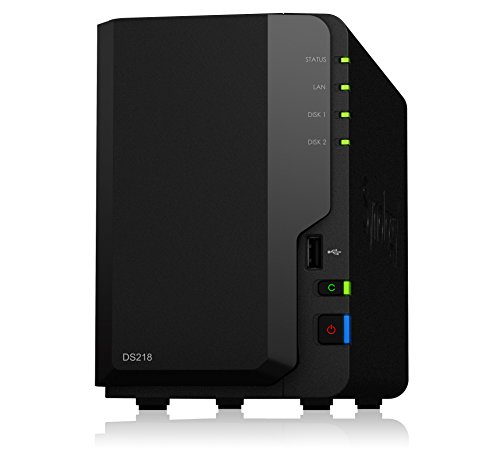
Synology DiskStation DS218 2-Bay NAS

TERRAMASTER F2-425 Plus 2-Bay NAS
The Picks, Examined More Closely
The TERRAMASTER F4-425 Pro sits at the top of the list for a reason: it pairs a low-power 8-core Intel N350 with 16GB of DDR5 memory, the kind of silicon that handles multiple users, Docker containers, and 4K transcoding without flinching. For a household running a Plex server while backing up three laptops, the headroom matters.
Two 5GbE ports, when linked together, can deliver roughly 10Gb of combined throughput, and three M.2 NVMe slots let you drop in cache SSDs for noticeably faster reads on big media folders. Compared with the entry-level UGREEN DH2300 later in this list, this unit trades a gentle learning curve for raw muscle.
Key Advantages
- Dual 5GbE networking gives creative households a real path to gigabit-plus file transfers.
- 16GB of DDR5 RAM out of the box means fewer upgrade purchases later.
- Three M.2 NVMe slots enable cache acceleration that genuinely improves video editing workflows.
- Four drive bays strike a useful balance between capacity headroom and physical footprint.
Things To Consider
- Diskless chassis, so the total cost climbs once you add drives and an SSD or two.
- 8-core N350 runs cool but the small fan can be audible in a quiet study at night.
Right Fit For
Creative pros, video editors, and busy households juggling media servers, backups, and remote work on the same box.
Look Elsewhere When
The Synology RS1221+ suits you better when you specifically need rack-mount form factor and eight bays for a home office rack setup.
The Synology RS1221+ is a different animal than the rest of the list: a 2U rackmount unit built for short-depth cabinets. If your “home” includes a small server closet, a structured wiring panel, or a converted crawlspace with rails, this slot makes sense.
Eight bays give you room for current libraries and a real growth path, and the DiskStation Manager (DSM) operating system remains the most polished NAS software on the market. Where the F4-425 Pro leans on hardware muscle, the RS1221+ leans on ecosystem maturity and a long track record.
The Case For It
- Eight 3.5-inch bays plus an expansion option through official Synology units.
- DSM software streamlines backups, user accounts, and remote access with minimal fuss.
- Short-depth chassis fits wall-mount racks common in home network setups.
Trade Offs
- Rack form factor is awkward if your router sits on a bookshelf, not in a closet.
- Comes diskless and benefits from ECC memory upgrades that raise the real budget.
- Not the right match for a casual household wanting simple photo backup.
Best Suited To
Home offices and enthusiasts who already own or are ready to install a small rack cabinet.
A Better Fit Elsewhere
The Synology DS920+ works better when you want a four-bay desktop tower with the same DSM experience.
The UGREEN DH4300 Plus targets households stepping off cloud storage for the first time. Four bays mean you can build a proper mirrored array, and the AI photo album and file hub features speak to the most common reason people buy a home NAS: photos, plus more photos.
Compared with the TERRAMASTER F4-425 Pro, this unit skips the dual 5GbE networking and trades raw CPU power for a friendlier interface and a 4K HDMI port for direct playback to a TV. Remote workers get their own profile here, too, with straightforward backup workflows for laptops.
Everyday Wins
- Designed for first-time NAS owners with a gentler setup path than pro-grade units.
- AI photo album helps organize thousands of mixed-phone backups without manual tagging.
- 4K HDMI output turns the NAS into a basic media player without an extra streaming box.
Room For Improvement
- 8GB LPDDR4X is fixed, leaving less upgrade room than the F4-425 Pro’s 16GB DDR5.
- Docker support is present, but full virtual machines are not, which limits some home-lab uses.
Made For
Beginners, families, and remote workers who want their first NAS to feel less like a server project and more like an appliance.
Skip It When
The UGREEN DXP4800 GT fits better when you need 10GbE networking for large media libraries and heavier multitasking.
The UGREEN DXP4800 GT is the most network-hungry box on this list, pairing an AMD Ryzen R2514 with twin 10GbE ports and two M.2 NVMe slots. For smart homes where security cameras, media servers, and several devices stream at once, the bandwidth ceiling sits well above typical home setups.
8GB of DDR4 is the starting point, and the path to 64GB expansion means this unit grows with you. Next to the DH4300 Plus, this model is what you pick when your home office has crossed from “files and photos” into “Docker containers, VMs, and active video editing.”
Standout Benefits
- Dual 10GbE ports future-proof the box against multi-gig switches arriving in home networks.
- AMD Ryzen R2514 with four cores handles backups, Docker, and 4K/8K media editing smoothly.
- RAM expands to 64GB, useful for running multiple virtual machines at once.
Potential Drawbacks
- Owners commonly report that dual 10GbE remains wasted unless your switch and cabling support it.
- The 4K HDMI port helps, but the unit costs noticeably more than the DH4300 Plus.
Feature Snapshot
Who Should Grab It
Smart home enthusiasts and office teams who want serious multi-gig networking and headroom for virtualization.
Consider Something Else When
The Synology DS920+ fits better when you want a calmer, software-led experience over raw networking speed.
The UGREEN DH2300 is the entry ticket to NAS ownership. Two bays mean a mirrored setup is the realistic ceiling, which still protects against a single drive failure, and the focus on phone backup makes this unit useful for solo households that want to stop paying monthly cloud fees.
Against the DH4300 Plus, this is a smaller, less ambitious unit, and that’s the point. For a single user, two drives often cover more than ten years of phone photos.
Benefits That Matter
- Two-bay design keeps power draw and noise low for bedrooms and small apartments.
- Phone backup workflows are the central feature, not an afterthought.
- Entry-level pricing makes sense for households stepping off paid cloud storage.
Worth Noting
- Two bays limit future expansion if a household’s media library grows quickly.
- Smaller CPU and memory mean heavier Docker or VM workloads are not realistic here.
Whose Shelf It Belongs On
Solo users, students, and couples who mainly want to back up phones and laptops.
Reach For A Different Pick When
The TERRAMASTER F2-425 Plus makes more sense if you want stronger CPU and triple M.2 expansion in a similar two-bay size.
The UGREEN DXP2800 sits in an interesting middle ground. Two drive bays keep the box compact, while the Intel N100 quad-core CPU and 8GB of DDR5 RAM push the unit well beyond simple file storage. 2.5GbE networking is the quiet upgrade here, faster than gigabit but without the cost or complexity of 10GbE.
Remote workers running home servers for small teams, or households building Docker labs, get a unit that won’t feel cramped within a year. Compared with the UGREEN DH2300, this is the same shape on the outside but a noticeably more capable machine underneath.
Good Reasons To Consider
- Intel N100 quad-core handles media transcoding and Docker apps more comfortably than entry-level CPUs.
- Two M.2 NVMe slots let you add cache SSDs for snappier read performance.
- 2.5GbE delivers a meaningful speed bump over gigabit without needing new cabling in most homes.
- Compact desktop size fits a side table or media shelf without dominating the room.
Honest Caveats
- Two drive bays cap raw storage capacity at two disks in any RAID layout.
- Diskless chassis means drive purchases add to the real-world budget.
Perfect Match For
Remote workers and advanced home users who need stronger CPU and memory in a compact two-bay form.
Where A Sibling Pick Shines
The UGREEN DXP4800 GT fits better when four bays and dual 10GbE networking are realistic needs.
The TERRAMASTER F8 SSD Plus is unusual: eight bays, but all built for SSDs rather than traditional spinning disks. That changes the math for households with serious media libraries, since SSD-based NAS delivers much faster access at the cost of higher per-terabyte spend.
An Intel Core i3-N305 with 8 cores and 16GB of DDR5 keeps the system responsive under heavy load, and a 10GbE Ethernet port supports multi-gig switches. Against the Synology RS1221+, this is the more performance-oriented choice for users who don’t need a rack chassis.
Why It Works Well
- Eight SSD bays offer speed that traditional HDD arrays can’t, useful for 4K and 8K editing.
- Intel Core i3-N305 brings laptop-class efficiency to a desktop NAS form factor.
- 10GbE port complements the SSD focus with networking that won’t bottleneck the drives.
Points To Note
- All-flash builds cost considerably more per terabyte than mixed HDD setups.
- Eight bays filled with SSDs means heat and power draw both climb noticeably.
Quick Facts
Built With In Mind
Households with large 4K and 8K media libraries, plus creators who want quiet, fast local storage.
Swap It Out When
The TERRAMASTER F4-425 Pro is the better fit if you prefer traditional HDDs for cheaper per-terabyte capacity.
The Synology DS920+ is the long-running favorite in this category, and for good reason. Four bays, two M.2 SSD slots for cache, and DSM’s mature app ecosystem make this a calm, well-documented box that households can grow into over years rather than months out.
Where the UGREEN DH4300 Plus aims for beginner ease, the DS920+ is what people graduate to when they want more polish and a wider app library. Compared with the older DS218, this unit quadruples the headroom and adds SSD caching.
A Strong Showing
- DSM software has years of refinement behind it, useful if you value stability over novelty.
- Two built-in M.2 SSD slots support SSD cache acceleration without using drive bays.
- Expandable through the official Synology DX517 unit for households planning to grow.
Points To Keep In Mind
- 4GB of DDR4 out of the box is light for Docker experiments, though it can be expanded.
- The DS920+ is an established unit, so newer CPU options from other brands may outpace it on raw numbers.
Who Will Love This
Households who want a proven, well-supported unit and value long-term software updates over bleeding-edge specs.
Where Another Pick Suits Better
The Synology RS1221+ fits better when you specifically need eight bays and a rackmount form factor.
The Synology DS218 is the unit many households bought years back and still run today. A 64-bit quad-core processor, 2GB of DDR4 memory, and 4K H.265 transcoding cover the basics most people want from a two-bay home NAS.
Against the newer UGREEN DH2300, the DS218 trades modern specs for Synology’s app ecosystem and a long history of firmware updates. For a dorm room, apartment, or small household, two bays still cover a lot.
What It Does Well
- Compact 2-bay design fits anywhere a router fits, with low noise and power draw.
- DSM operating system is widely documented, with strong community resources for new owners.
- 4K H.265 transcoding supports streaming to TVs and phones without taxing your network.
Less Ideal Details
- 2GB of DDR4 limits how many apps you can run at once.
- An established unit means newer alternatives offer more cores per dollar in this category.
Best Suited To
Small households, apartments, and dorm rooms that want simple backups plus media streaming.
Not Your Match When
The Synology DS920+ is the better fit when you want four bays and SSD cache slots.
The TERRAMASTER F2-425 Plus is the small box that punches above its weight. An Intel N95 quad-core CPU with 8GB of RAM sits inside a two-bay chassis, and three M.2 slots open the door to SSD cache or independent fast pools for active projects.
Dual 5GbE LAN ports deliver link-aggregated bandwidth that exceeds typical gigabit home networks. Compared with the UGREEN DXP2800, the F2-425 Plus adds an extra M.2 slot and a faster CPU generation, in a similar compact shape.
Notable Upsides
- Intel N95 quad-core handles home workloads comfortably, with turbo headroom for spikes.
- Triple M.2 slots support SSD cache and fast pool configurations in a two-bay unit.
- Dual 5GbE LAN ports give genuine bandwidth headroom for fast local transfers.
Some Limits To Know
- Two 3.5-inch bays cap raw HDD capacity compared with the four-bay options earlier in this list.
- Filling three M.2 slots plus two drive bays raises the real-world budget quickly.
Feature Card
Perfect Match For
Small homes and remote workers who want a compact NAS with serious expansion potential.
Look Elsewhere When
The UGREEN DXP2800 fits better when you prefer DDR5 memory over the F2-425 Plus’s DDR4-class baseline.
What To Weigh Before Choosing Your Home NAS
Bay Count And Capacity Path
Drive bays determine how much you can store today and how far you can grow. Two bays handle solo households and modest photo libraries, while four bays give a household room for a proper RAID setup and future expansion. Eight-bay units make sense for power users with large media collections or home labs. Plan for storage you will need two to three years from now, not just today’s pile of files.
CPU, Memory, And Real Workloads
The processor and RAM define what the NAS can run beyond file storage. A quad-core CPU with 8GB of RAM handles backups, photo apps, and media streaming smoothly. Light Docker experiments are possible on most modern units. Heavier workloads like virtual machines, 4K transcoding, and active video editing benefit from 16GB or more of memory. For simple backup boxes, less powerful hardware keeps cost and noise down.
Networking And Multi-Gig Future
Gigabit Ethernet is the baseline, but 2.5GbE and 5GbE ports have trickled down into home NAS units and your switch needs to match. Most households won’t see the benefit of 10GbE without compatible switches and cabling. A RAID array is a way to spread data across multiple drives for redundancy, so even if one drive fails your files stay safe. Match the unit’s network ceiling to how you actually plan to move files.
Software Ecosystem And Long-Term Use
NAS operating systems vary in polish, app selection, and update cadence. Synology’s DSM has years of refinement behind it, while newer systems focus on ease of use. Think about the apps you want to run, the mobile apps you will rely on, and how comfortable you are with tinkering. A smoother software experience often beats a slightly faster CPU in daily use.
Picking Up The Right Habits
Common Slip Ups Worth Dodging
Buying too few bays is the most common mistake. A two-bay unit fills up faster than expected once a household adds raw video, 4K media, and multiple years of photos. Picking a unit without checking the noise profile is the second slip, since fans in a quiet study can wear on you over time. Skim past drive compatibility at your own risk, too: not every chassis accepts every drive size or SSD type.
What The Higher Tier Really Buys
Stepping up to a premium NAS usually means faster networking, more memory headroom, and stronger CPUs. For households running Docker apps, virtual machines, or active video editing, the extra spend pays off in smoother daily use. For simpler backup setups, the upgrade is harder to justify. The honest read is that mid-tier four-bay units cover most households, while premium builds make sense when your NAS doubles as a server.




