

Running out of space on your laptop feels inevitable once the photo library passes a few thousand files. A home NAS (network attached storage, basically a private cloud box that sits on your router) lets you centralize photos, videos, and backups without paying monthly fees. The picks below split into two groups: full NAS enclosures ready to take your drives, and the surveillance-rated hard drives that thrive inside them.
A Closer Look At The Lineup

TERRAMASTER F4-425 Pro NAS 4-Bay 16GB DDR5

Synology DiskStation DS1019+ 5-Bay NAS
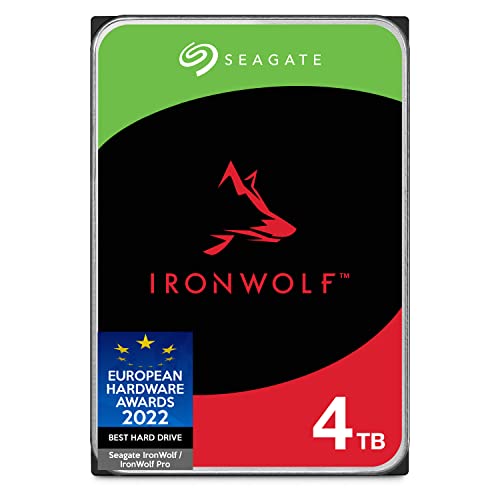
Seagate IronWolf 4TB NAS Internal HDD

WD Purple 4TB Surveillance HDD WD40PURZ

Seagate SkyHawk 8TB Surveillance HDD

Seagate SkyHawk 6TB Surveillance HDD

WD Purple 6TB Surveillance HDD WD62PURZ

TERRAMASTER F2-425 Plus NAS 2-Bay 8GB DDR5

TERRAMASTER F4-424 Pro NAS 4-Bay 32GB DDR5
More On The Choices That Made The List
The TERRAMASTER F4-425 Pro lands in that sweet spot where a home NAS stops feeling like a toy and starts acting like a real server. With an Intel N350 8-core CPU and 16GB of DDR5, it shrugs off multi-user streams and Docker containers. You also get dual 5GbE network ports (network jacks that support up to 5 gigabits per second, each), which most home routers don’t even support yet, so future-proofing is built in.
Three M.2 NVMe slots (tiny stick-shaped SSD slots that sit directly on the motherboard) handle cache acceleration without eating into the four main drive bays. For a home with growing photo libraries, security camera archives, and a Plex server, that headroom matters.
Strengths Worth Knowing
- Dual 5GbE ports combine for around 10Gb of aggregated bandwidth when your switch supports it
- 16GB of DDR5 means you can run multiple apps and VMs without choking the box
- Three M.2 NVMe slots leave the four main bays free for bulk storage drives
- The N350 chip runs cool and quiet, which matters in a living-room shelf
Things To Consider
- You’ll need a 5GbE-capable switch or router to actually use the second port
- TERRAMASTER’s software ecosystem lags Synology’s in polish, so first-time NAS owners may face a learning curve
- Drives are not included, so budget for at least two matching drives
Key Specs
Who Will Love This
Power users running a home server with multiple services, media transcoding, or a small business backup routine.
Consider Something Else When
First-time NAS owners who want the smoothest software experience should look at the Synology DiskStation DS1019+ instead.
The Synology DiskStation DS1019+ is the box that turned a lot of households into NAS believers. Its five drive bays give you room to grow, and the included DiskStation Manager (DSM) operating system makes setup feel less intimidating than raw Linux. For a household juggling backups, photo syncing, and occasional media streaming, DSM practically holds your hand.
Inside, a quad-core CPU with AES-NI encryption (a hardware feature that speeds up encrypted file transfers) keeps file transfers smooth even when the drives are scrambling data. The 8GB of DDR3L memory is enough for most home workflows, and the 4K transcoding capability (converting video on the fly so any device can play it) handles Plex-style streaming without breaking a sweat.
Where It Helps
- DSM software is widely considered the most beginner-friendly NAS interface on the market
- Five bays support RAID (a drive configuration that protects your data if one drive fails) configurations like SHR (Synology Hybrid RAID) for flexible growth
- AES-NI encryption means secure transfers without tanking performance
- Compact desktop form factor fits beside a router
Points To Note
- DDR3L memory is older than what the TERRAMASTER picks offer, so future expandability is limited
- No M.2 slots for NVMe cache on this model, so caching happens on the main drives only
- Software updates eventually phase out older units, a real consideration for long-term ownership
Whose Shelf It Belongs On
First-time NAS owners and small offices who want the smoothest possible setup experience.
Not Your Match When
Power users needing 10Gb-class networking should reach for the TERRAMASTER F4-425 Pro.
Once you pick a NAS enclosure, you need drives that actually like living inside one. The Seagate IronWolf 4TB is built for exactly that: 24/7 operation, RAID arrays, and the constant vibration that comes from multi-bay chassis. The 5900 RPM spin speed keeps it cooler and quieter than faster 7200 RPM drives, which matters when the box sits in a living area.
CMR recording technology (Conventional Magnetic Recording, the traditional way drives write data, as opposed to shingled SMR) means write performance stays consistent even when the drive fills up. For most home users, 4TB per drive hits a nice balance between cost and capacity.
What Stands Out
- Built for multi-user NAS environments with rotational vibration sensors
- CMR recording keeps write speeds stable across the full drive
- 5900 RPM operation runs cooler and quieter than faster drives
- AgileArray firmware optimizes the drive for RAID reliability
Points To Note
- 4TB fills up fast if you store 4K video, so plan for expansion
- 5400 RPM-class drives feel slow during large sequential writes compared to SSDs
- Matching drives from the same batch sometimes fail close together, so buy from different sources for large arrays
Quick Facts
Made For
Households filling a 2- to 4-bay NAS with general-purpose storage and backups.
Where Another Pick Suits Better
If your NAS is a dedicated video surveillance NVR, the Seagate SkyHawk 6TB handles that workload better.
The WD Purple line exists for one job: sitting inside a DVR or NVR (network video recorder, a box that saves footage from security cameras) and writing surveillance footage around the clock. The 4TB WD40PURZ uses AllFrame firmware, which reduces video frame loss and pixelation during heavy write workloads. For a homeowner with a handful of cameras, this drive makes a lot of sense.
The 5400 RPM speed class keeps power draw low, which matters in a system that never powers off. Pair it with a compatible NVR enclosure and the drive quietly does its job for years.
Why It Works Well
- AllFrame technology reduces dropped frames during multi-camera recording
- Low 5400 RPM operation keeps heat and noise down in an always-on system
- 64MB cache handles sustained write streams from multiple cameras
- Engineered for write-intensive, low bit-rate workloads typical of surveillance
Worth Noting
- 4TB is on the small side for multi-camera 4K setups, so check retention math first
- Not optimized for general file serving or random read workloads
- Slower seek times than 7200 RPM NAS drives like the IronWolf if you mix use cases
Feature Snapshot
Best Suited To
Homeowners running a small NVR system with several 1080p or moderate-resolution cameras.
Look Elsewhere When
You need a general-purpose NAS drive instead, in which case the Seagate IronWolf 4TB is the better all-rounder.
The Seagate SkyHawk 8TB is the workhorse tier of the surveillance drive world. With support for up to 64 simultaneous HD streams and a workload rating of 180TB per year, it handles busy multi-camera installs without sweating. For a homeowner or small business running a serious camera setup, 8TB buys real retention time.
Built-in RV sensors (rotation vibration sensors that detect shake from neighboring drives) help maintain performance even in multi-bay chassis. SkyHawk Health Management adds a layer of monitoring, so the drive can flag issues before total failure.
The Good Stuff
- Rated for workloads up to 180TB per year, which is overkill for most homes but reassuring
- Supports up to 64 simultaneous HD camera streams without dropped frames
- 256MB cache keeps multiple write streams flowing
- RV sensors prevent performance drop in multi-drive enclosures
Honest Caveats
- Overkill capacity for households running only 2-4 cameras
- Not the right tool for general file storage, where IronWolf drives fit better
- 3.5-inch form factor requires a desktop-class enclosure, not a small NAS
Right Fit For
Properties with a dozen or more cameras, or anyone wanting months of continuous footage on a single drive.
Skip It When
You’re running just a few cameras on a tighter budget. The Seagate SkyHawk 6TB is a more sensible size.
The 6TB SkyHawk is the Goldilocks size for typical home surveillance rigs. Big enough to hold weeks of footage from a half-dozen cameras, small enough to keep cost reasonable. Like its 8TB sibling, it includes ImagePerfect firmware for clean video capture and the same always-on reliability.
For most households running 4 to 8 cameras at standard resolution, this drive gives a comfortable balance. The 256MB cache handles multiple streams without breaking a sweat.
Advantages To Know
- ImagePerfect firmware minimizes frame loss during long recording sessions
- 256MB cache helps with burst write activity from multiple cameras
- Lower power draw than 7200 RPM alternatives, friendlier for always-on duty
- Compatible with leading NVR software and enclosures
Less-Strong Areas
- 6TB still requires planning if you want 30+ days of 4K retention
- For purely file-server use, an IronWolf drive is a more flexible choice
- Multi-bay vibration handling is good but not as robust as 7200 RPM enterprise-class drives
Who Should Grab It
Homeowners with a moderate camera setup who want reliable, around-the-clock recording without overspending.
A Better Fit Elsewhere
Installs with many high-resolution cameras may stretch the 6TB limit, where the SkyHawk 8TB earns its premium.
The 6TB WD Purple WD62PURZ doubles the cache of its 4TB sibling to 128MB, which helps when several high-bitrate cameras write to the drive at once. It’s still tuned for surveillance rather than general use, but the larger buffer makes it more forgiving when camera count or resolution climbs.
AllFrame technology remains the headline feature, working to keep recorded footage free of glitches and dropped frames. In always-on NVR enclosures, this drive tends to run quietly and cool.
Points In Its Favor
- 128MB cache handles concurrent streams from several high-resolution cameras
- AllFrame firmware reduces frame loss and pixelation in recorded footage
- Tuned for low bit-rate, high stream-count workloads common in surveillance
- Reliable choice for systems that record 24/7 for months on end
Trade-Offs
- Not a fit for general file serving, where NAS drives like the IronWolf 4TB perform better
- Capacity can still feel tight on multi-camera 4K systems
- Performance focus on writes means slower random reads when browsing footage
At A Glance
Perfect Match For
Households or small businesses running 6-10 cameras that need a few weeks of continuous recording.
Reach For A Different Pick When
Pure general-purpose NAS use, where the Seagate IronWolf 4TB is a more flexible and budget-friendly drive.
The TERRAMASTER F2-425 Plus is the smallest box on this list, but it doesn’t feel like a compromise. With an Intel N150 quad-core CPU and 8GB of DDR5, it handles file syncing, photo backups, and a modest Plex library without flinching. Two drive bays keep it tidy, and three M.2 SSD slots (tiny solid-state drive slots) open up cache or fast-pool options that bulkier 2-bay boxes can’t match.
For a household stepping into NAS ownership for the first time, the size and price make it less intimidating than a 4-bay unit. It also works well as a backup target for a laptop or two.
Everyday Advantages
- Compact 2-bay form factor fits on a shelf or beside a router
- Three M.2 SSD slots support fast cache or independent storage pools
- 8GB of DDR5 is generous for the size and price tier
- Dual 5GbE network ports future-proof your home network connection
Soft Spots
- Two bays limit you to a single redundancy drive, so usable capacity takes a hit
- Smaller enclosure means harder drive swaps after setup
- Not designed for heavy multi-user or business workloads
Built With In Mind
First-time NAS owners and small households that just need a tidy private cloud for photos and backups.
Swap It Out When
You anticipate rapid storage growth. The TERRAMASTER F4-425 Pro offers four bays for easier expansion.
The TERRAMASTER F4-424 Pro is what you reach for when “home NAS” is starting to feel like an undersized description. With a Core i3-N305 8-core CPU and a full 32GB of DDR5, it has the muscle to handle multiple virtual machines, heavy transcoding, and a household full of concurrent users. The integrated UHD graphics (a built-in video processor) even helps with hardware-accelerated media tasks.
Dual 2.5GbE ports (network jacks that support up to 2.5 gigabits per second each) and dual M.2 NVMe slots round out a spec sheet that reads more like a small business server than a living-room appliance. It still fits in a home, but you feel the headroom.
Noteworthy Benefits
- 32GB of DDR5 supports virtualization and many simultaneous apps
- Core i3-N305 8-core CPU reaches 3.8GHz turbo for demanding workloads
- Dual 2.5GbE ports aggregate for up to 5Gb on compatible switches
- Dual M.2 NVMe slots handle cache without sacrificing main drive bays
Possible Compromises
- Power and capability exceed what most households actually need
- 32GB memory is non-upgradable, so you can’t expand later
- Costs more than the entry-level TERRAMASTER F2-425 Plus without much benefit for casual users
Feature Rundown
Who Will Love This
Small business owners, content creators, and technically inclined households running virtual machines or large media libraries.
Another Choice May Suit
Most home users will find the TERRAMASTER F4-425 Pro more than capable at a friendlier price point.
What To Weigh Before Picking A Home NAS Drive
A NAS is only as good as the match between workload and hardware. The right choice depends on how many people will hit the box at once, what kind of files dominate, and how much future expansion you want to leave room for.
Drive Count And RAID Layout
Two bays suit a simple mirror (RAID 1, where data is duplicated across two drives so one can fail without losing files) for households with a few terabytes to protect. Four bays open up RAID 5 or Synology Hybrid RAID, which give you usable capacity plus one-drive fault tolerance. For surveillance rigs, plan storage based on camera count, resolution, and retention days. A 4-camera 1080p system writes roughly 60-100GB per day, so a 6TB drive fills in about two months of continuous recording.
NAS Enclosure Versus Standalone Drive
If you already have a server, a USB drive, or a simple file share, a bare internal drive like the IronWolf or SkyHawk series slides right in. A full NAS enclosure like the Synology DS1019+ or TERRAMASTER boxes makes more sense when multiple devices need access, when you want automatic backups, or when remote file syncing matters.
Performance Tiers That Matter
CPU and RAM dictate how many apps you can run. 8GB handles most homes, while 16GB or 32GB opens up virtual machines and heavy transcoding. Network speed matters too: 1GbE tops out near 125 MB/s, while 2.5GbE and 5GbE multiply that headroom for 4K video workflows.
Matching Drive Type To Workload
NAS drives like IronWolf balance read and write for file serving. Surveillance drives like SkyHawk and WD Purple optimize for sustained sequential writes (recording video constantly), at the cost of slower random reads. Mixing them in the wrong slot can leave performance on the table.
Key Considerations Across These Picks
Common Buying Slip Ups
The most frequent mistake is filling a NAS with desktop drives, which aren’t rated for 24/7 vibration. Stick with NAS or surveillance-rated drives. Another pitfall: ignoring network bottlenecks. A fast NAS on a 1GbE switch can’t deliver 5GbE speeds, no matter how much you paid for the box. Match your switch and cabling to the network ports you’re paying for.
What The Higher Tier Buys
The premium NAS enclosures add CPU power, more RAM, and faster networking that translate to real speed during multi-user access and media transcoding. The jump from a 2-bay to 4-bay unit matters most for storage flexibility, while 5GbE and 10GbE networking future-proofs households that stream large files. Higher-tier surveillance drives add cache and workload ratings that pay off when camera count climbs or 4K retention becomes a priority. The upgrade is worth it when the workload outgrows the entry tier, and unnecessary when it doesn’t.
Frequently Asked Questions
What Is A NAS Drive And Why Use One For Home?
A NAS drive is a hard disk built for always-on operation inside a multi-bay enclosure. It handles vibration, heat, and 24/7 workloads better than a standard desktop drive.
How Many Bays Do I Need For Home Use?
Two bays work for light file sharing and backups, while four bays give you room to grow and offer better redundancy options for families and content creators.
Can I Mix NAS And Surveillance Drives In The Same Box?
You can, but the optimization is wasted because each drive type tunes for a different workload. Pick one job per NAS for the best results.
Is SSD Or HDD Better For Home NAS Storage?
HDDs deliver far more capacity per dollar, which matters for media libraries and backups. SSDs work better for caching or fast storage pools inside a hybrid setup.
Do I Need A Special Network Switch For Faster NAS?
A 2.5GbE or 5GbE NAS only hits top speed with a compatible switch and cabling. Without that, the box falls back to 1GbE, capping transfers around 125 MB/s.
Final Verdict
A reliable home NAS setup starts with honest answers about how you’ll use it. A small household with a few cameras and a growing photo library will be perfectly happy with a 2-bay enclosure and a pair of NAS drives. Larger families, content creators, or anyone with serious surveillance needs should look toward 4-bay enclosures and surveillance-rated drives. Pick the tier that fits your real workload today, and leave a bay or two free for tomorrow.




