

A home full of phones, laptops, and smart TVs generates a steady stream of photos, videos, and project files that quickly outgrow free cloud tiers. A network attached storage (NAS) device solves the problem locally: your own private server sitting on the router, streaming to every screen and backing up every device without monthly fees. The right pick depends on how much room you need, how many people tap into it, and whether you want to tinker or just plug it in. The list below covers solid options from Synology, UGREEN, and TERRAMASTER, spanning two-bay starters, four-bay family hubs, and power-user rigs built for 4K editing and virtual machines.
A Snapshot Of The Selections

TERRAMASTER F4-425 Pro NAS 4-Bay, Intel N350 8-Core, 16GB DDR5 (Diskless)

UGREEN DH4300 Plus 4-Bay NAS for Beginners

Synology DiskStation DS1019+ 5-Bay NAS (Diskless)

UGREEN DH2300 2-Bay NAS for Beginners

UGREEN DXP2800 2-Bay NAS with Intel N100

Synology DiskStation DS920+ 4-Bay NAS (Diskless)

Synology DiskStation DS1621+ 6-Bay NAS (Diskless)
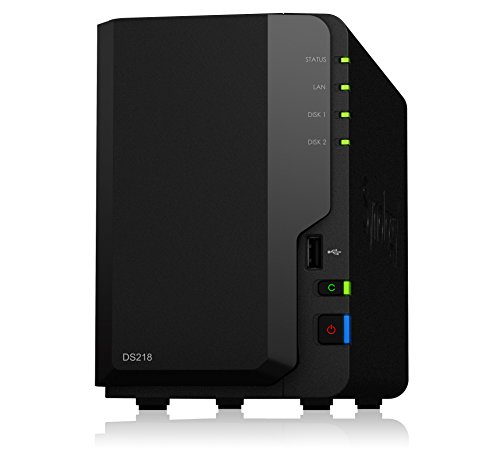
Synology DiskStation DS218 2-Bay NAS (Diskless)

TERRAMASTER F2-425 Plus NAS 2-Bay with Intel N150

TERRAMASTER F4-424 Pro NAS 4-Bay with Core i3-N305
Inside Each Recommended Option
The TERRAMASTER F4-425 Pro sits at the top of the list because it pairs a low-power 8-core Intel N350 processor with 16GB of DDR5 memory, which is unusual headroom for a 4-bay enclosure. Dual 5GbE network ports can be combined (a practice called link aggregation, which simply means using both ports together for more bandwidth) to push advertised transfer speeds up to roughly 1020 MB/s, fast enough for multiple people editing video off the same box.
Three M.2 NVMe slots handle SSD caching (using small solid-state drives to speed up reads and writes to the larger hard drives), which keeps random access snappy even when the main bays are full of spinning disks. Compared to the Synology DS920+ later in this list, the F4-425 Pro trades Synology’s polished software ecosystem for raw horsepower, and most power users will see that as a fair swap.
Everyday Perks
- Eight CPU cores and 16GB DDR5 handle several simultaneous users without choking
- Dual 5GbE ports give headroom for 4K streaming and large file moves at the same time
- Three NVMe slots let you separate cache from dedicated SSD pools, useful for editing scratch space
- Diskless chassis means you choose the drives that match your capacity and noise tolerance
Trade Offs
- TERRAMASTER’s app ecosystem is functional but less polished than Synology DSM, so you may spend more time on manual configuration
- 16GB is the ceiling, so heavy virtualization workloads can hit the wall faster than the F4-424 Pro below
Key Specs
Who It Suits Best
Power users running virtual machines, container stacks, or 4K editing off the NAS will appreciate the headroom.
Look Elsewhere When
You want Synology’s first-party app polish instead of TERRAMASTER’s more hands-on approach; the Synology DS920+ is a friendlier fit.
The UGREEN DH4300 Plus is aimed squarely at people who have never owned a NAS before. UGREEN built the operating system around familiar app tiles: phone backup, AI photo album, home surveillance, and a 4K HDMI output for plugging straight into a TV. 8GB of LPDDR4X memory is soldered in, so you trade future RAM upgrades for a quieter, more compact design.
For most households stepping off Dropbox or Google Drive, the DH4300 Plus is the gentlest on-ramp on this list. The catch is that UGREEN’s app catalog is still maturing; you get the core jobs done, but power-user features like full virtual machines are out of reach.
Practical Advantages
- App-first interface lowers the learning curve for first-time owners
- AI photo album auto-tags faces and scenes, which saves hours of manual sorting
- 4K HDMI output turns the box into a media player without a separate streaming stick
Worth Noting
- Memory is fixed at 8GB, so the box will feel slow once you stack many services on it
- Docker support exists, but virtual machines are not officially supported, which limits some home-lab ambitions
Made For
Families and remote workers moving their first photo and video library off cloud subscriptions.
Where Another Pick Suits Better
Creators who need Intel N100 horsepower and 2.5GbE networking should step up to the UGREEN DXP2800 instead.
The Synology DS1019+ lands in the middle of this list because it threads a useful needle: five drive bays, a quad-core CPU with a hardware AES-NI encryption engine (a dedicated chip that handles scrambling and unscrambling of files without slowing the rest of the system), and 8GB of DDR3L memory out of the box. Read and write throughput stays above 225 MB/s even when the entire volume is encrypted, which is the kind of number small studios care about.
Five bays is the sweet spot for RAID 5 (a drive configuration that stripes data across disks for speed while keeping one disk’s worth of space as a safety net, so a single drive failure doesn’t erase everything) plus a hot spare, giving both performance and a built-in backup disk. Compared to the newer Synology DS920+, the DS1019+ is the older sibling with similar DNA and a friendlier entry point.
Where It Helps
- Hardware encryption keeps sensitive files safe without throttling transfer speeds
- Five bays support RAID 5 with a dedicated spare, a real safety net for a small office
- DiskStation Manager (DSM) is widely considered the most beginner-friendly NAS operating system available
- Built-in 4K transcoding (real-time conversion of video files so they play on any device) for media libraries
Points To Keep In Mind
- DDR3L memory is dated, so future expansion options are narrower than the DS920+
- Stock 8GB is enough today, but heavy container users may bump into limits within a few years
Feature Snapshot
Right Fit For
Small home offices and prosumer studios that want Synology’s software polish with room for one extra drive.
Skip It When
You want modern DDR4 memory and M.2 cache slots; the Synology DS920+ covers both.
The UGREEN DH2300 is the smallest and least intimidating unit on this list. Two drive bays mean RAID 1 mirroring (where every file is written to both drives simultaneously, so a single drive failure still leaves an exact copy) is the realistic configuration, doubling your drive cost but giving you a built-in safety net from day one. The whole experience is designed around phone backup, which is the most common reason people start looking at NAS gear in the first place.
For solo users and couples, the DH2300 keeps the noise and footprint low. Set it next to the router, plug in a pair of drives, and let the app walk you through the rest. Anyone who expects the box to run a dozen Docker containers will outgrow it quickly, though.
A Few Highlights
- Compact two-bay footprint fits on a shelf or beside a router
- One-tap phone backup from iOS and Android apps
- Simple mirrored storage keeps your files safe even if a drive dies
Room For Improvement
- Two bays cap your maximum capacity, so large 4K libraries will need the DH4300 Plus instead
- Limited app ecosystem compared to Synology’s mature DSM
Who Will Love This
Solo users and small households who mainly want to back up phones and laptops without monthly fees.
A Better Fit Elsewhere
Growing families who want four bays and room for a media server should look at the Synology DS920+.
The UGREEN DXP2800 takes the same beginner-friendly chassis philosophy as the DH2300 and slots in much more capable internals. An Intel N100 quad-core CPU and 8GB of DDR5 memory give it real headroom for transcoding, Docker, and Plex media serving. Two M.2 NVMe slots let you add SSD caching or even dedicated SSD storage pools, which is rare in a two-bay box.
The single 2.5GbE port (2.5 gigabit Ethernet, roughly 2.5 times the speed of a standard gigabit network jack) is the headline networking feature, letting you push past the gigabit barrier without rewiring the house. Versus the TERRAMASTER F2-425 Plus further down, the DXP2800 trades dual 5GbE ports for a more proven app experience.
The Upside
- Intel N100 and DDR5 RAM keep multiple apps responsive at once
- 2.5GbE networking breaks the gigabit ceiling for faster transfers on a wired network
- 4K HDMI output doubles as a low-cost media player
Areas To Watch
- Two drive bays mean RAID 1 mirrors, so you lose half your raw capacity
- No 10GbE upgrade path on the chassis itself
Quick Facts
Best Suited To
Remote workers and content creators who need fast transfers in a small two-bay box.
Consider Something Else When
You need four bays for more drives; the Synology DS920+ is the natural step up.
The Synology DS920+ is the box most people picture when they hear “home NAS”: four bays, two built-in M.2 SSD slots for cache, and Synology’s DSM operating system. The 4GB of DDR4 memory is enough for a family setup, and it can be expanded later if your needs grow. SSD cache technology accelerates read and write performance without forcing you to fill all four bays with solid-state drives.
The expansion story is the real headline. Adding a Synology DX517 expansion unit lets you scale from 4 bays to 9, then 14, on the same operating system, so the box grows with you. For households that start small and keep accumulating data, that path matters more than raw CPU power.
Points In Its Favor
- Two M.2 slots handle SSD cache without sacrificing drive bays
- DX517 expansion support means the chassis is the start, not the ceiling
- DSM remains the gold standard for NAS software, with a deep app catalog
Less Ideal Details
- Stock 4GB RAM can feel tight once you load up Synology’s heavier apps
- No 2.5GbE or 5GbE networking out of the box, so large transfers take a while over standard gigabit
Perfect Match For
Growing families and small teams who want a polished software experience with room to expand later.
Not Your Match When
You need faster wired networking from day one; the UGREEN DXP2800 brings 2.5GbE in a smaller box.
The Synology DS1621+ is the heaviest hitter in the Synology lineup worth considering for a home, and it earns that label honestly. Six bays plus the option to add two DX517 expansion units means you can scale up to 16 drives in the same ecosystem. Synology claims 174% higher 4K random read IOPS (input/output operations per second, a measure of how many small file reads the system can handle at once) and 76% faster sequential write speeds compared to the prior generation, which translates to noticeably snappier app and file behavior.
The dual built-in M.2 slots accept NVMe SSDs that act as cache without eating into the six main bays, and the PCIe slot (an internal expansion slot on the motherboard) lets you add a 10GbE SFP+ or RJ-45 NIC (network interface card) when your network is ready. Compared to the Synology DS1019+ earlier, the DS1621+ trades a bit of friendliness for serious throughput.
Key Advantages
- Six bays cover large households, prosumers, and small creative studios
- 10GbE ready through the PCIe expansion slot, a future-proof networking path
- Synology’s full backup suite (Active Backup, Hyper Backup, and Snapshot Replication) ships in the box
Potential Drawbacks
- Drives aren’t included, and filling six bays with NAS-rated drives adds up quickly
- The chassis is larger and louder than a two- or four-bay unit, so closet placement is wise
Spec Overview
Whose Shelf It Belongs On
Data-heavy households and prosumers running virtual machines, large media archives, or backup targets.
Swap It Out When
Your library is under 20TB and you don’t need six bays; the Synology DS920+ is a saner fit.
The Synology DS218 is the oldest box on this list, but its 64-bit quad-core processor and 2GB of DDR4 memory still hold up for typical apartment and small-home use. 4K 10-bit H.265 transcoding on the fly (real-time conversion of high-efficiency video files so they play smoothly on phones, tablets, and TVs that can’t handle the original format) is the standout feature for anyone who has a personal media library and wants to stream to any device.
Maximum single volume size tops out at 108TB, which is well beyond what two spinning drives can hold. For a small household that mostly streams, backs up laptops, and archives family photos, the DS218 is a quiet, low-power option that just works.
Bright Spots
- 4K H.265 transcoding handles mixed-device streaming without a separate media PC
- DSM operating system gets the same polished app catalog as larger Synology units
- Compact, low-noise enclosure is easy to hide in a living room
Soft Spots
- 2GB of RAM is tight for anyone running multiple services side by side
- Two drive bays cap capacity, and RAID 1 mirrors cut usable space in half
Built With In Mind
Apartment dwellers and small households who want reliable media streaming and laptop backups in a compact box.
Another Choice May Suit
Power users need more memory and NVMe cache; the UGREEN DXP2800 is the modern 2-bay alternative.
The TERRAMASTER F2-425 Plus is a two-bay box that wears the most ports of any unit in this size class. The Intel N150 quad-core CPU (up to 3.6GHz) and 8GB of DDR5 give it the brains, and the triple M.2 SSD design means you can run cache, dedicated SSD pools, or even boot from those slots. Dual 5GbE LAN ports keep it in the same networking league as the larger F4-425 Pro from item one.
For a small household with one or two people, this is plenty of horsepower in a compact case. The catch, as with most TERRAMASTER units, is that the operating system is more configurable than friendly, so first-timers should expect a learning curve.
A Favorable Mix
- Triple M.2 slots are unusual for a 2-bay box and add real flexibility
- Dual 5GbE ports outpace most competitors in the same size class
- Intel N150 and DDR5 memory keep the system responsive under load
Where It May Fall Short
- Two bays cap maximum raw storage at whatever two drives can hold
- TERRAMASTER’s software updates and app catalog are less consistent than Synology’s
Who Should Grab It
Tinkerers in small spaces who want SSD-heavy storage and 5GbE networking without a four-bay footprint.
Reach For A Different Pick When
You want a more polished software experience; the UGREEN DH2300 is a friendlier first NAS.
The TERRAMASTER F4-424 Pro is the most powerful 4-bay on this list, and it sits at the end for a reason: you really do not need it unless you are pushing the box hard. The Core i3-N305 is an 8-core, 8-thread CPU that turbos to 3.8GHz, paired with 32GB of DDR5 at 4800MHz. The integrated UHD GPU clocks up to 1.25GHz, which helps with media tasks and certain transcoding jobs.
Dual 2.5GbE ports and dual M.2 NVMe slots round out a chassis that can serve as a virtualization host or a 4K editing scratch volume. The 32GB is non-upgradable, which is worth knowing if you assume the headroom will grow with you over the years.
Well-Handled Touches
- Eight-core CPU and 32GB DDR5 handle multiple virtual machines comfortably
- Dual M.2 NVMe slots keep cache or dedicated SSD pools off the main drive bays
- Integrated GPU accelerates compatible transcoding workloads
Practical Considerations
- 32GB RAM is the ceiling, so growth has to come from drives, not memory
- Power draw is higher than the F4-425 Pro, which matters if the box runs 24/7
Core Details
The Right Fit
Power users running virtual machines, container stacks, or 4K editing off the NAS itself.
Where A Sibling Pick Shines
Most households will be just as happy with the TERRAMASTER F4-425 Pro, which costs less and still has 16GB of DDR5.
Matching The Right Nas To Your Home
Drive Bay Count Drives Real Capacity
Two bays cover light households and solo users, especially when RAID 1 mirroring is the goal. Four bays give you RAID 5 (one disk’s worth of overhead for fault tolerance) or RAID 6 (two disks’ worth of overhead, safer for larger arrays), which is the standard sweet spot for families and home offices. Six bays, as on the Synology DS1621+, are worth it when the data library is genuinely large or when you want the option to add expansion units later. The honest read is that most people who buy a two-bay box eventually want a four-bay one, so think about year three, not just launch day.
CPU, RAM, And The App Stack That Comes With Them
Processors like the Intel N100 and N150 are quiet, modern, and surprisingly capable for media and container work. RAM matters more than people expect: 4GB is the bare floor, 8GB is comfortable for most households, and 16GB or more becomes important once you start running multiple apps at once. Memory that you cannot upgrade later, as on the UGREEN DH2300 and the TERRAMASTER F4-424 Pro, is a real constraint to weigh against the cheaper price.
Networking Speeds And Why They Matter
Standard gigabit Ethernet caps real-world transfers at roughly 110 MB/s, which feels slow when you are moving 100GB of video. Boxes with 2.5GbE, like the UGREEN DXP2800, push that to about 280 MB/s over compatible switches and cabling. Dual 5GbE ports, as on the TERRAMASTER F4-425 Pro and F2-425 Plus, can be linked for 10Gb of aggregate bandwidth, which matters in a busy home with multiple editors or streamers.
Key Considerations Across These Picks
Traps First Timers Fall Into
The most common mistake is buying a NAS without enough bays to grow into, then migrating everything a year later when the drives fill up. Diskless enclosures are cheaper up front, but NAS-rated hard drives (drives designed to run 24/7 in a multi-drive enclosure, unlike standard desktop drives) are a separate line item that can match or exceed the box itself. Watch out for assuming any SATA drive will do; in a multi-bay chassis, NAS-rated drives like those in the WD Red or Seagate Ironwolf families are built for vibration tolerance and 24/7 operation, and they tend to last longer in this role.
Where The Extra Money Goes
Higher-tier models earn their price through three things: more RAM, faster networking, and stronger CPU. The Synology DS1621+ and the TERRAMASTER F4-424 Pro both stretch into workloads a typical household never touches, including virtualization, 10GbE networking, and 4K editing. For a single laptop and a few phones, a four-bay Synology DS920+ or UGREEN DH4300 Plus will feel just as fast in daily use, and at a friendlier price. The upgrade is worth it once you are running multiple services, transcoding 4K on the fly, or hosting virtual machines for development work.
Frequently Asked Questions
Do I Need A NAS If I Already Use Cloud Storage?
A NAS gives you local control, faster transfers on your home network, and no monthly fees, which adds up for households with large photo and video libraries. Cloud storage still works well as an off-site backup, since a NAS protects against drive failure but not against fire, theft, or flood.
How Many Drive Bays Should I Buy?
Two bays are fine for a single person or couple, four bays suit most families and home offices, and six bays make sense once your library passes roughly 20TB or you want a dedicated hot spare. Expansion units can add bays later, but only certain models support them.
Are NAS Hard Drives Different From Regular Hard Drives?
NAS-rated drives are built for 24/7 operation and vibration tolerance, which matters in a multi-bay enclosure. They typically cost a little more per terabyte, and many owners report longer lifespans compared to standard desktop drives in the same role.
Can A NAS Stream 4K Video To My TV?
Most modern boxes here can stream 4K directly, and the Synology DS218, UGREEN DH4300 Plus, and TERRAMASTER F4-424 Pro handle 4K transcoding on the fly. The Synology DS920+ also supports 4K, though it benefits from an SSD cache for smoother playback.
What Happens If A Drive Fails?
Most of these units support hot-swappable drives (you can pull and replace a failed drive without shutting the box down) and RAID configurations that keep your data safe through a single drive failure. Replacing the failed drive and letting the array rebuild is the standard recovery path, and DSM or TOS walks you through the steps.
Closing Remarks
The right NAS depends less on raw specs and more on how your household actually uses storage. A two-bay box handles phone backups and modest media libraries. Four bays cover most families, and six or more make sense once you start running virtual machines or editing 4K video. Match the box to your data, not to a spec sheet, and you will get years of quiet, fee-free storage in return.




