

Picture the scene: a bedside lamp that needs the wall switch replaced, a hallway light controlled from two ends, or a ceiling fan that should finally join the rest of the smart home. Picking the right HomeKit smart switch turns those small frustrations into quiet wins, no rewiring drama required. This list covers nine solid options, from plug-and-play remote outlets for renters to in-wall dimmers for a full renovation. Every pick below is sized up for real homes, real wiring, and real routines.
The Picks In Brief
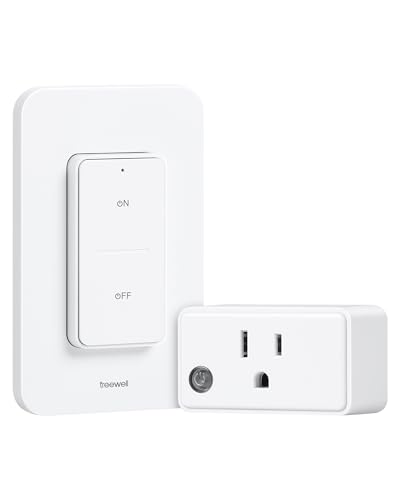
treewell Remote Control Outlet with Wireless Wall Switch
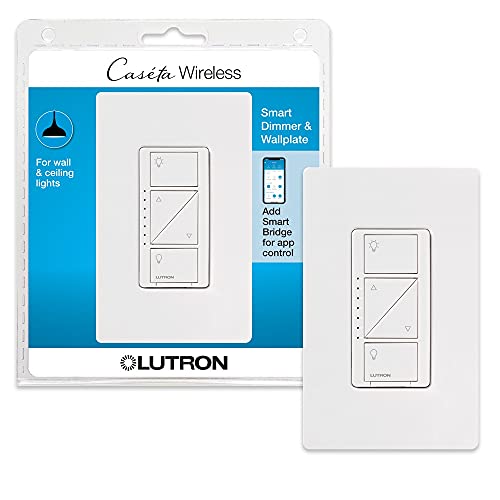
Lutron Caseta Smart Dimmer Switch with Wallplate

Lutron Caseta Smart Dimmer Switch, No Neutral

Lutron Caseta Smart Switch for Lighting and Fans
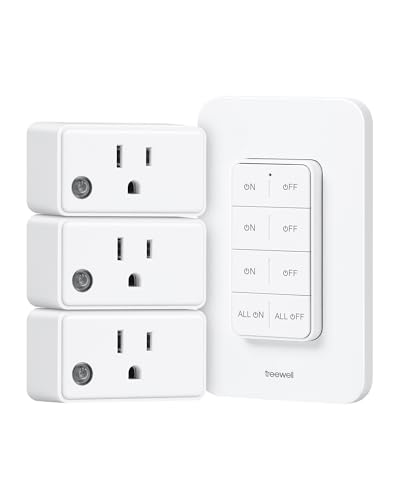
treewell 3 Independent Remote Control Outlets

treewell Wireless Outlet with Decorator Rocker Wall Switch

meross Smart Light Switch Single Pole, 2 Pack
meross Smart WiFi Switch 3-Way/Single-Pole, 4 Pack

meross Smart Light Switch Single Pole, HomeKit
Meet The Standout Selections
Renters, dorm dwellers, and anyone avoiding a call to the electrician will appreciate the no-fuss nature of this treewell kit. The outlet sits between the wall socket and a lamp or appliance, while a wireless wall switch sticks anywhere with adhesive or doubles as a handheld remote. The 200FT rated range is generous for apartments and modest single-story homes.
Compared to the Lutron dimmers coming up later, this one trades HomeKit integration for true plug-and-play simplicity. No neutral wire hunt, no app pairing, no hub. For a bedside lamp that needs a wall switch added across the room, this is the kind of low-effort fix that solves a real annoyance in minutes.
Positive Points
- Truly plug-and-play with zero wiring, ideal for renters who can’t modify the wall box
- 200FT wireless reach covers most apartments and many single-story homes without dropouts
- Detachable remote works as both a wall switch and a handheld clicker for the couch
- One outlet and one switch are enough for single-lamp setups and tucked-away electronics
Things To Consider
- No HomeKit, Alexa, or Google Assistant support, so it lives outside the smart-home ecosystem
- Single outlet only; clusters of devices need extra kits or the 3-outlet version reviewed later
Made For
Anyone renting a home who wants a wall switch without touching a single wire, especially for one bedside lamp or a hard-to-reach floor light.
Where Another Pick Suits Better
Shoppers building a full Apple household should jump to the meross Smart Light Switch Single Pole (pick 7) for native HomeKit control.
Lutron’s Caseta line has earned its reputation among smart-home installers for good reason: rock-solid radio performance and dimming that doesn’t buzz or drop out. This kit ships with the dimmer plus a clean wallplate, so the wall looks finished once the install is done. The switch handles up to 600W of incandescent or halogen loads, which covers the standard fixture a homeowner is likely to swap.
The catch every Lutron buyer faces: a Smart Hub (the Lutron Caseta Bridge) is required and sold separately. That extra box is the gateway to HomeKit, Alexa, Google Assistant, and the broader Caseta ecosystem of Pico remotes and shades. If you’re building a thoughtful whole-home system rather than just one room, this hub requirement becomes a feature rather than friction.
Points In Its Favor
- Smooth, flicker-free dimming across a wide load range, ideal for dining rooms and media spaces
- Caseta’s Clear Connect wireless protocol is widely reported as more reliable than crowded Wi-Fi alternatives
- Included wallplate means no hunting for a matching cover plate at the hardware store
- HomeKit-ready through Lutron’s hub, fitting cleanly into an Apple-centric home
Trade Offs
- The Smart Hub adds cost and a small box that needs an outlet and ethernet or Wi-Fi connection
- Neutral wire required; homes without one will need pick 3 instead
Quick Facts
Right Fit For
Homeowners planning a multi-room Caseta rollout who already plan to buy the bridge and want a clean, finished look out of the box.
Swap It Out When
Older homes without a neutral wire should skip to the Lutron Caseta No-Neutral dimmer (pick 3) to avoid a rewiring surprise.
Homes built before the mid-1980s often lack a neutral wire at the switch box, which is exactly the headache this dimmer solves. Unlike pick 2, this model works in those older boxes without forcing an electrician visit. The dimming behaves the same as the standard Caseta dimmer, which is the whole point: same ecosystem, friendlier install requirement.
For renovators and restorers working on century homes or mid-century ranches, this is one of the few smart dimmers that doesn’t punish you for the original wiring. Pair it with the same Lutron Bridge as pick 2, and you’ve got full HomeKit, scenes, and Pico remote support without rewiring a single junction.
Advantages To Know
- Installs in switch boxes without a neutral wire, saving an electrician call in older homes
- Plugs into the existing Caseta ecosystem, so remotes and scenes carry across rooms
- Smooth dimming curve for LED bulbs when paired with Lutron’s compatibility list
Worth Noting
- Still requires the Lutron Bridge for HomeKit and app control, same as pick 2
- Some LED bulbs flicker at low dim levels; checking Lutron’s compatibility list before buying is wise
Best Suited To
Owners of pre-1980 homes who want Caseta’s dimming quality without paying for an electrician to pull a neutral wire.
Reach For A Different Pick When
Plug-in simplicity matters more than wall-mounted dimming; the treewell outlet kit in pick 1 is faster to deploy.
Not every switch in a smart home runs just lights. This Caseta switch is rated for lighting and ceiling fan loads up to 720W, which puts it in heavier territory than a standard dimmer. The on/off only behavior (no dimming curve) suits fan motors, where variable power isn’t safe anyway.
Think of it as pick 2’s more rugged sibling for circuits where dimming would damage the load. It’s a great fit for a master bedroom ceiling fan, a porch light on a separate switch leg, or a bathroom fan that deserves a HomeKit schedule. Same Caseta Bridge required, same reliable Clear Connect radio underneath.
The Case For It
- Handles higher 720W ratings for fans and multi-fixture circuits
- On/off switching suits motor loads where dimming would cause damage or noise
- Compatible with the same Pico remotes as pick 2, keeping accessories consistent across rooms
Minor Gripes
- No dimming function, so it’s the wrong pick if mood lighting is the goal
- Requires the Lutron Bridge, adding upfront cost for first-time Caseta shoppers
Feature Snapshot
Whose Shelf It Belongs On
Anyone wiring a ceiling fan, a chandelier cluster, or a porch fixture into a HomeKit routine without dimmer-induced motor noise.
A Better Fit Elsewhere
Bedrooms needing bedside dimming are better served by the Lutron Caseta dimmer in pick 2.
Where pick 1 gave you one outlet and one switch, this treewell kit scales up to three independently controlled outlets and a single wall switch. Each socket responds to its own button on the remote, or you can hit all three at once if you want a room to wake up together. The same detachable wall/handheld switch design carries over from pick 1.
Holiday lights behind the couch, a fish tank filter, and a sound machine make a strong use case. For a media center where multiple components share one wall outlet, the ability to cut phantom power draw on each device independently adds up over a year of energy savings.
Reasons It Performs
- Three independently controlled outlets cover a media center, holiday display, or appliance cluster
- Group control mode switches all three at once for a single-tap shutdown
- Detachable remote stays useful as a portable remote across rooms
- Same zero-wiring install as pick 1, so renters stay happy
Points To Note
- No smart-home integration at all; these stay analog-style RF remotes only
- Takes up three sockets on a power strip, which can crowd adapters and bulky plugs
Quick Facts
Perfect Match For
Anyone with a tangle of lamps and appliances behind the couch who wants individual control from one wall-mounted remote.
Skip It When
HomeKit routines matter; jump to pick 7 or pick 8 for native Apple Home support.
The other treewell kits use a small clicker-style remote, but this version swaps that for a decorator rocker wall switch that fits standard multi-gang wall plates. If the remote will live on the wall full-time, the rocker style blends in with the rest of the switch bank instead of sticking out. The remote is magnetic too, so popping it off the wall for handheld use is a satisfying little snap.
Think of it as the aesthetic upgrade over picks 1 and 5. The functional core is identical (one outlet, one switch, plug-and-play), but the form factor suits a finished room where the switch is visible rather than hidden behind a door.
Practical Advantages
- Decorator rocker style matches standard wall switches for a cleaner, built-in look
- Magnetic mount lets you grab the remote off the wall for couch use
- Fits multi-gang wall plates so it doesn’t look out of place next to other switches
Honest Caveats
- No smart-home ecosystem support, same as the other treewell picks
- Single outlet only; bigger jobs need multiple kits
Who Should Grab It
Design-conscious renters who want the wall switch to look like it belongs, not like an aftermarket add-on.
Look Elsewhere When
Smart-home ecosystem integration tops the list; the meross Smart Light Switch Single Pole (pick 9) handles HomeKit natively.
The meross single-pole switch is one of the most affordable native HomeKit switches on the market, and this 2-pack doubles down on that value. Setup requires a neutral wire in the box (a quick peek behind the existing switch tells you what you have), and from there the HomeKit pairing is as simple as scanning the QR code on the switch.
For an Apple household with two rooms to convert, this 2-pack covers the job without breaking the bank. The companion meross app handles firmware updates and offers a fallback when HomeKit isn’t around. Remote HomeKit control needs a HomePod, Apple TV 4K, or Apple TV HD as a hub, which most Apple households already own.
Why It Works Well
- Native HomeKit support without needing a third-party bridge
- Two-pack pricing makes sense for adjacent rooms or matching upstairs and downstairs swaps
- Wi-Fi connection skips the extra bridge box required by Lutron picks
Softer Spots
- Neutral wire is mandatory, ruling out older homes without one
- Single-pole only, no 3-way support for hallways and staircases
Feature Card
Who Will Love This
Apple-centric homeowners with two adjacent rooms to convert who already own a HomePod or Apple TV.
Consider Something Else When
A hallway with two switches controlling one light is in play; pick 8 is the 3-way capable version.
Hallways, staircases, and long rooms with a switch at each end need 3-way support, and meross packs that flexibility into this 4-pack kit. The same switch hardware covers single-pole and 3-way setups, which simplifies buying when one box covers a mix of rooms. A patent-designed wiring layout means only one switch needs full replacement; the other end uses a smaller companion module.
For whole-home conversions, a 4-pack is often the sweet spot. HomeKit pairing matches the simpler meross picks (scan the QR code), and the meross app handles firmware and Wi-Fi setup. Like other meross switches, a neutral wire is required.
Everyday Advantages
- 3-way and single-pole compatibility in one switch line reduces confusion at checkout
- Four-pack size suits whole-room or whole-floor conversions
- HomeKit native, with the meross app as a backup for firmware and settings
- Patent design replaces only one switch in 3-way setups, easing installation
Potential Drawbacks
- Neutral wire required at the main switch box, which older homes may lack
- Not a dimmer; on/off only, ruling out mood-lighting use cases
Feature Snapshot
Built With In Mind
Homeowners with multiple hallways and staircases converting an entire floor or level at once.
Where A Sibling Pick Shines
Single-room dimming calls fit better with the Lutron Caseta dimmer in pick 2.
The single-pack version of the meross HomeKit switch is the right size for one or two switch swaps. If the project is a guest bedroom or a home office rather than a whole-home rollout, this keeps the budget and the parts list tight. Setup, pairing, and HomeKit behavior mirror the larger meross kits already covered.
For newcomers to the meross line, this is a sensible starting switch to test Wi-Fi stability and HomeKit responsiveness before committing to the 4-pack. The same neutral-wire caveat applies, so a quick look behind the existing switch confirms fit before clicking through to the listing.
Useful Touches
- Single-pack size keeps cost low for one- or two-room conversions
- HomeKit native with QR pairing, no third-party bridge needed
- Wi-Fi connection simplifies setup compared to hub-required Lutron alternatives
Where It Is Less Suited
- Neutral wire required, ruling out the oldest homes
- Single-pole only, so 3-way hallways need pick 8 instead
Right Fit For
Homeowners starting small with one switch swap who want to confirm HomeKit performance before scaling up.
Not Your Match When
Dimming is the goal; the Lutron Caseta dimmer in pick 2 offers smoother LED dimming with the trade-off of added hub cost.
What Matters Most Before Choosing HomeKit Smart Switches
The first question is wiring. A neutral wire (typically a white wire that stays energized) is required by most in-wall smart switches, including every meross pick in this list. Homes built before the mid-1980s often lack one, which is where the Lutron no-neutral dimmer (pick 3) becomes the realistic choice. Pop the wall plate off, peek at the wires, and you have your answer in 30 seconds.
The second question is ecosystem. Lutron’s Caseta line uses a proprietary hub that adds cost and a small dependency, while meross switches connect directly to Wi-Fi and pair with HomeKit natively. Plug-and-play treewell kits trade both for zero wiring and zero smart-home integration, which suits renters more than smart-home builders.
The third question is load type. Dimming and fan motors don’t mix well. Lutron’s dimmer (pick 2) handles lights, while the heavier switch (pick 4) handles fans and lighting without dimming. Choosing the wrong load type can produce buzzing, flicker, or even motor damage.
The fourth question is layout. Hallways and staircases need 3-way support, which is exactly where pick 8 earns its place. Single-pole switches like picks 7 and 9 work fine for bedrooms, offices, and standalone rooms.
Key Considerations Across These Picks
Traps First Timers Fall Into
The most common mistake is assuming every switch box has a neutral wire. Older homes often don’t, and buying a switch that requires one leads to a return trip. A two-minute peek inside the existing box saves an afternoon.
Another frequent slip is buying a dimmer for a ceiling fan. Dimmer switches push variable voltage to motors, which can cause hum, heat, and shortened motor life. For fans, choose an on/off smart switch rated for motor use, like pick 4.
Where The Extra Money Goes
The Lutron premium pays for the Clear Connect radio protocol, which operates on a less-crowded frequency than Wi-Fi. In dense apartment buildings, this often translates to fewer dropped commands and more reliable dimming. The Hub is a one-time cost that unlocks HomeKit, Pico remotes, and shades for years.
Higher-tier picks also tend to support wider load ranges and more robust dimming curves across LED bulbs. For LED-heavy homes, the smoother low-end dimming is often worth the extra spend over budget alternatives.
Frequently Asked Questions
Do I need a HomePod for HomeKit switches to work?
A HomePod, Apple TV 4K, or Apple TV HD is needed only for remote HomeKit control when you’re away from home. In-home control and Siri voice commands work with just the iPhone or iPad that owns the HomeKit home.
Can smart switches work without a neutral wire?
A few can, including the Lutron Caseta no-neutral dimmer in this list. Most in-wall smart switches, including all the meross picks, require a neutral wire. Plug-in options like the treewell kits need no wiring at all.
Will my existing dimmable LED bulbs work with a smart dimmer?
Compatibility varies widely. Lutron publishes a tested bulb list for its dimmers, and many LED bulbs dim poorly with budget hardware. Choosing bulbs from the compatibility list prevents flicker and drop-out at low dim levels.
Can I install these switches myself?
Plug-in remote kits are tool-free and safe for anyone. In-wall smart switches involve mains voltage wiring and should be installed by someone comfortable working with household electrical, or by a licensed electrician.
What’s the difference between single-pole and 3-way switches?
A single-pole switch controls one light from one location. A 3-way switch controls one light from two locations, like a hallway with switches at each end. Choose 3-way hardware like pick 8 for the latter setup.
The Takeaway
The right HomeKit smart switch depends on wiring, ecosystem, and load. The meross line covers most modern homes with native HomeKit and Wi-Fi simplicity. The treewell kits cover renters and lamp setups that need no wiring. Lutron Caseta fills in older homes and dimming fans, at the cost of a separate hub. Pick the option that matches the wall in front of you, and the rest tends to fall into a sensible kit list.
