

The right indoor or outdoor camera turns a quiet house into a place you can actually check on from anywhere. Whether you travel often, share walls with roommates, or just want to see the front porch without leaving the couch, a Wi-Fi camera gives you a window into your space. This roundup focuses on picks that handle day-to-day monitoring well, with options for renters, parents, pet households, and small-business owners. Each item was chosen for clear use-case fit rather than brand cachet, so the list covers everything from window-mounted color night vision to outdoor floodlight coverage.
A Quick View Of The Lineup

Ring Floodlight Cam Wired Plus with Video Doorbell

Ring Indoor Cam (2nd Gen) with Pet Tag
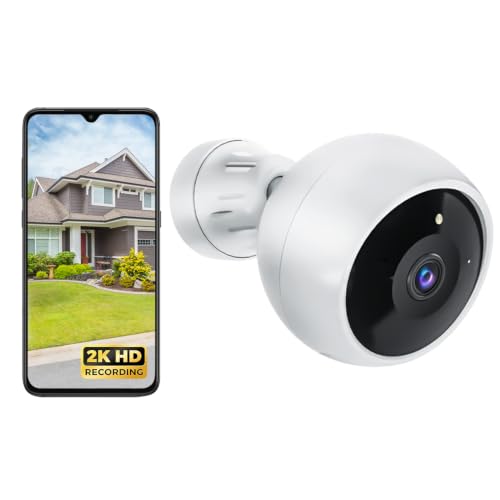
Wireless Outdoor 2K Battery Camera (Indoor)

REOLINK 4MP 2K Indoor Camera E1 WiFi 6

REOLINK 4K Indoor Camera E1 Zoom WiFi 6

REOLINK E1 Pro 3K PT Wi-Fi Indoor Camera

Window Security Camera 3MP 2K with Colorvue AI

Window Security Camera 2K 2-Pack with Colorvue AI
Why These Options Stand Out
This bundle pairs a hardwired floodlight camera with a battery video doorbell, so a single order covers both the driveway and the front entry. The floodlight unit replaces an existing exterior fixture and pulls power continuously, which means no battery swaps and no weather-driven downtime. If your home has an existing porch light junction box, installation usually takes under an hour with basic tools.
Where it shines is in active deterrence. The motion-triggered LED panels light up a wide patch of walkway the moment something crosses the frame, and the onboard siren can be triggered from your phone if needed. For most two-story homes with a defined front yard, the lighting reach makes nighttime footage far more usable than a passive camera alone.
Well-Handled Touches
- Hardwired power means continuous recording without recharging.
- Motion-activated LED panels add visible deterrence before any alert reaches your phone.
- The bundled video doorbell covers the secondary point of entry without extra shopping.
- Custom motion zones let you exclude a busy sidewalk and focus on the actual walkway.
- 1080p HD video keeps faces readable at typical porch distances.
Worth Bearing In Mind
- Hardwired installation may feel intimidating in older homes without an outdoor fixture box.
- Cloud video history typically requires an ongoing subscription plan.
Who Should Grab It
Homeowners with an existing exterior fixture box who want active outdoor deterrence plus a doorbell in one bundle.
A Better Fit Elsewhere
Renters who can’t drill into siding will do better with the battery-powered Wireless Outdoor 2K Battery Camera covered below.
The Ring Indoor Cam (2nd Gen) is a compact plug-in camera built for inside use, and this bundle stretches its reach with a 10-foot power cable. That extra length matters in real homes, where the nearest outlet is rarely right behind the spot you actually want to watch. Place it on a high shelf overlooking a dog crate, mount it to a ceiling corner, or perch it above a baby gate without crawling behind furniture.
The included Ring Pet Tag is a small Bluetooth beacon that helps the camera recognize which pet is moving around, which cuts down on generic motion alerts. For pet owners who want a low-effort window into the living room while away, the combination is genuinely practical.
Real-World Strengths
- The 10-foot cable gives flexibility for high shelves, ceilings, and awkward corners.
- Pet Tag filtering reduces generic notifications during normal pet activity.
- 1080p HD with color night vision keeps footage readable after the lights go down.
- Setup is plug-and-play with no extra adapter needed for the bundled cable.
Trade Offs To Consider
- Indoor-only rating means it cannot be used outdoors or in damp locations.
- Cloud storage for recorded clips usually requires a paid Ring plan.
Made For
Pet owners and renters who want flexible indoor placement and smarter pet-specific alerts without permanent mounting.
Look Elsewhere When
Anyone needing outdoor coverage should step up to the Ring Floodlight Cam Wired Plus covered above.
Battery power changes how a camera fits into a home, especially for renters. The Wireless Outdoor 2K Battery Camera pairs true-wireless placement with 2K resolution and color night vision, so the unit works just as well monitoring a back patio as a garage entry or a baby’s room. Mount it once, recharge every couple of months, and forget about wiring work.
Compared to the plug-in Ring Indoor Cam above, this one trades continuous power for placement freedom. AI motion detection adds a layer of filtering, helping the camera tell the difference between a passing car and a person approaching the door.
Where It Helps
- Wire-free install works for renters and sheds without existing power.
- 2K resolution captures finer detail than standard 1080p units.
- Color night vision makes after-dark footage far more useful for identifying people.
- Two-way talk lets you greet visitors or calm pets remotely.
Possible Compromises
- Battery recharging every few weeks to months depending on traffic.
- Some advanced AI options may sit behind a subscription tier.
Quick Facts
Best Suited To
Renters and homeowners who need flexible placement indoors or out without running new wires.
Skip It When
Continuous, always-on recording matters more than placement freedom, in which case the REOLINK 4MP 2K Indoor Camera E1 covered below is a steadier pick.
REOLINK’s E1 is a small pan-tilt camera that lives quietly on a shelf or a desk. WiFi 6 support (the newest Wi-Fi standard, offering faster speeds and better handling of multiple devices) gives it an edge in busy networks crowded with laptops, phones, and streaming gear. For a home office where dropped frames matter, that stability is the headline.
The 4MP sensor lands above standard 1080p, so faces and labels across a small room stay readable. It does not support RTSP or ONVIF (protocols that let cameras stream to third-party recording systems), which is fine for most households but rules out advanced users tying it into custom setups.
Where It Delivers
- WiFi 6 support helps it stay stable on busy home networks.
- 4MP resolution captures finer detail than typical 1080p units.
- Pan and tilt covers a whole office or nursery from a single mount point.
- Two-way audio supports quick check-ins during the workday.
Honest Caveats
- No RTSP or ONVIF support limits integration with custom recording systems.
- Plug-in design means placement is tied to a nearby outlet.
Whose Shelf It Belongs On
Remote workers and parents who want steady indoor monitoring on a busy Wi-Fi setup.
Reach For A Different Pick When
Optical zoom matters more than resolution, in which case the REOLINK 4K Indoor Camera E1 Zoom below is the better step up.
This is the camera for households that want a real close-up without sacrificing overall coverage. A 3X optical zoom (a true lens-based zoom that maintains sharpness, unlike digital zoom which just magnifies pixels) lets you push into a crib, a reading nook, or a pet bed and still see clear detail, while the wider view keeps the full room in frame the rest of the time. Auto-tracking follows movement across the room, which is helpful for monitoring without sitting at the app.
Dual-band WiFi 6 (the ability to use either 2.4 GHz for range or 5 GHz for speed) helps it hold a strong signal in a busy household, and the 4K sensor gives plenty of pixels for that zoom to actually mean something. Where the 4MP E1 above is a workhorse, this one is the upgrade for people who zoom in often.
A Few Highlights
- 3X optical zoom keeps footage clear at distance without pixelation.
- 4K resolution captures detail that holds up after cropping.
- Auto-tracking follows movement across the room.
- Dual-band WiFi 6 handles crowded networks well.
Soft Spots
- Higher resolution demands more storage and bandwidth than 1080p units.
- Larger learning curve to use the full pan, tilt, and zoom features.
Feature Snapshot
Perfect Match For
Detail-oriented households who frequently zoom in on a specific spot and want true 4K clarity indoors.
Swap It Out When
Simpler everyday monitoring is enough, in which case the more affordable REOLINK E1 Pro 3K PT covered below is worth a look.
The E1 Pro is the everyday workhorse in REOLINK’s indoor line. The 3K sensor sits comfortably between 1080p and full 4K, capturing enough detail for most nurseries and playrooms without the storage demands of a 4K stream. Dual-band Wi-Fi gives it room to breathe on networks shared with smart TVs and gaming consoles.
Compared to the 4K E1 Zoom above, this Pro trims optical zoom and resolution but keeps the pan-tilt experience and Bluetooth-assisted setup. For families who want a reliable eyes-on-the-room camera without overthinking it, this one strikes a sensible middle ground.
Everyday Advantages
- 3K resolution captures more detail than standard 1080p.
- Dual-band Wi-Fi handles busy household networks smoothly.
- Pan and tilt cover a whole room from a single shelf spot.
- Bluetooth setup simplifies initial pairing from a phone.
Small Caveats
- Lacks the optical zoom of the higher-end REOLINK E1 Zoom above.
- Indoor-only rating limits placement to dry interior rooms.
Who Will Love This
Parents and pet owners who want balanced everyday indoor coverage without paying for 4K.
Consider Something Else When
Frequent zoom-ins matter to you, in which case the REOLINK 4K Indoor Camera E1 Zoom is a more capable choice.
Window-mounted cameras solve a real problem for renters. Drilling into siding or running exterior cable is usually off the table, but a window-mounted unit gives you a clear view of the street, the parking lot, or the front walkway without touching the building. This HOMIQ LIFE model uses Colorvue AI to keep night footage in color, which makes a big practical jump in identifying faces and clothing after dark.
Auto-focus adjusts the lens as light changes through the day, so morning sun and evening streetlight do not blur the image. For ground-floor apartments, condos, and anyone avoiding permanent exterior modifications, that flexibility matters more than another incremental resolution bump.
A Favorable Mix
- Window mount avoids drilling into siding or exterior walls.
- Colorvue AI keeps night footage in color for clearer identification.
- Auto-focus adjusts as light shifts through the window.
- Person detection filters out general motion from cars and shadows.
A Few Limitations
- Glass-mount reflections can affect image quality at certain angles.
- Performance depends on the chosen window having a clear, unobstructed view.
Technical Highlights
Right Fit For
Renters and apartment dwellers who want outdoor-style monitoring without making permanent changes to the building.
Not Your Match When
You need coverage in more than one spot, in which case the two-pack Window Security Camera 2K below covers more ground for similar money.
Most indoor camera setups benefit from at least a second lens somewhere else in the home, and this HOMIQ LIFE 2-pack solves that in one order. Each unit carries the same 2K sensor and Colorvue AI color night vision as the single-camera version above, so a front window and a side window can both feed clear, color footage after dark without buying twice.
For households covering a townhome, a duplex, or a small business with two entrances, the math is straightforward. Two coordinated cameras cost less together than two separate orders, and the app setup is the same on both.
Everyday Wins
- Two coordinated cameras cover more entry points in a single purchase.
- Colorvue AI color night vision keeps both feeds readable after dark.
- Window mount avoids exterior modifications for renters.
- Person detection reduces unnecessary alerts on both units.
Where It Is Less Suited
- Both units share the same app experience, so placement matters for both views.
- Glass glare varies by window and can affect one camera more than the other.
Built With In Mind
Homeowners and small-business owners who want front-and-side coverage without buying cameras separately.
Where A Sibling Pick Shines
If only one window is in play, the single Window Security Camera 3MP above is the leaner choice.
Matching The Right Camera To Your Space
Picking a Wi-Fi camera gets easier when you start from the room or entry point you actually want to watch, rather than the spec sheet. Indoor pan-tilt units like the REOLINK E1 Pro and E1 Zoom shine in open living spaces where one camera needs to see the whole room. Window-mounted units work best for ground-floor apartments where drilling into siding is off the table. Battery-powered outdoor units give shed, garage, and patio coverage where running a cable is impractical.
Resolution matters, but context matters more. 1080p reads faces fine across a small nursery, while 4K earns its keep when you regularly zoom into a specific spot. Night vision is the real headline for most people, and color night vision makes a clear, practical jump over black-and-white infrared for identifying clothing and vehicles.
Wi-Fi band is a quiet but important detail. A camera placed far from the router benefits from 2.4 GHz’s longer range, while a camera near it can take advantage of 5 GHz’s faster speeds. Dual-band units cover both situations, which removes guesswork during setup.
Finally, think about ongoing costs. Many cameras offer local storage via SD card for casual monitoring, while cloud recording and richer AI alerts usually sit behind a subscription. If you want continuous, no-monthly-fee coverage, look for units with strong local storage support before you buy.
What To Watch Before You Commit
Pitfalls Shoppers Hit
A common mistake is choosing a camera based on resolution alone and ignoring night-time performance, which is when most break-ins and incidents actually happen. Another is forgetting to check the Wi-Fi environment where the camera will live; older routers can choke a 4K stream. Buyers also often overlook power constraints, picking a hardwired unit for a spot with no nearby outlet, or a battery unit for a high-traffic entry that drains in days. Finally, mounting location matters as much as the camera itself. A window camera pointed at a brick wall sees nothing useful.
When Paying More Pays Off
Higher-tier models in this roundup earn their cost in three places. First, better sensors keep color and detail after dark, which is the moment most cameras fail in real use. Second, optical zoom on the REOLINK E1 Zoom is a real lens, not digital cropping, so the image stays sharp when you push in. Third, dual-band WiFi 6 support future-proofs the camera against the growing pile of connected devices on home networks. For most households, these three upgrades are where the extra spend actually shows up in everyday footage.
Frequently Asked Questions
Do I need a subscription to use these cameras?
Most cameras in the roundup offer basic live viewing and motion alerts without a paid plan. Subscriptions typically unlock cloud video history, longer recording windows, and richer AI alerts like person detection. Local SD storage is a useful fallback if monthly fees do not fit the budget.
Can I install these cameras myself?
Yes. Plug-in units only need an outlet and a Wi-Fi connection. Window-mounted cameras use removable adhesive or simple brackets. Battery-powered units pair over Bluetooth and Wi-Fi. The only install that may require a professional is the hardwired Ring Floodlight Cam, which replaces an exterior fixture box.
Will a Wi-Fi camera work without internet?
Most cameras need internet for remote viewing and alerts. Some keep recording to a local SD card during an internet outage, then sync clips once the connection returns. If uninterrupted recording matters during outages, prioritize models with strong local storage support.
Are indoor cameras safe from hackers?
Reputable brands use encrypted video streams and two-factor authentication for app logins. Strong, unique account passwords and a secured home Wi-Fi network do most of the work. Avoid leaving default passwords unchanged and keep firmware updated through the manufacturer’s app.
Where should I place a Wi-Fi camera indoors?
High corners and shelves give the widest view of a room while keeping the camera out of easy reach. Avoid pointing lenses directly at windows during the day, since backlighting can wash out the image. Entry points, hallways, and main living areas are the highest-value spots.
Closing Remarks
Wi-Fi cameras cover very different jobs, so the right pick depends on the room, the entry point, and the kind of footage you actually want. Focus on the use case first, then the resolution, and let the night vision and Wi-Fi setup fall into place. With those three pieces aligned, the rest of the decision is mostly about whether you need one camera or two, indoor only or a mix of indoor and outdoor coverage.




