

A flaky router can ruin a working day faster than almost any other gadget in the house. Whether you’re tired of dead zones in the back bedroom or you’re finally ready to retire the unit your ISP handed you five years ago, the goal is the same: a reliable connection that doesn’t drop when the kids hop on a video call and you hop on a meeting at the same time. This roundup covers standalone routers, mesh systems, and a couple of accessory picks that make a good network setup look and work better.
The Choices Worth Comparing
JICICUXI Portable WiFi 6 Travel Router 4G LTE (Pearl White)

CENYIDU Wall Mount for AT&T BGW320 Modem (White)

NETGEAR Nighthawk BE9300 WiFi 7 Tri-Band Router

TP-Link Deco S7 AC1900 WiFi Mesh Router

ASUS ROG Rapture GT-AX6000 EVA Edition Gaming Router
NETGEAR Nighthawk RS90 WiFi 7 Dual-Band Router

NETGEAR Nighthawk RS140 WiFi 7 Dual-Band Router
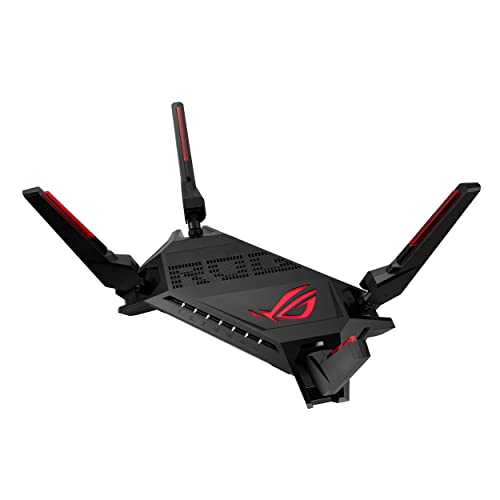
ASUS GT-AX6000 WiFi 6 Dual-Band Gaming Router

OkeMeeo Wall Mount for Google Nest WiFi Pro 6E
More Details On Our Top Picks
Road warriors and frequent flyers tend to hate hotel WiFi for good reason, and this little Pearl White travel router sidesteps the issue entirely. It accepts a SIM card and pulls in 4G LTE on multiple bands, then rebroadcasts that connection as your own private WiFi 6 (the current standard for faster, more reliable wireless) network for laptops, phones, and tablets.
You will need a data plan from your carrier, but once the SIM is inserted the setup feels closer to a phone than a router. It is a different lane from every other pick here: those are home replacements, while this one is for the road or a temporary sublet.
The Helpful Details
- SIM-slot design means you skip sketchy public WiFi in airports and cafés.
- WiFi 6 broadcast gives laptops and modern phones cleaner speeds than older travel units.
- Multi-band LTE support helps where signal strength is patchy.
- Pearl White finish looks tidy on a hotel desk or shared workspace.
Points To Keep In Mind
- Real-world throughput depends on your carrier’s signal in that exact zip code.
- You’ll need a separate data plan, which adds a monthly line item.
- Not built to replace a full home router for stationary households.
Who It Suits Best
Business travelers, digital nomads, and renters who bounce between places and want a personal network wherever they land.
Look Elsewhere When
The TP-Link Deco S7 is a better fit if your goal is steady whole-home coverage rather than a pocketable hotspot.
Not every networking problem is solved by buying new gear. Some are solved by getting the gear you already own off the floor, away from the dog, and out from behind the couch. This heavy-metal mount is built specifically for the AT&T BGW320-500 and BGW320-505 gateways, which a lot of fiber subscribers end up with.
It also cradles the original power brick, so the cable mess tightens up too. For households trying to make a corner of the living room look like a tidy little media zone rather than a service panel, this kind of accessory does real work.
Useful Highlights
- Custom fit for two specific BGW320 variants removes the wobble of universal brackets.
- Matching power brick holder keeps cables bundled and the outlet accessible.
- All hardware is included, so no extra trip to the hardware store.
- Heavy-metal build holds steady even with a curious pet or toddler nearby.
Things To Consider
- Only fits those two listed BGW320 models, nothing else.
- Does not improve signal strength, so the gateway still needs sensible placement.
- You’ll want a stud finder or solid anchor for drywall installation.
Key Specs
Made For
AT&T Fiber subscribers with a BGW320 gateway who want a cleaner, safer spot for their modem.
Reach For A Different Pick When
The OkeMeeo mount is the better pick if your router is a Google Nest WiFi Pro 6E rather than an AT&T gateway.
WiFi 7 is the newest wireless standard, and the BE9300 is the kind of router that lets you actually use it. Tri-band (it splits traffic across three radio frequencies instead of two) means one band is reserved for high-demand gear while the others handle everyday phones and tablets. The 2.5 Gigabit internet port is ready for multi-gig fiber plans, which are spreading fast in 2026.
Coverage is rated up to 2,500 square feet, and capacity sits at around 100 connected devices. For a busy household running 4K streams, gaming PCs, video calls, and a wall of smart-home gear, that is the kind of breathing room most older routers simply don’t have.
Useful Touches
- Tri-band design keeps gaming and 4K traffic on a less crowded lane.
- 2.5 Gig internet port future-proofs multi-gig fiber and cable plans.
- Designed for roughly 100 simultaneous devices, more than most homes need.
- VPN support adds a layer of privacy for work-from-home setups.
Worth Noting
- This is a router only, so a separate modem is required for most ISP setups.
- Full WiFi 7 throughput only kicks in with WiFi 7 client devices.
- Larger footprint than compact units like the RS90 below.
Right Fit For
Tech-forward households with multi-gig service, lots of smart-home gear, and active streamers or gamers.
Swap It Out When
The NETGEAR RS140 is the friendlier choice if you want WiFi 7 without paying for tri-band headroom.
When a single router cannot reach the back of the house, a mesh system fills the gap. The TP-Link Deco S7 is a mesh kit where two or more units talk to each other and hand devices off as you walk between rooms. Coverage from a single unit is around 2,100 square feet, and you can scale it by adding more Deco nodes later.
The Deco app keeps parental settings and device management straightforward. It is also compatible with voice assistants for basic network tasks. For multi-story homes or older properties with plaster walls, a mesh approach is often more effective than chasing a stronger single router.
What Earns Its Place
- Mesh nodes extend signal into spaces a single router cannot reach.
- Three Gigabit Ethernet ports on each unit give wired options for TVs and consoles.
- Parental controls live in the app, not buried in menus.
- Add-on units are simple to expand when you move or renovate.
Trade-Offs To Consider
- AC1900 is an older wireless standard than the WiFi 6 and 7 options above.
- Maximum throughput per device is lower than the Nighthawk BE9300.
- Each node needs its own power source and outlet nearby.
Quick Facts
Best Suited To
Multi-story family homes and anyone chasing steady signal in harder-to-reach rooms.
Skip It When
The NETGEAR BE9300 is the better fit for households that want newer WiFi 7 speeds in a single unit.
Built for gamers who care more about latency than aesthetics, the ROG Rapture GT-AX6000 EVA Edition pairs aggressive styling with serious networking hardware. Underneath the themed shell sits a 2.0 GHz quad-core processor, dual 2.5G WAN/LAN ports (the high-speed wired jacks that connect to your modem and other gear), and ASUS’s Triple-Level Game Acceleration feature.
Triple-Level Game Acceleration is a three-stage system that prioritizes game packets from your console all the way to the game server. WAN aggregation lets you combine two internet lines for redundancy or speed. Mobile Game Mode is a one-tap option in the app that drops latency for phone gaming sessions.
A Strong Showing
- Triple-Level Game Acceleration squeezes ping on competitive titles.
- Dual 2.5G ports give serious wired headroom for gaming PCs and NAS (network-attached storage) boxes.
- AiMesh (ASUS’s mesh extension system) lets you add compatible routers as nodes later.
- Lifetime internet security is included, so no subscription reminder nags.
A Few Limitations
- The EVA styling will not appeal to anyone with a minimalist living room.
- WiFi 6 rather than WiFi 7, so newer client devices won’t get the latest speeds.
- Full feature set is overkill for households that don’t game competitively.
Whose Shelf It Belongs On
Hardcore console and PC gamers, especially anyone with a multi-gig fiber line and an EVA color scheme.
Consider Something Else When
The ASUS GT-AX6000 below offers nearly identical networking without the themed shell, for shoppers who’d rather skip the styling tax.
The RS90 is the friendlier entry point into WiFi 7. Wireless speed tops out at around 3.6 Gbps, which is more than most apartment internet plans can feed anyway. Coverage is rated for about 2,000 square feet and roughly 50 connected devices, which covers most one or two-bedroom setups.
The 2.5 Gig internet port keeps you ready for faster tiers as ISPs raise speeds. For most people, this is the practical sweet spot: newer wireless, sensible coverage, without paying for tri-band headroom they won’t use.
Strong Points
- WiFi 7 wireless standard at a more approachable tier than the BE9300.
- 2.5 Gig port supports faster cable and fiber tiers.
- Capacity for about 50 simultaneous connections covers typical households.
- Setup is straightforward through the Nighthawk app.
Softer Spots
- Dual-band only, so heavy multitaskers may want the tri-band BE9300.
- No modem built in, so you still need your ISP’s hardware or a separate unit.
- Wall-mounting options are limited compared to mesh kits.
Perfect Match For
Apartment dwellers, small homes, and anyone upgrading from an aging WiFi 5 router for the first time.
A Better Fit Elsewhere
The TP-Link Deco S7 is the smarter move if your home has stubborn dead zones that one unit can’t reach.
The RS140 is the step-up sibling to the RS90 above, lifting wireless speed to about 5.0 Gbps and pushing capacity to around 80 devices. Coverage lands at roughly 2,250 square feet. For smart-home households running doorbells, cameras, thermostats, and a few TVs all at once, the higher device ceiling matters more than it sounds.
WiFi 7 across 2.4 GHz and 5 GHz bands handles a busy evening of streaming and gaming without the slowdowns that plagued older dual-band routers. The 2.5 Gig internet port keeps the door open for gig-plus service.
Where It Delivers
- Up to 80 connected devices, comfortable for most smart-home households.
- 5.0 Gbps wireless speed leaves room for future client devices.
- 2,250 sq. ft. coverage is enough for many mid-size homes.
- 2.5 Gig internet port supports multi-gig ISP tiers.
Honest Caveats
- Still router-only, so you pair it with a modem or ONT (the box your fiber provider installs).
- Dual-band only, so the BE9300 still wins on raw tri-band headroom.
- Higher device ceiling only matters if you actually have that many devices.
Who Will Love This
Smart-home-heavy households that need more device slots than a basic dual-band router offers.
Not Your Match When
The RS90 makes more sense if your connected device count stays under 40 and you don’t need the extra headroom.
Where the EVA Edition above trades on styling, the plain GT-AX6000 focuses purely on networking. You still get the same dual 2.5G WAN/LAN ports, WAN aggregation, and VPN Fusion (a feature that lets certain devices use a VPN while others stay on the regular connection), but inside a more neutral shell.
WiFi 6 dual-band tops out around 6000 Mbps with 160 MHz channels (wider lanes that move data faster). The hardware includes a beefy processor that handles many wired and wireless clients without breaking a sweat. In the box you get the router, an RJ-45 cable, the power adapter, and quick-start paperwork.
The Value In It
- Dual 2.5G ports for high-speed wired connections to a NAS or gaming PC.
- WAN aggregation can bond two connections for steadier throughput.
- 160 MHz channels push faster WiFi 6 throughput on supported devices.
- AiMesh support means you can extend coverage with compatible ASUS routers later.
Points To Note
- WiFi 6, not WiFi 7, so newer client devices won’t get the freshest speeds.
- Larger footprint than the Nighthawk RS-series above.
- App and web interface has a learning curve for first-time ASUS users.
Feature Snapshot
Built With In Mind
Home-office pros with a wired NAS (network-attached storage box) or gaming PC who want serious wired speed without the themed look.
Skip It When
The NETGEAR BE9300 is the better move for households that want WiFi 7 tri-band in a single unit.
The Google Nest WiFi Pro 6E looks clean sitting on a shelf, but a router up high usually performs better than one tucked behind a TV stand. This mount lets you hang the Nest on a wall or ceiling, getting the unit off the desk and into open air where its signal has less furniture and bodies to fight through.
It is custom fit for the Nest WiFi Pro 6E specifically, so the router sits flush rather than wobbling. The end result is a tidier surface and, in many homes, a sturdier signal.
What Helps Most
- Custom fit keeps the router flush against the mount.
- Lifts the unit above desk clutter for cleaner sight lines.
- Higher placement can help signal reach farther in some homes.
- Router not included, so you’re only paying for the mount itself.
Small Caveats
- Router is not included, so this is an add-on rather than a full solution.
- Only fits the Nest WiFi Pro 6E, not older Nest WiFi models.
- You’ll need a drill and anchors if you don’t already have studs in the right place.
Who Should Grab It
Nest WiFi Pro 6E owners who want their router off the counter and looking tidy.
Where Another Pick Suits Better
The CENYIDU mount is the better choice if your router is the AT&T BGW320 instead of a Nest unit.
Picking The Right Router For Your Home
Speed Tiers That Actually Matter
The biggest number on a router box is theoretical wireless speed, and it rarely translates one-to-one into what you feel in the apps. A 6 Gbps WiFi 6 router can feel smoother than a 3.6 Gbps WiFi 7 unit when client devices only support WiFi 6 anyway. Match the standard on both sides: a WiFi 7 router only shines if your laptop and phone also speak WiFi 7.
For most apartment dwellers, anything above 3 Gbps of wireless headroom is plenty. For larger homes with multi-gig fiber, the 2.5 Gig internet port is the real upgrade, since that is what feeds the whole system.
Coverage And Layout
Square footage numbers are a starting point, not a guarantee. Plaster walls, brick fireplaces, and metal appliances all cut signal. A single router in the center of a one-bedroom apartment rarely needs help. A three-story house with the router in the basement often does. Mesh kits like the TP-Link Deco S7 exist for exactly that second scenario.
Wired Ports And Modem Pairing
Most of these picks are router-only, meaning they still need a separate modem or ONT. Check your ISP’s setup before you upgrade. If you want the cleanest wired setup, dual 2.5G ports (as on the ASUS GT-AX6000 and ROG Rapture) give you a fast lane to a gaming rig or NAS without bottlenecks.
Security And Lifespan
Free lifetime security software is included on ASUS gaming routers, which removes a subscription reminder. Other brands lean on companion apps for parental controls and device management. Consider how often you’ll actually open the app, not just what it can do on paper.
Key Considerations Across These Picks
Wrong Turns To Avoid
Chasing the highest speed number usually costs more than it helps. A 9.3 Gbps router sounds great until you realize your plan caps at 1 gig and your phone tops at WiFi 6. The other common slip is buying a single router for a home that needs mesh, or buying mesh when one well-placed router would have done the job. Map your dead zones first, then pick the form factor that solves them.
When Paying More Pays Off
The jump from a budget dual-band router to a tri-band WiFi 7 unit is most worth it in households with lots of simultaneous users. Think two parents on video calls, kids on game consoles, and a small fleet of smart-home gear. The extra band keeps everything from queuing up on the same lane. For single-user apartments, the lower tiers are usually the smarter spend.
Frequently Asked Questions
Do I Need WiFi 7 Or Is WiFi 6 Enough?
WiFi 6 is enough for most households today, especially if your top internet speed is 1 gig or less. WiFi 7 pays off when you have multi-gig service and newer client devices that support the standard.
Is A Mesh System Better Than A Single Router?
Mesh wins in larger or multi-story homes where a single router cannot reach every room. A single powerful router is usually the better value for apartments and smaller homes.
Can I Use These Routers With Any ISP?
Most modern routers work with any ISP, but you still need the ISP’s modem (or equivalent gateway) unless your plan includes one. Some fiber ISPs use an ONT that connects directly to your router’s WAN port.
What Is A 2.5 Gigabit Port For?
A 2.5 Gig port accepts internet speeds above 1 gig, which most cable and fiber providers now offer. If your plan is 1 gig or less, a standard Gigabit port is enough.
Do I Need To Replace My Router Every Few Years?
Routers generally last four to six years before wireless standards shift enough to matter. Replace sooner if you are adding many smart-home devices or upgrading to faster internet tiers.
The Takeaway
A good router is the kind of upgrade you stop noticing the moment it is in, in the best possible way. Match the standard to your devices, the coverage to your home’s layout, and the wired ports to your gear. The picks above cover everything from travel hotspots to gaming beasts, and at least two of them will probably suit your situation.




