

Finding a camera that quietly watches your front door, your napping toddler, or that one room where the dog gets into everything can change how your home feels when you’re not in it. The right pick keeps an eye on what matters, sends alerts that actually mean something, and doesn’t demand a networking degree to install. Below are eight options spanning indoor plug-ins, bulb-style curiosities, and full pan-tilt units, each chosen for a specific kind of household.
The Lineup, Simplified

Ring Indoor Cam (2nd Gen) with Pet Tag

Ring Indoor Cam 1080p HD (White)
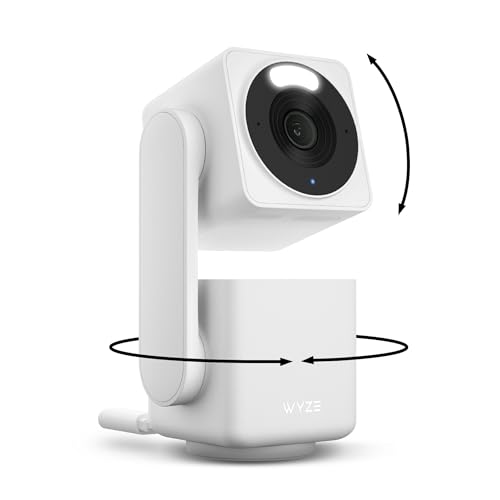
WYZE Cam Pan v4 4K PT Camera
Light Bulb Security Camera 2K 5G/2.4G
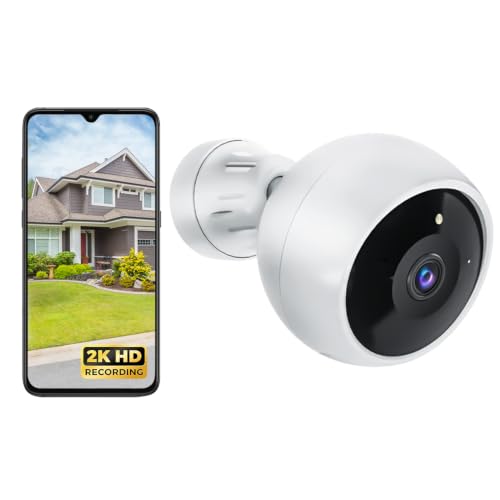
Jooedi 2K Battery WiFi Camera

REOLINK E1 4MP WiFi 6 Camera

REOLINK E1 Zoom 4K PT Camera

REOLINK E1 Pro 3K PT (Black)
Ring’s second-generation Indoor Cam arrives bundled here with a 10-foot power cable and a Ring Pet Tag, giving you extra reach for high shelves, ceilings, or awkward corners. The longer cord means no scramble for an outlet near the spot you actually want covered, which is a small thing until you try mounting a camera across the room from the nearest socket.
It records in 1080p HD with color night vision, and pairs with the Ring app for live view, motion alerts, and customizable activity zones. Compared to the standalone Indoor Cam below, this bundle adds flexibility in placement without forcing you to buy a longer cord separately. For most first-time indoor users, it’s the path of least resistance.
Where It Helps
- The 10-foot cable reaches ceilings and high shelves without an extension cord, a real win in older homes with sparse outlets.
- Color night vision produces usable footage in dim rooms where traditional infrared cameras leave you staring at gray blobs.
- Custom motion zones mean you stop getting pinged every time the cat walks past, an underrated quality-of-life upgrade.
- The included Pet Tag is a nice bonus for anyone tracking a roaming animal, though it’s only useful if you already use Ring’s ecosystem.
Things To Consider
- Full feature access depends on a Ring Protect subscription for cloud storage and richer notifications.
- The camera needs a constant power outlet, so placing it outdoors or in a hallway without a nearby plug takes planning.
Who It Suits Best
First-time indoor camera shoppers who want a long cable, simple app controls, and easy integration with other Ring devices already in the home.
Look Elsewhere When
You need pan-and-tilt coverage across a large room, in which case the WYZE Cam Pan v4 is a stronger fit.
The compact Indoor Cam fits almost anywhere, which matters more than people expect when you’re trying to keep an eye on a kitchen doorway or a side hallway. It streams 1080p HD with color night vision, so even low-light clips stay readable enough to tell a person from a shadow.
A manual privacy cover physically shuts off both the camera and microphone with a swivel, addressing one of the biggest hesitations renters have about indoor cameras. Where the bundled Ring above focuses on cable reach, this one keeps the footprint tiny for tighter spaces. If you’re in an apartment or short-term rental, the privacy cover alone can justify the choice.
What Stands Out
- The privacy cover delivers real peace of mind, since you can disable both mic and camera with one motion when guests arrive.
- Live View, motion alerts, and two-way talk all run through the same Ring app many shoppers already trust.
- The compact body fits on a bookshelf, kitchen counter, or windowsill without drawing attention.
Room For Improvement
- Advanced Pre-Roll video previews and longer clip history sit behind a paid subscription.
- No pan or tilt, so coverage is fixed to wherever you aim it at install time.
- Glossy white finish shows dust and fingerprints quickly in sunlit spots.
Made For
Apartment dwellers and renters who want a small, privacy-conscious camera for one room without drilling into walls.
A Better Fit Elsewhere
Anyone wanting whole-room movement on a budget should consider the WYZE Cam Pan v4, which sweeps across spaces automatically.
Where the Ring Indoor Cams above sit still, the WYZE Cam Pan v4 sweeps the entire room. With a 360-degree horizontal range and 180-degree vertical tilt, it can follow a toddler wandering from the playroom into the kitchen, or a dog who keeps hopping onto the couch when you’re out.
The IP65 rating pushes this camera outside the typical indoor-only category, so it handles a covered porch or garage entry too. Dual-band WiFi (2.4G and 5G) keeps streams smooth when your network is busy, and 8x digital zoom gives you a closer look at the front door without needing a separate camera. It’s the most flexible unit in the lineup for open floor plans.
The Value In It
- The pan-tilt mechanism replaces what would otherwise take two or three fixed cameras in a large room.
- Color night vision stays sharp enough to identify faces at typical living-room distances.
- IP65 weather rating makes this a genuine indoor-outdoor pick, useful for covered patios and mudrooms.
- Smart assistant compatibility lets you pull a live feed on an Alexa or Google display.
Worth Noting
- Digital zoom loses clarity fast past about 4x, and the motor is audible during quiet nighttime pans.
- Auto-tracking occasionally loses fast-moving pets in low light, based on widely reported behavior.
Best Suited To
Owners of large open-plan spaces who want one camera to cover a living room, playroom, or covered patio.
Consider Something Else When
Your priority is 4K detail from a fixed angle, in which case the REOLINK E1 Zoom is a sharper alternative.
This is the camera for anyone who dreads drilling holes or running cables. It screws into a standard E26/E27 socket, the same base as a regular bulb, so installation takes seconds and leaves no visible wires. For a porch fixture, garage entry, or basement stairwell, that simplicity is hard to beat.
It pairs 1000-lumen warm-white lighting with a 2K sensor, color night vision, two-way talk, and human motion detection. Unlike the stationary Ring models above, the bulb format tilts and aims to cover the area you point it at. Local microSD storage up to 256GB keeps footage on the device, and the optional cloud plan stays opt-in.
Useful Highlights
- No tools, no hubs, no electrician. Screw it in, connect to WiFi, and you’re monitoring within minutes.
- Dual-band 5G and 2.4G WiFi reduces dropouts in homes where one band is congested.
- Local SD storage means no forced monthly subscription just to review clips.
- The built-in lighting doubles as a deterrent, since most porch intruders avoid well-lit entries.
Trade Offs
- Power depends entirely on the socket staying on, so a switched fixture means you must leave the switch on.
- Bulb shape limits viewing angles compared to a wall-mounted pan-tilt like the WYZE Cam Pan v4.
The Right Fit
Renters and homeowners without outdoor outlets who need a low-effort camera at a porch, garage, or side door.
Reach For A Different Pick When
You need full panning coverage across a large room, where the WYZE Cam Pan v4 is the stronger choice.
Going battery-powered sounds minor until you’ve tried to mount a camera above a back door with no outlet nearby. The Jooedi runs on a rechargeable cell, so you can mount it almost anywhere indoors or out and bring it inside to charge when needed. It’s the freedom pick of the bunch.
It records in 2K with full-color night vision, AI motion detection, two-way talk, and a built-in siren for deterrence. SD and cloud storage options cover both casual and long-term clip keepers. Compared to the Ring Indoor Cam, the trade is no continuous power for genuinely wireless placement.
Practical Advantages
- Battery power means renters can install without touching the landlord’s wiring.
- Color night vision produces more recognizable footage than the gray-black IR look on older cameras.
- AI motion detection filters out branches and headlights more reliably than basic pixel-change alerts.
- The integrated siren offers a one-tap scare option for unexpected visitors.
Points To Keep In Mind
- Battery life depends heavily on how often motion triggers recording, so heavy-traffic spots need more frequent charging.
- WiFi-only connection won’t help if your router sits far from the mount point.
Whose Shelf It Belongs On
Renters and outdoor placements where running a power cable would mean drilling or hiring an installer.
Swap It Out When
You want a permanent indoor setup with constant power and pan-tilt coverage, in which case the WYZE Cam Pan v4 fits better.
REOLINK’s entry-level E1 quietly punches above its class with 4MP resolution and WiFi 6 support, which future-proofs your connection against an aging router. The 2K footage reads crisply on phone screens, and the camera fits into a nursery or home office without looking like surveillance equipment.
Built-in cry detection and two-way talk target parents and remote workers who need more than a passive feed. Compared to the Ring Indoor Cam above, this delivers higher pixel counts in a similar compact footprint. The plug-in design keeps setup simple.
Why It Works Well
- WiFi 6 support keeps streams stable on modern mesh networks where older 2.4G-only cameras stutter.
- Enhanced infrared night vision reaches a 30% sharper image than standard IR for clearer low-light detail.
- Cry alerts add value for new parents without needing a separate baby monitor.
Worth Bearing In Mind
- No RTSP or ONVIF support, which limits integration with third-party NVR systems.
- Plug-in only, so placement still depends on a nearby outlet.
Who Should Grab It
Nursery and home-office shoppers who want sharper footage than the Ring Indoor Cam delivers with baby-friendly extras.
Not Your Match When
You need pan-tilt or battery-powered placement, where the WYZE Cam Pan v4 or Jooedi camera makes more sense.
The E1 Zoom earns its name with a real optical zoom lens, which means you can punch in without losing clarity the way digital zoom does. Paired with 4K resolution, you can read a label across the room or identify a face at the far end of a hallway, useful for anyone monitoring a side entrance from a desk.
The professional-grade lens has an F1.6 aperture that pulls in more light for low-light scenes, so night footage holds up better than typical indoor units. Dual-band WiFi 6 keeps the heavy 4K stream from clogging your network. For shoppers who care about detail over coverage area, this is the sharpest option here.
What Makes Sense
- 3x optical zoom preserves image quality that digital zoom destroys, a real difference at distance.
- Auto-tracking follows people and pets through the room without manual intervention.
- F1.6 aperture delivers stronger low-light performance than typical indoor cameras.
Honest Caveats
- 4K streams demand more bandwidth, so older routers may struggle to keep up smoothly.
- Higher resolution clips fill SD cards faster than lower-res alternatives.
Perfect Match For
Detail-focused shoppers who want to read faces, license plates, or labels from across a large room.
Skip It When
You mostly want to watch pets at play in a smaller space, where the REOLINK E1 Pro is plenty.
The E1 Pro rounds out REOLINK’s indoor trio with a 3K sensor and dual-band WiFi for households who want sharp footage without paying the 4K premium. Pet parents often gravitate here because the pan-tilt base keeps a curious cat or dog in frame without manual nudging.
The F1.6 aperture keeps the dim corners of a living room readable at night, and the 2880×1616 resolution hits a nice middle ground between the Ring Indoor Cam and the pricier E1 Zoom above. Bluetooth pairing simplifies initial setup, so it’s friendly to anyone new to networked cameras.
What Works In Its Favor
- 3K resolution noticeably outperforms 1080p when reviewing clips on a tablet or laptop.
- Dual-band WiFi reduces congestion issues in busy households with many devices online.
- PT movement and zoom cover a whole room from a single shelf or counter spot.
Small Caveats
- Lower resolution than the E1 Zoom, so detail at distance trails behind that flagship.
- Glossy black finish attracts fingerprints and dust on flat surfaces.
Who Will Love This
Pet parents and growing families who want a flexible indoor camera with sharper-than-HD clarity at a sensible price.
Where Another Pick Suits Better
Shoppers who need long-range optical zoom should reach for the REOLINK E1 Zoom instead.
## What To Weigh Before Choosing Home Indoor Security Cameras ### Wired Vs. Cordless Setup Plug-in cameras like the Ring Indoor Cams and REOLINK E1 series deliver constant power but tie you to outlet locations. Battery and bulb-format picks such as the Jooedi and Light Bulb Camera free you from wiring but require periodic charging or a socket left switched on. Runners logging long distances, you mean busy parents, anyone chasing a flexible placement should weigh this first. ### Coverage Shape And Field Of View Fixed-angle cameras cover a slice of a room, while pan-tilt units like the WYZE Cam Pan v4 sweep across a full 360-degree arc. Optical zoom (the E1 Zoom) magnifies without losing detail, unlike digital zoom which simply enlarges pixels. The right match depends on whether your room is wide and shallow or long and narrow. ### Storage And Subscription Reality Many cameras offer both local SD storage and optional cloud subscriptions. Local storage avoids monthly fees but caps clip history to card size. Cloud plans usually extend retention and add smart previews, yet they tie ongoing cost to the camera. Reading the fine print before checkout prevents surprises after install. ### Smart Home Compatibility WiFi 6 and dual-band support help on crowded networks, and smart assistant compatibility (Alexa, Google) matters if you plan to pull a feed to a display. Older routers may bottleneck a 4K stream, so checking your network before buying a high-resolution unit saves frustration later. ## Key Considerations Across These Picks ### Pitfalls Shoppers Hit A common slip is choosing a 4K camera without confirming the router can handle the stream, leading to stuttering live feeds. Another is ignoring outlet placement, which forces ugly extension cords across doorways. Buying a camera with mandatory cloud storage without budgeting for the subscription also derails long-term plans. ### Where The Extra Money Goes Stepping up to optical zoom, WiFi 6, or pan-tilt motors adds real capability, not just marketing gloss. A 4K sensor captures usable footage from further away, and a wider aperture keeps dim rooms readable at night. For households watching wide spaces or needing identifiable detail, the upgrade typically pays off within weeks of use. ## Frequently Asked Questions ### Do indoor cameras work without a subscription? Many of the cameras in this roundup record to a local microSD card without any monthly fee, though cloud storage and longer clip history usually sit behind a subscription. Check each listing’s storage options before deciding. ### Can indoor cameras be used outside? Several picks here, including the WYZE Cam Pan v4 and the Jooedi battery camera, carry weather ratings for covered outdoor use. Standard Ring Indoor Cams and REOLINK E1 models are designed for indoor environments only. ### How much bandwidth does a security camera use? A 1080p stream typically uses a few Mbps, while 4K streams can demand 10 Mbps or more when viewed live. Dual-band routers and WiFi 6 help distribute that load across your network. ### Are pan-tilt cameras noisy? Most pan-tilt motors produce a faint hum during movement, which can be noticeable in quiet bedrooms at night. Mounting them away from sleeping areas reduces the disturbance. ### How long do battery-powered cameras last? Battery life varies widely based on motion frequency, recording length, and temperature. In typical use, expect several weeks between charges, though high-traffic spots may need more frequent top-ups. ## Closing Remarks The right indoor camera depends less on raw specs and more on your room shape, your network, and how much fiddling you want to do. Compact plug-ins like the Ring Indoor Cam fit renters and small spaces, while pan-tilt units such as the WYZE Cam Pan v4 cover wide living areas. For sharper detail, the REOLINK E1 Zoom and E1 Pro deliver without overwhelming complexity. Pick the model that matches your space, set it up thoughtfully, and you’ll spend less time fussing with alerts and more time actually using the footage.



