

A good home office desk shapes how your day actually flows, from the first coffee to the last video call. The right surface holds your gear without crowding your elbows, fits the nook you have, and keeps your back from staging a protest by Wednesday. This roundup pulls together ten desks that earn their keep in real homes, from tiny studio apartments to dedicated corner workspaces, so you can match the table to the room and the routine you already live.
A Quick View Of The Lineup

Vari Classic Electric Standing Desk 72×30
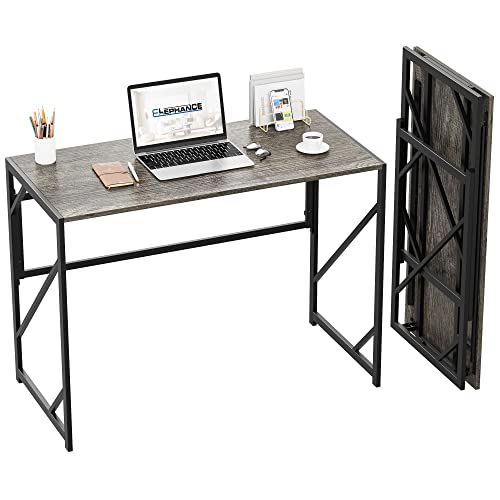
Elephance Folding Desk No-Assembly

SHW 55×60 L-Shape Corner Desk Cherry

SIAGO Standing Desk 60×28 Double Frame
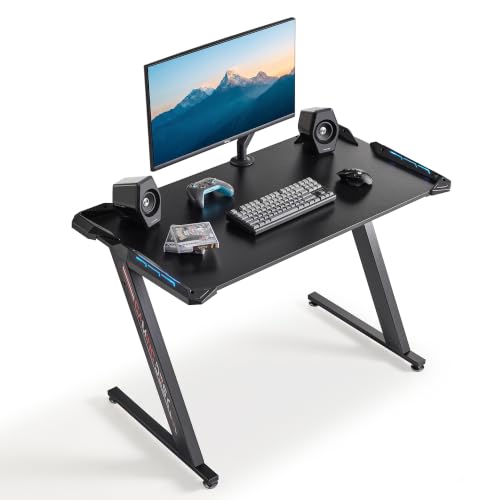
EUREKA ERGONOMIC 44 Inch Gaming Desk

FATORRI L-Shaped Industrial Desk 59 Inch
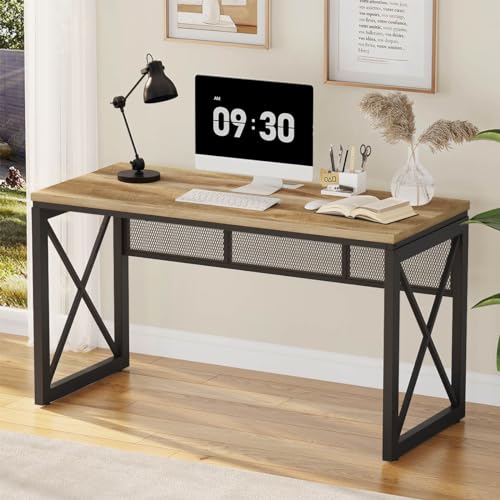
BON AUGURE 54 Inch Farmhouse Desk Vintage Oak

SHW 55-Inch Commercial-Grade Desk Cherry
SHW 48-Inch Commercial-Grade Desk Maple

Aquzee Computer Desk with Hutch 47 Inch
The Picks, Examined More Closely
The 72-inch walnut top turns a corner of your living room into a command center without looking like office furniture parachuted into the house. Where the Elephance folds away for a renter on the move, this one stays put and earns its footprint with room for two wide monitors, a laptop dock, and still some breathing space for a notebook and coffee.
Setup stays quick thanks to a pre-installed frame and slide-and-lock legs, so a single afternoon is usually enough to go from box to first sit-stand session. Programmable height memory lets you jump between writing posture and standing posture without fumbling with trial-and-error adjustments. If you split your day between deep focus and video calls, the generous width absorbs the gear so your keyboard doesn’t fight your second screen for elbow room.
Notable Gains
- The 72×30 walnut surface accommodates dual 27-inch monitors side by side without crowding
- Slide-and-lock legs and a pre-installed frame trim assembly time dramatically
- Programmable height presets speed up sit-stand transitions throughout the day
- Thick one-piece top resists flex even when you lean on it during long calls
Things To Consider
- The 72-inch footprint demands a real wall, not a nook behind a door
- Walnut top shows fingerprints and coffee rings, so a weekly wipe-down keeps it looking sharp
- Heavier than folding options, so rearranging rooms more than once a year gets old fast
Key Specs
Right Fit For
Remote professionals running dual monitors who want sit-stand flexibility and have a dedicated wall to anchor the 72-inch span.
Swap It Out When
Studio dwellers should look at the Elephance Folding Desk, which disappears against a wall when the workday ends.
It arrives ready to use, which sounds like marketing until you actually pull it out of the box and unfold it against a wall. For renters, students, and anyone whose living space doubles as a guest room, this 40-inch folding surface skips the Allen-key marathon entirely.
The P2 particle board top rides on an I-shaped steel frame, so it carries a laptop, monitor, and paperwork without the wobble common to bargain folding tables. When the day ends, it folds flat and leans behind a couch or into a closet. If your “office” is a corner of the dining table that needs to clear by dinner, this solves the daily choreography problem more than any fixed desk can.
Everyday Perks
- No assembly required, so first use happens minutes after unboxing
- Folds flat for storage against a wall or inside a closet
- Lightweight enough to move between rooms without recruiting a helper
Worth Noting
- 40-inch width fits a laptop comfortably but crowds a second monitor
- Particle board top needs coasters, since water rings tend to linger on the finish
- Not height adjustable, so ergonomic positioning depends on chair choice
Who Should Grab It
Studio renters and students who need a real work surface that disappears when guests arrive or the lease ends.
Consider Something Else When
Multi-monitor professionals should step up to the Vari Classic Electric Standing Desk for the breathing room and the sit-stand travel.
An L-shape uses the corner of a room the way a rectangle never can, and the 55×60 cherry surface here splits neatly between active screens and reference paperwork. Unlike the Vari’s single slab, this design creates a built-in wing for a printer, a notebook tray, or that pile of folders you keep meaning to file.
The powder-coated steel frame underneath shrugs off years of daily use, and adjustable leveling glides keep the work surface steady on older floors that aren’t perfectly flat. You trade sit-stand travel for raw footprint, so think of this as the desk you plant behind a dedicated door and live with for a decade.
Advantages To Know
- L-shape layout uses corner space that a rectangular desk leaves dead
- Steel frame supports heavier monitor arms and docked laptops over the long haul
- Leveling glides correct for uneven floors in older homes and rental units
Room For Improvement
- L-shape demands a real corner, so placement options narrow after delivery
- Fixed height rules out standing sessions without a separate converter
- Larger footprint than the Elephance, so small rooms feel smaller once it lands
Best Suited To
Work-from-home professionals who run multiple monitors, handle paperwork, and have a dedicated corner to anchor a permanent setup.
Reach For A Different Pick When
Anyone wanting sit-stand flexibility should pivot to the SIAGO Standing Desk, which delivers adjustable height without sacrificing load capacity.
The headline number here is the 1-inch tabletop, which sounds like marketing fluff until you put a 34-inch ultrawide on it and notice the surface doesn’t bounce when you type. Compare that to lighter sit-stand desks where the whole top shimmies during a fast keystroke, and the difference shows up in your first hour.
A reinforced double-beam frame supports up to 220 pounds, so dual monitors, a laptop dock, and a swing-arm mount all ride without complaint. For anyone whose home office is also a streaming or recording rig, that stability matters more than a few extra inches of width.
Features That Help
- 1-inch thick top keeps the surface steady during heavy typing and monitor adjustments
- 220-pound lift capacity absorbs multi-monitor rigs with swing arms
- Double-beam steel frame resists the sway common to lighter sit-stand desks
Honest Caveats
- Standing desks in general invite cable management attention, since the moving base exposes slack
- Heavier construction makes relocation harder than the Elephance folding approach
Quick Facts
Made For
Creators and remote engineers running heavy monitor setups who want sit-stand travel and a surface that won’t wobble during fast keystrokes.
Where Another Pick Suits Better
Renters prioritizing portability should consider the Elephance Folding Desk, which collapses and moves without disassembly.
The 44-inch footprint lands in the sweet spot for a bedroom or a converted dorm nook where a full Vari would overwhelm the room. It accepts monitors up to 40 inches, which is more headroom than most people ever plug into at home. RGB lighting along the edges gives the setup a gaming personality without shouting about it.
A triangular support brace and Z-shaped metal frame keep the surface planted during late-night sessions, and leveling feet adjust for floors that aren’t perfectly even. If your home office moonlights as a stream setup, this desk accepts that role without needing a separate station.
Real Benefits
- Compact 44-inch depth fits bedrooms and dorm corners where a Vari would dominate
- Supports monitors up to 40 inches, plenty of room for an ultrawide or paired displays
- Triangular brace and Z-frame keep the surface steady during keyboard-heavy sessions
Points To Keep In Mind
- RGB lighting requires a power outlet nearby, which influences placement
- Gaming aesthetic may clash with a minimalist living room setup
- Smaller depth than the SIAGO, so ultrawide owners lose a bit of elbow room
Perfect Match For
Gamers and bedroom-based creators who want a compact surface that doubles as a streaming station without dominating the room.
Look Elsewhere When
Shared living spaces with a more neutral aesthetic are a better match for the BON AUGURE Farmhouse Desk, which leans into wood warmth.
Two adjustable shelves ride along the corner of this L-shape, so the desk pulls double duty as a workstation and a low bookcase. Where the SHW L-Shape leaves shelving to a separate piece of furniture, FATORRI bakes the storage in and lets you decide which side it lands on.
The reversible configuration matters more than it sounds, since the wall your room offers may favor a left- or right-facing setup. The 59-inch top swallows three monitors when the workflow calls for it, but also handles a single-screen writing session without feeling like overkill.
Strong Points
- Reversible shelves adapt to either corner orientation
- Built-in shelving removes the need for a separate bookcase
- Wide top supports triple-monitor gaming or trading workflows
Less Ideal Details
- Industrial metal legs may feel cold in a soft, residential room
- Larger footprint than the EUREKA, so smaller rooms feel crowded
- Particle board shelves can bow slightly when loaded with hardcover books
Feature Card
Who It Suits Best
Gamers and remote workers who want a single piece to replace a desk-plus-bookcase combo and value configurable corner placement.
Where A Sibling Pick Shines
A minimalist setup without the industrial look should consider the BON AUGURE Farmhouse Desk, which trades metal legs for warmer rustic styling.
Rustic oak paired with a metal frame gives this one the kind of presence a flat-pack rectangle rarely manages. The 54-inch top handles a monitor, laptop, and a stack of working folders without feeling packed, and the farmhouse finish blends into living rooms that don’t want to look like a corporate outpost.
The wider span also gives the desk crossover appeal as a writing table when the workday ends, which matters in homes where the office is the dining room by night. It’s the rare workhorse that earns its footprint in style as well as function.
What Works In Its Favor
- Vintage oak finish blends into residential rooms that resist office aesthetics
- 54-inch width handles daily monitor-plus-laptop workflows with room for a notebook
- Metal frame adds structural support without looking industrial-cold
Trade-Offs To Consider
- Wood finish shows water rings, so coasters become a daily habit
- Heavier than folding options, so rearranging rooms takes planning
Best Suited To
Style-conscious professionals who want a desk that looks like furniture and fits into living spaces without an office makeover.
Skip It When
Heavier multi-monitor gaming rigs need the FATORRI L-Shaped Industrial Desk, which adds shelving and corner footprint.
Sometimes the right answer is a clean rectangle that doesn’t try to be clever. The 55-inch cherry surface here handles a single monitor and a laptop side by side, with room left for a writing pad or a coffee mug without elbow cramping.
Where the SHW L-shape uses a corner, this one stretches along a wall, which suits rooms where the longest uninterrupted span is straight rather than angled. The powder-coated steel frame carries the same commercial feel as its corner sibling, so durability stays consistent across the line.
Standout Benefits
- Straight 55-inch layout fits along walls where an L-shape won’t sit
- Steel frame handles daily loads from docked laptops and monitors
- Commercial-grade build targets long working hours without flex
Small Caveats
- No built-in storage, so a separate hutch or drawer unit rounds out the setup
- Cherry finish shows dust under direct light, so weekly wiping helps
Feature Snapshot
Built With In Mind
Traditional office-style setups that need a durable wall-hugging rectangle for daily workhorses like spreadsheets and video calls.
Not Your Match When
Anyone wanting built-in shelving should move to the FATORRI L-Shaped Industrial Desk instead, since the SHW offers no on-desk storage.
The 48-inch maple top is the trim-and-practical choice for a room that can’t stretch to 55 inches of wall. It handles a single monitor and a laptop, which covers most writing-heavy workflows without pretending to be a control room.
Same steel frame and leveling glides as the bigger SHW siblings, so the build quality stays consistent across the line. If you’ve outgrown a folding table but still need a compact footprint, this lands in a useful middle ground.
Where It Helps
- 48-inch width fits shorter walls and small rooms where longer desks overwhelm
- Steel frame carries the same commercial durability as the larger SHW siblings
- Leveling glides adjust for older floors and rental-unit imperfections
A Few Limitations
- Smaller top crowds a second monitor, so dual-screen setups need an upgrade path
- No integrated storage, so accessories require a separate rolling cart
Whose Shelf It Belongs On
Compact-office workers handling one-monitor workflows who want commercial-grade durability in a tighter footprint.
A Better Fit Elsewhere
Multi-monitor professionals need the Vari Classic Electric Standing Desk or the SHW L-Shape for proper breathing room.
Three shelves and an open hutch put reference books, a printer, and the daily clutter right above the work surface instead of across the room. For paper-heavy workflows or anyone who wants their desk to organize itself, this is the most self-contained option in the roundup.
The 47-inch width works in a guest room or a converted closet where wall space is real but limited. Compare it to the SHW 48-inch rectangle, which offers similar width without overhead storage. If your routine leans on printed documents, the on-desk shelving earns its footprint faster than a separate bookcase ever will.
A Few Highlights
- Built-in hutch keeps reference materials within arm’s reach
- Three shelves replace a separate bookcase for paper-heavy workflows
- 47-inch width fits smaller rooms where a 55-inch desk overwhelms
Practical Considerations
- Open hutch shelves collect dust, so occasional wiping keeps the setup tidy
- Hutch height limits monitor placement, since larger screens may not fit underneath
Feature Rundown
The Right Fit
Paper-heavy professionals and students who want their reference materials integrated with the work surface instead of spread across the room.
Where Another Pick Suits Better
Minimalist setups without paper storage needs are a better match for the SHW 48-Inch Commercial-Grade Desk, which keeps the silhouette cleaner.
What To Weigh Before Choosing Your Home Office Desk
Start with the room, not the desk. Measure the wall or corner you plan to use, then add six inches of clearance on every side for chair movement and cable routing. A 72-inch Vari sounds generous until it bumps a doorframe on delivery day.
Match the surface to your gear count. One monitor and a laptop fit on a 47-inch Aquzee without strain. Two 27-inch monitors need at least 55 inches of width, and three screens or an ultrawide push you toward 60 inches or more. Lifting capacity matters too: heavy monitor arms and docks add up faster than people expect, so the SIAGO’s 220-pound rating covers setups the SHW rectangles technically accept but feel marginal under.
Decide between sit-stand and fixed height before you fall in love with a look. Sit-stand travel, like on the Vari or SIAGO, helps anyone with back tension or restless legs during long calls. Fixed-height desks cost less and tend to feel sturdier, which matters more if your workflow is keyboard-heavy and your chair already does the ergonomic work.
Consider storage separately from the desk itself. The Aquzee bakes shelves into the hutch, the FATORRI adds corner shelves, and the rest rely on you to bring a separate bookcase or drawer unit. Mixing those approaches mid-setup usually leaves you with a desk that fights its own storage.
Key Considerations Across These Picks
Common Shopping Slip Ups
The most common regret is buying a desk that’s too small. Measure your monitor’s width plus your laptop’s width, then double it for breathing room, and you’ll land closer to the right size than starting from the listed dimensions. Skipping this step is how a 48-inch desk ends up crowded by a single ultrawide monitor.
Another trap is ignoring floor level. Homes with old hardwood, basements, or uneven rental-unit floors need leveling glides, which the SHW line includes but some lighter folding options skip. Without them, monitors drift toward one edge over time, and your keyboard tray becomes a slide.
Where The Extra Money Goes
Spending up usually buys three things: thicker tops, heavier frames, and integrated storage. A 1-inch tabletop like the SIAGO’s keeps the surface planted during fast typing, where thinner tops shimmy. Steel frames last longer than particle-only construction when the desk moves with you or handles heavy gear daily. Built-in shelving, like on the Aquzee or FATORRI, replaces a separate piece of furniture and saves the footprint you’d lose to a freestanding bookcase.
The honest read: if your workflow is light and your room is small, those upgrades don’t earn their cost. If your gear is heavy and your days run long, they pay back faster than you’d think.
Frequently Asked Questions
How do I know what size desk my home office needs?
Add up the width of every screen you plan to use, plus the keyboard and mouse footprint, then leave at least ten inches of clearance on each side. Most single-monitor setups fit comfortably on 47 to 55 inches, while dual-monitor or ultrawide workflows need 60 inches or more.
What is the difference between a fixed desk and a standing desk?
A fixed desk stays at one height, which keeps the build simpler and usually sturdier. A standing desk moves electronically between sitting and standing heights, which helps with back comfort and restless energy during long calls, but costs more and adds weight.
Are L-shaped desks better than rectangular desks?
L-shaped desks use corner space efficiently and create a built-in wing for a printer or paperwork, but they need a real corner to anchor them. Rectangular desks fit along any wall and usually feel roomier in tight spaces, though they sacrifice the dedicated secondary surface.
Do I need a desk with a metal frame?
A metal frame resists flex over years of daily use and supports heavier monitor arms more reliably than particle-only construction. For light laptop workflows, the difference shows up later, but for anyone running multiple monitors or dock-heavy setups, the steel frame earns its weight quickly.
How much should I spend on a home office desk?
Most solid home office desks for daily work fall into a wide range, and the right spend depends on how many hours per day you use the surface and how much gear sits on it. Lighter folding desks handle occasional use, while heavy commercial-grade or sit-stand options justify higher costs for full-time setups.
The Takeaway
The best desk for your home office is the one that fits the room you have and the gear you actually use. Measure your space first, count your screens honestly, and let the workflow decide between folding, sit-stand, corner, or fixed-height. Any of these ten will serve you well, provided the room is the one calling the shots.




