

Choosing a router shapes everything downstream: how reliably video calls hold, how fast a backup finishes at 2 a.m., how cleanly a small office segments guest traffic. This list walks through nine Cisco Routers worth your attention, mixing refurbished enterprise Integrated Services Routers (ISRs), a Meraki cloud-managed teleworker gateway, a small-office analog telephone adapter, and a few TP-Link Wi-Fi 7 alternatives for spaces where a consumer unit makes more sense. Each pick is matched to a specific user profile, so the shortlist should save you some guesswork.
The Essentials At A Glance
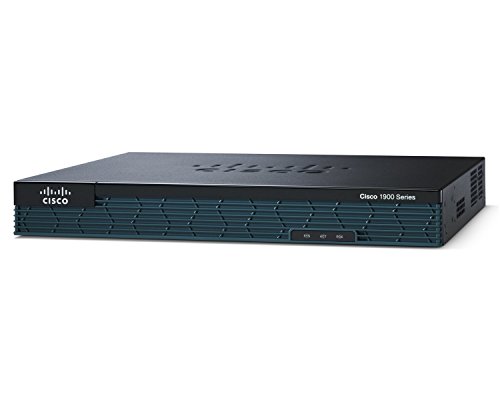
Cisco CISCO1921-SEC/K9 2-Port Integrated Services Router (Renewed)

Cisco CISCO2821 Integrated Services Router

Cisco CISCO2911/K9 2900 Series Integrated Services Router (Renewed)

Cisco CISCO1921/k9 Series Integrated Services Router (Renewed)
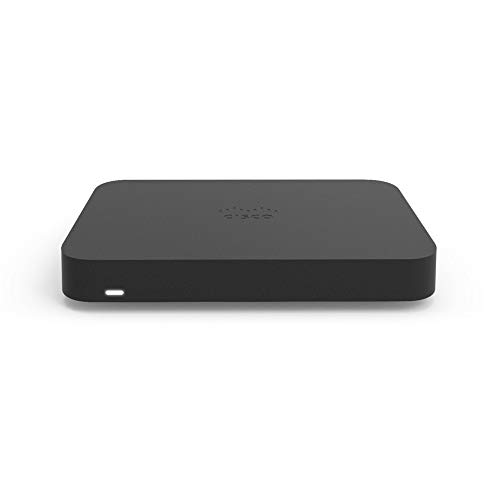
Meraki Cisco Z3 Teleworker Gateway Bundle (3-Year License)

TP-Link Archer BE230 Dual-Band BE3600 Wi-Fi 7 Router

TP-Link BE400 Dual-Band BE6500 Wi-Fi 7 Router

TP-Link Archer BE550 Tri-Band BE9300 Wi-Fi 7 Router

Cisco SPA122 Small Business ATA with Router (Renewed)
What Each Pick Brings To The Table
The 1921-SEC/K9 sits in a comfortable middle ground for a small branch that needs real VPN without paying ISR-4000 prices. The SEC bundle ships with hardware crypto acceleration, so IPsec tunnels stop crushing the CPU the moment you turn on a few site-to-site links. Two Gigabit Ethernet ports are the headline; you do not get a huge switching fabric, but for a single WAN plus LAN, that is enough.
Most small offices with five to fifteen users land here. The refurbished angle keeps the cost approachable, and the IOS image supports the firewall and routing features a typical branch needs out of the box.
Strong Points
- SEC license unlocks hardware-accelerated VPN, which matters once you have more than a couple of tunnels running.
- Modular EHWIC slot accepts a cellular card or extra switch ports when the office grows.
- Two Gigabit Ethernet ports cover a single WAN and LAN without needing an extra switch for very small teams.
- Refurbished pricing brings enterprise-class routing into a small-business budget.
Honest Caveats
- Only two onboard Ethernet ports means you will add a small switch for anything beyond a few wired devices.
- Refurbished units can show minor cosmetic wear, and replacement fans are not always easy to source years down the line.
Right Fit For
Network admins running a single small branch with site-to-site VPN and a need for hardware crypto acceleration.
Reach For A Different Pick When
You need true voice services and more module slots, where the Cisco CISCO2911/K9 2900 Series Integrated Services Router (Renewed) offers a step up.
The 2821 is one of those workhorse ISRs that keeps showing up in mid-sized enterprise wiring closets a decade after release. It is a 2U-class chassis with the muscle to run concurrent services: routing, firewall, VPN, and voice, all without breaking a sweat under moderate load. The four HWIC slots and AIM slot let you bolt on T1/E1 cards, extra switch modules, or crypto accelerators as the site grows.
You are buying a mature platform with a deep community and lots of spare modules floating around. For a regional office that needs flexibility more than raw throughput, the 2821 still earns its place.
Why It Works Well
- Four HWIC slots plus an AIM bay handle voice, T1/E1, and crypto upgrades without swapping the chassis.
- Mature IOS ecosystem, which means documentation, sample configs, and peer advice are easy to find.
- Services-friendly CPU runs firewall, VPN, and QoS features concurrently for a regional site.
- Refurb and used inventory is plentiful, so spare parts tend to be accessible.
Worth Bearing In Mind
- Power draw is higher than newer ISR 4000-series models, which shows up in long-term operating cost.
- Newer IP SLA and advanced SD-WAN features are not available on this older generation of IOS.
The Right Fit
Mid-sized enterprise sites that need a flexible, modular ISR and have Cisco-trained staff on hand.
Look Elsewhere When
Your branch is small and you only need two ports, where the Cisco CISCO1921-SEC/K9 2-Port Integrated Services Router (Renewed) is a leaner fit.
The 2911 is the natural step up from the 1921 if your branch has outgrown two Ethernet ports. You get three Gigabit Ethernet interfaces, three EHWIC slots, and a 2900-series CPU that handles voice and video services without dropping calls under load. Compared with the 2821 above, the 2911 is a more power-efficient 2900-series design that still feels modern for most branch scenarios.
It is the right call for converged voice and data, where T1/E1 cards, DSP modules, and crypto acceleration all need a home at the same time.
Everyday Wins
- Three onboard Gigabit Ethernet ports simplify a DMZ plus LAN plus WAN layout without an extra switch.
- Three EHWIC slots and two service-module slots cover voice, switching, and cellular expansion.
- 2900-series services performance handles concurrent voice, video, and data for busy branches.
- Refurbished pricing makes a 2900-series build far more approachable than a new ISR 4000.
Trade-Offs To Consider
- Refurbished stock means licensing can vary; confirm the IOS feature set and SEC license before you commit.
- Fan noise is noticeable, so a wiring closet or back room is the better home.
Best Suited To
Branches running converged voice and data with growth room for additional modules.
Swap It Out When
You only need a basic two-port setup and want to save money, where the Cisco CISCO1921-SEC/K9 2-Port Integrated Services Router (Renewed) is enough.
This is the SEC-stripped sibling of the pick at number one, the same 1921 chassis without the security license preload. That is the trade: lower entry cost, and you add VPN, firewall, and intrusion prevention features through a separate license purchase if you need them. For a home lab or a small site that only needs basic routing and NAT, the 1921/k9 is the cheap door into real Cisco IOS.
It is also a great platform for CCNA and CCNP study, since you get the real command-line experience without the SEC license noise.
Positive Takeaways
- Refurbished pricing is hard to beat for a genuine Cisco ISR learning platform.
- Two Gigabit Ethernet ports and one EHWIC slot cover typical home lab or micro-office needs.
- Same IOS image family as the SEC version, so adding a license later is a software step, not a hardware swap.
Points To Keep In Mind
- Without the SEC license, hardware crypto and advanced firewall features stay locked behind an extra purchase.
- Refurb units vary in cosmetic condition, so ask about rack-mount ears and power supplies if you need them.
Who Should Grab It
Home lab builders, students, and very small offices that just need solid routing on a tight budget.
Not Your Match When
You need VPN and firewall on day one without a separate license, where the Cisco CISCO1921-SEC/K9 2-Port Integrated Services Router (Renewed) is the smarter start.
The Meraki Z3 is a different animal from the ISRs above. It is a small desktop gateway built to give remote employees a secure, managed tunnel back to corporate, all configured from the Meraki cloud dashboard. Five Gigabit Ethernet ports handle wired gear, integrated wireless covers laptops and phones, and Auto VPN builds the encrypted path to headquarters without a long config file on the user’s end.
IT teams running a Meraki-managed campus or branch network will recognize the dashboard immediately. The three-year license bundles the device and cloud entitlement in one box, which simplifies procurement.
A Strong Showing
- Auto VPN reduces tunnel setup to a few clicks in the Meraki dashboard, no CLI wrestling required.
- Integrated wireless covers a home office or small remote site without a separate access point.
- Cloud management gives IT full visibility into remote sites from the same dashboard as the main office.
- Enterprise-class firewall and traffic shaping protect the corporate session without end-user fiddling.
Some Limits To Know
- The unit only does its job inside a Meraki-licensed ecosystem, so it is the wrong choice if you run a mixed-vendor network.
- Throughput is sized for a single home user, not a small office full of concurrent video calls.
Perfect Match For
Work-from-home executives and remote staff on a Meraki-managed corporate network.
Skip It When
You want a self-contained home router with no cloud dependency, where the TP-Link Archer BE550 Tri-Band BE9300 Wi-Fi 7 Router is a cleaner consumer fit.
Stepping out of the Cisco lineup for a moment: the Archer BE230 is the entry point into TP-Link’s Wi-Fi 7 family, and it is a smart pick for a smaller apartment where full enterprise routing is overkill. Dual-band radios cover 2.4 GHz and 5 GHz, and the BE3600 class delivers multi-gigabit wireless without the price tag of a tri-band flagship. The body stays compact enough to tuck behind a TV or on a bookshelf.
This is the sort of router that suits a couple or a single remote worker who streams 4K and runs video calls but does not need a six-antenna gaming rig.
Well-Handled Touches
- Wi-Fi 7 with Multi-Link Operation keeps latency stable when multiple devices stream or call at once.
- Compact footprint fits on a shelf or side table without dominating the room.
- TP-Link’s Tether app makes first-time setup and guest networks painless for non-technical users.
A Few Limitations
- Dual-band radios mean the 6 GHz band is not on the menu, so future Wi-Fi 7-only clients will sit on 5 GHz.
- Throughput is sized for an apartment, not a multi-story home with thick walls.
The Right Fit
Apartments and small homes that want modern Wi-Fi 7 without a flagship price.
Look Elsewhere When
You need the 6 GHz band for newer devices and want tri-band headroom, where the TP-Link Archer BE550 Tri-Band BE9300 Wi-Fi 7 Router is the step up.
The BE400 sits one rung above the Archer BE230 and aims squarely at busy family homes. Six streams across the dual bands push the total bandwidth up to the BE6500 class, which translates to smoother 4K streaming in the living room while someone else is on a video call in the home office. Multi-Link Operation and Multi-RUs handle the Wi-Fi 7 efficiency features that make a real difference when many devices are connected at once.
For a household with smart TVs, gaming consoles, and a stack of phones, this is a comfortable middle ground before jumping to tri-band.
Points In Its Favor
- Six-stream dual-band radio handles a full household of phones, TVs, and laptops without queueing everything.
- Multi-RU support keeps throughput high even when neighboring Wi-Fi networks are crowded.
- Setup and parental controls live in TP-Link’s Tether app, which is friendly for non-technical households.
Room For Improvement
- Still dual-band, so newer 6 GHz-only clients fall back to 5 GHz in this model.
- Mesh expansion requires TP-Link OneMesh or EasyMesh compatible nodes, not just any extender.
Whose Shelf It Belongs On
Family homes with lots of connected devices that do not need the 6 GHz band today but want Wi-Fi 7 headroom.
A Better Fit Elsewhere
You want 6 GHz for the newest phones and laptops, where the TP-Link Archer BE550 Tri-Band BE9300 Wi-Fi 7 Router is the right call.
The Archer BE550 is the one most power users should be looking at. Tri-band radios unlock the 6 GHz band, and 320 MHz channels paired with 4K-QAM push real-world throughput into multi-gig territory. Gamers chasing low ping, creators moving multi-gigabyte project files over the network, and households full of Wi-Fi 7 phones will all benefit from the extra headroom that 6 GHz brings.
It costs more than the BE230 and BE400 above, and you feel that in build quality and the broader feature set, but it remains well under enterprise pricing.
Benefits That Matter
- 6 GHz band and 320 MHz channels deliver the speeds that Wi-Fi 7 was built for, especially on newer flagship phones and laptops.
- Tri-band layout keeps latency predictable when the network is busy with multiple streams and downloads.
- EasyMesh support lets you expand coverage with compatible TP-Link nodes when the home grows.
What To Weigh
- 6 GHz range is shorter than 5 GHz, so coverage in larger or older homes may need a mesh node.
- Premium pricing means older Wi-Fi 5 and Wi-Fi 6 clients will not see the full speed benefit.
Made For
Gamers, creators, and households with newer Wi-Fi 7 devices that want full tri-band headroom.
Where Another Pick Suits Better
Your network is mostly older Wi-Fi 6 gear, where the TP-Link Archer BE230 Dual-Band BE3600 Wi-Fi 7 Router saves real money.
The SPA122 is not really a router in the same sense as the ISRs above. It is an analog telephone adapter, often called an ATA, that pairs a basic router with two FXS ports. Plug in a couple of analog phones or a fax machine, point it at a SIP provider, and you have VoIP without buying IP phones. The onboard router handles a single LAN while voice traffic stays segmented from the rest of the network.
It is a niche pick, but for a home office, a small retail shop, or a satellite location still using analog handsets, the SPA122 keeps the existing gear useful.
Key Advantages
- Two FXS ports let you keep analog phones and a fax machine on a SIP trunk without replacing them.
- Built-in router covers a small LAN, so you can deploy it as a one-box voice gateway for a tiny site.
- Refurbished pricing makes a Cisco ATA accessible to small businesses and home offices.
- QoS settings keep voice traffic prioritized so calls stay clear even when the LAN is busy.
Honest Caveats
- This is a specialty device, so the routing side is limited and not a substitute for a real ISR in a busy office.
- Power adapter and cabling are sometimes missing on refurbished units, so check the listing before you commit.
Who Will Love This
Small offices and home setups that need to bridge analog phones or a fax machine to a SIP provider.
Swap It Out When
You need real branch routing with VPN and modular growth, where the Cisco CISCO2821 Integrated Services Router is the better long-term play.
Choosing The Right Cisco Router For Your Network
Match The Router Class To The Site
Branch and small-office sites usually sit on a 1900 or 2900 series ISR, and the choice mostly comes down to port count and module slots. The 1921 fits a tiny site with one WAN and one LAN, while the 2821 and 2911 add the modular room you want for T1/E1, voice DSPs, or extra switch modules. Step above that and you are into ISR 4000 territory, which is the right call only when SD-WAN, application-aware routing, or very high throughput are real requirements.
For remote workers on a Meraki-managed corporate network, the Meraki Z3 is purpose-built, and the cloud dashboard removes a lot of the hands-on work.
Look At Licensing Before You Buy
Cisco routers rarely come with everything unlocked. SEC bundles, voice licenses, and feature packs can change what a single chassis can do, sometimes for years. Refurbished units sometimes ship with mismatched licenses, so it pays to confirm which IOS feature set and license entitlement are active before committing. A cheap chassis with the wrong license ends up costing more than a slightly more expensive unit that is ready to run.
Plan For Modules, Power, And Cooling
Modular routers earn their keep through expansion, but only if the slots match your needs. EHWIC slots handle most small cards, AIM and service-module slots unlock heavier voice and crypto work, and power-supply redundancy is worth checking for any site that cannot tolerate a reboot. Older ISRs run hotter and louder than the 4000 series, so a dedicated wiring closet is a better home than an open office shelf.
Decide When Consumer Wi-Fi 7 Makes More Sense
Not every site needs an enterprise ISR. A small home or a single remote worker often does better with a modern consumer Wi-Fi 7 router like the TP-Link Archer BE230, BE400, or BE550, which give multi-gig wireless without the IOS learning curve. The trade is that you lose the deep routing, security, and VPN feature set, so the right answer depends on whether you need a router or a strong wireless gateway.
Things To Watch Before You Commit
Pitfalls Shoppers Hit
The most common trap in this category is buying a chassis on price without checking the IOS image and license. A $50 ISR with no SEC license and a base IP-only IOS cannot do what the marketing copy implies, and the missing license often costs more than the savings. Watch for refurbished listings that do not include rack-mount ears, power cables, or working fans, since those parts can be surprisingly hard to source for older models.
Another mistake is treating the SPA122 as a general router. It is a voice ATA with a small router on the side, and pushing real branch traffic through it will leave you disappointed. Match the device to the job.
When Paying More Pays Off
Spending up on a 2900-series ISR over a 1900-series model buys you more service-module slots, better voice support, and headroom for concurrent services. That extra capacity matters once you start running VPN, QoS, and voice at the same time on a busy link. The 2911 in particular earns its premium over the 1921 for any branch with growth plans, and the Meraki Z3 earns its premium over a generic home router for any remote worker on a Meraki-managed corporate network.
Frequently Asked Questions
What Is The Difference Between A Cisco ISR And A Home Router?
A Cisco ISR runs full IOS with deep routing, VPN, firewall, and modular expansion. A home router is built for simple internet sharing and Wi-Fi, with a much smaller feature set and far less room to grow.
Are Refurbished Cisco Routers Worth Buying?
Refurbished units can offer real value, especially for home labs and small branches on a budget. The trade is variable cosmetic condition and sometimes partial licensing, so it pays to confirm what is included before you commit.
Do I Need A Separate License For VPN On A 1921?
Yes, the security features on a 1921 typically require a SEC license to unlock hardware crypto and the full firewall feature set. Without it, basic routing and NAT still work, but the advanced security features stay disabled.
When Does A Wi-Fi 7 Router Make More Sense Than An ISR?
For a single home or a single remote user without complex routing needs, a Wi-Fi 7 consumer router is usually the cleaner fit. An ISR earns its place once you need VPN, multi-site routing, or voice services.
Can The Meraki Z3 Work Without A Meraki Cloud Account?
No, the Z3 is designed to be managed through the Meraki dashboard and requires an active cloud license. Without that, the device does not function as intended.
The Takeaway
The right router depends on the site, the traffic, and the team that has to manage it. Enterprise ISRs like the 1921, 2821, and 2911 cover serious branch and small-office needs, while the Meraki Z3 brings cloud-managed simplicity to remote workers. For homes and small offices without complex routing demands, the TP-Link Wi-Fi 7 trio delivers modern wireless without the IOS learning curve. Match the device to the actual job, and the rest of the network tends to take care of itself.




