

Smart plugs used to be a niche gadget for tinkerers, but they’ve quietly become the cheapest way to add scheduling, voice control, and energy tracking to ordinary appliances you already own. If you’re renting, running a dorm room, or just tired of getting up to flip a lamp switch, this category solves problems without rewiring anything. The trick is knowing whether you need a Wi-Fi model with app control, a simple RF remote, or a hub-based system that scales across many devices, because each style fits a different household. Below are nine options that cover the full spread, including outdoor-ready and high-current models for heavier appliances.
A Quick View Of The Lineup

KSLNRGY Smart Plug Device, Plug-and-Play (2PCS)

Govee Dual Smart Plug 2 Pack, 15A WiFi Bluetooth Outlet
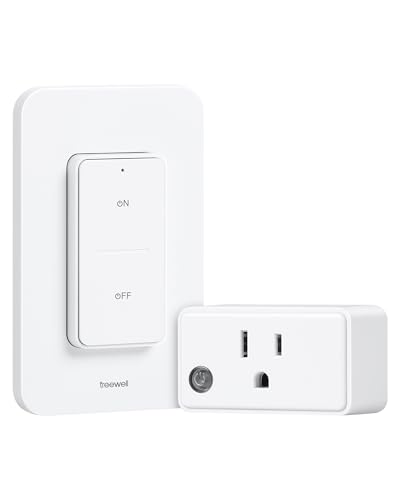
treewell Remote Control Outlet with Wireless Wall Switch, 200FT

Amazon Smart Plug, Works with Alexa, Simple Setup

Lutron Caseta Smart Outdoor Plug for Lights and Motors (Pack of 9)

YoLink Smart Energy Plug 15A, 1/4 Mile LoRa Range

WILAWELS Wireless Remote Control Outlet (2 Remotes + 1 Outlet)

Zooz 800 Series Z-Wave Long Range Smart Plug ZEN04 800LR

Philips Hue Smart Plug, White, Compatible with Alexa & HomeKit
More On The Choices That Made The List
Sometimes you don’t need an app, a voice assistant, or a hub; you just need something that turns a lamp on and off without getting out of bed. That’s exactly where the KSLNRGY plug-and-play pair fits, with no wiring, no account creation, and no smartphone required. The two-pack format also makes it easy to outfit a bedroom and a living room on the same afternoon.
Built with ABS housing for everyday indoor use, these sit flush against most standard US wall outlets and don’t crowd the second socket. You may find the lack of app control limiting if you want schedules, but that’s also the point: nothing to configure means nothing to troubleshoot later.
What Helps Most
- True zero-setup operation, just plug and toggle the physical switch
- Two-pack value covers multiple entry points in your home
- Compact body keeps the adjacent outlet accessible on most wall plates
- ABS shell handles daily indoor wear without feeling flimsy
Worth Noting
- No app, voice, or scheduling means you trade convenience features for simplicity
- Range depends on line-of-sight and may struggle through thick walls in larger homes
Right Fit For
Anyone renting a space, furnishing a dorm room, or testing whether they even want smart-home gear before committing to a connected ecosystem.
Look Elsewhere When
You want voice or schedule control from a phone; the Govee Dual Smart Plug covers that need more directly.
Most cheap smart plugs waste a second outlet behind a bulky body, but Govee’s dual design flips two horizontal receptacles into one compact brick. You end up with four smart outlets from two wall sockets, which is a real win behind a TV stand or in a home office where every plug counts.
Setup runs over 2.4 GHz Wi-Fi or Bluetooth, so you get a fallback path when the router acts up. Voice control through Alexa or Google Assistant covers most hands-free scenarios you actually use. One thing worth flagging: the Govee Home app requires its own account, separate from your existing smart-home setup, so plan a minute for that first-time step.
Everyday Wins
- Expands a two-socket wall plate into four independently controlled smart outlets
- Dual Wi-Fi plus Bluetooth pairing reduces dropouts compared to Wi-Fi-only models
- 15A rating handles heavier lamps and fans without flinching
- Alexa and Google Assistant support cover most mainstream voice ecosystems
Trade Offs
- No 5 GHz Wi-Fi support, so dual-band routers need the 2.4 GHz band enabled
- Requires a Govee Home App account, which adds one more credential to manage
Key Specs
Made For
Households already running Alexa or Google Assistant who want four smart outlets from two wall sockets without stacking bulky single plugs.
Reach For A Different Pick When
You only need one outlet at a time and prefer zero-app simplicity; the KSLNRGY two-pack handles that without any account setup.
The treewell kit solves a specific frustration: a lamp or fan plugged into an outlet that’s tucked behind furniture and impossible to reach. The wireless wall-mount switch sticks anywhere with adhesive, so you can put the clicker right where your old pull-chain used to be. One outlet, one remote, no router required.
The 200-foot advertised range is generous for a typical apartment or single-floor home, though concrete and metal walls will shrink that in practice. It pairs through RF (radio frequency) rather than Wi-Fi, which means no app, no account, and no internet outage taking down your bedside lamp. It’s a small, focused tool that does one job cleanly.
The Case For It
- Remotes can mount as a wall switch or detach for handheld use
- RF signal works through walls without depending on Wi-Fi
- No app or account setup means it’s usable right out of the box
- 200-foot range covers most apartments and small houses comfortably
Things To Consider
- Only one paired outlet per remote, so multi-lamp setups need multiple kits
- No scheduling, voice control, or energy data, which rules it out for whole-home automation
Best Suited To
Anyone who wants to add a wall switch to a hard-to-reach outlet without hiring an electrician or running new wire.
Swap It Out When
You want voice control alongside the remote; the Amazon Smart Plug integrates that capability into an Alexa household seamlessly.
For households already running Echo speakers, this plug is the path of least resistance. Setup happens inside the Alexa app you’re probably already using, so there’s no extra login or second ecosystem to babysit. The “Alexa, turn on the fan” loop works on the first try, which is rarer than it sounds in this category.
It’s worth knowing what you’re getting: the plug only pairs with Alexa, so if your household leans on Google Assistant or Apple HomeKit, you’ll hit a wall fast. The body is also on the larger side, and may cover the neighboring outlet on crowded wall plates. For an Alexa-only home, though, that integration tradeoff is exactly the feature.
The Practical Payoff
- Onboarding happens inside the familiar Alexa app in just a few minutes
- No separate hub required, just an existing Echo speaker or the Alexa app
- Physical on/off button keeps manual control available when Wi-Fi is down
- Compatible with lamps, fans, and coffee makers that have a manual switch
A Few Limitations
- Alexa-only pairing means Google Home and HomeKit users should look elsewhere
- Larger housing can crowd the second outlet on some wall plates
At A Glance
Whose Shelf It Belongs On
Anyone whose household already relies on Alexa for timers, lists, and music will find this plug slots into the same flow without friction.
Skip It When
You use Google Assistant as your primary voice platform; the Govee Dual Smart Plug handles both ecosystems in one purchase.
The Lutron Caseta Outdoor Plug is one of the few smart plugs built to live outside year-round, not just on a covered porch. The IP66 rating (a standard for dust-tight and powerful water-jet protection) means it shrugs off rain, dust, and dirt, while the polycarbonate body resists UV and the kind of temperature swings that crack cheaper plastic.
Because it’s part of the Caseta family, this plug needs the matching Lutron hub to function, which adds cost if you’re starting fresh. For someone already running Caseta switches inside, that hub is probably already in the closet, and the outdoor units slot right into the same app. The pack-of-9 format also makes sense for whole-yard coverage rather than a one-off purchase.
Positive Takeaways
- IP66-rated enclosure handles rain, dust, and severe weather exposure
- Polycarbonate body resists UV fading and temperature swings from -4°F to 122°F
- Two outlets per plug cover lights and motor-driven fixtures in the same box
- Integrates into existing Caseta routines and scenes without extra apps
Factors To Consider
- Requires a Lutron Caseta Smart Hub, which adds to total system cost
- Pack-of-9 format only makes sense for whole-yard setups, not single-outlet buyers
Who Should Grab It
Anyone committed to the Caseta platform who wants weather-rated control over patio lighting, fountain pumps, or holiday displays.
Consider Something Else When
You just want one outlet for a balcony string light; the Govee Dual Smart Plug handles covered or semi-outdoor use at lower cost.
YoLink runs on LoRa, a long-range, low-power radio protocol that reaches a quarter mile in open air, which is wildly longer than Wi-Fi or Bluetooth. For detached garages, basements, and outbuildings where your normal router signal gives up, that range becomes the deciding feature. The 15A current rating also handles heavy-duty gear like dehumidifiers, pumps, and space heaters that would overwhelm a standard 10A smart plug.
You also get cycle scheduling, which means you can set a fan to run for 20 minutes every two hours instead of a flat on/off timer. Real-time energy monitoring and exportable reports turn the plug into a small utility meter for anyone tracking consumption. The catch is hub dependency: this plug won’t run without a YoLink hub on the same network.
Where It Delivers
- Quarter-mile LoRa range reaches detached garages and outbuildings where Wi-Fi fails
- 15A capacity handles pumps, dehumidifiers, and space heaters comfortably
- Cycle scheduling supports interval-based routines beyond simple on/off timers
- Real-time energy monitoring with exportable reports for usage analysis
Room For Improvement
- Requires a YoLink hub on the network, adding to setup complexity
- Overload protection is a nice safety layer, but you’ll want to verify your appliance rating before plugging in heavy gear
Feature Rundown
Perfect Match For
Workshops, detached garages, and basements where Wi-Fi is weak and the appliance being a power draws significant current.
A Better Fit Elsewhere
You want simple indoor lamp control; the treewell Remote Control Outlet is easier to set up and cheaper for that scenario.
The WILAWELS kit ships with two remotes and one outlet, which solves a small but real annoyance: households where one person wants the bedside clicker and another wants a wall-mounted one in the hallway. RF signals pass through walls without Wi-Fi or an app, so this stays functional during internet outages or router hiccups.
For someone with limited mobility, an elderly parent, or a pregnant partner who shouldn’t be reaching behind the sofa, a simple click on a handheld remote takes that problem off the table entirely. The 100-foot range is shorter than the treewell kit’s 200-foot spec, though both work fine in typical apartments.
Where It Helps
- Two remotes included, useful for bedside and hallway placement
- RF signal works through walls and doors without Wi-Fi
- FCC listing signals the product meets US safety standards
- Simple one-button operation is friendly for accessibility scenarios
Honest Caveats
- 100-foot range is shorter than some competitors, which may matter in larger homes
- One outlet, one paired channel means multi-lamp setups require additional kits
Who Will Love This
Households caring for an older family member or anyone with mobility considerations who benefits from a handheld, click-and-go switch.
Where Another Pick Suits Better
You want a 200-foot range for a detached garage; the treewell Remote Control Outlet offers more reach for the same money.
The Zooz ZEN04 is for households running a Z-Wave smart-home hub (a small dedicated controller that speaks the Z-Wave wireless language), which is a different crowd than someone buying their first smart plug. Z-Wave, a mesh wireless protocol built specifically for smart-home devices, forms a self-healing mesh network, where each device relays signals to neighbors, so the more Z-Wave products you own, the stronger and more reliable the network becomes.
The 800-series chip adds Z-Wave Long Range support, pushing wireless reach further than older Z-Wave generations. S2 authenticated security (the current Z-Wave standard for encrypted, tamper-resistant pairing) keeps the pairing process safe, while SmartStart (a feature that pre-configures devices before they’re plugged in) cuts the setup steps when you’re adding multiple plugs. You also get real-time energy monitoring, which is useful when you’re optimizing a home for consumption. The catch: no dimming control, so this is on/off only, not a dimmer.
Good Reasons To Consider
- Z-Wave 800-series chip with Long Range support for extended wireless reach
- S2 security and SmartStart pairing protect against unauthorized access
- Real-time energy monitoring helps track consumption per outlet
- Works with Z-Box Hub, Home Assistant, and Hubitat for flexible integration
Points To Note
- Hub sold separately adds upfront cost if you don’t already own one
- No dimming control, on/off functionality only
- Z-Wave Long Range requires your hub to support the newer standard
Quick Facts
Built With In Mind
Tinkerers and homeowners already invested in a Z-Wave hub like Home Assistant, Hubitat, or the Z-Box who want reliable mesh-network coverage.
Not Your Match When
You’re starting from scratch with no hub; the Amazon Smart Plug offers app-based control without the extra hardware.
The Hue Smart Plug exists for one reason, fitting into a Hue lighting setup without breaking the visual language. The compact white body stays out of the way behind furniture, and the design matches the rest of the Hue family, so it doesn’t look like an obvious third-party add-on.
Like other Hue gear, this plug works best when paired with the Hue Bridge, which unlocks Matter support, automations, and remote access from anywhere. Without the bridge, you get basic on/off and voice through Alexa, Google Assistant, or HomeKit, which is still useful. For most people, the price makes sense only if you’re already deep in the Hue ecosystem; otherwise a cheaper Wi-Fi plug gets you 80% of the function for less.
Standout Benefits
- Compact white housing keeps a clean look in living spaces
- Compatible with Alexa, Google Assistant, and Apple HomeKit for flexible voice control
- Integrates with Hue Bridge for automations, remote access, and Matter support
- Turns any plugged-in lamp into a Hue-controllable fixture
Trade-Offs To Consider
- Full feature set depends on owning the Hue Bridge as a separate purchase
- Higher cost than comparable Wi-Fi plugs for users outside the Hue ecosystem
Who It Suits Best
Hue households who want a plug that visually matches the rest of the system and integrates into existing automations.
Where Another Pick Suits Better
You’re not running Hue; the Govee Dual Smart Plug delivers voice control and dual outlets at a lower entry cost.
What To Weigh Before Buying Cheap Smart Plugs
Connectivity Type Decides The Experience
Smart plugs fall into three communication families, and the right one depends on your home setup. Wi-Fi plugs connect directly to your router and need no extra hardware, which makes them easy to start with. Bluetooth-only plugs are simpler but typically only work within range of your phone. RF remote plugs use radio frequency and need neither Wi-Fi nor an app, which keeps them functional during internet outages. Hub-based systems like Z-Wave or Zigbee (a competing low-power smart-home mesh protocol similar to Z-Wave) require a dedicated hub but reward you with mesh reliability and lower Wi-Fi congestion.
Current Rating Matters For Heavy Gear
Standard smart plugs handle 10A, which covers lamps and small fans comfortably. Plug in a space heater, dehumidifier, or window AC unit and you’ll want a 15A model like the YoLink. Exceeding the rating is a safety issue, not just a performance one, so check the spec before assuming a plug can handle your appliance.
Outlets Per Plug Shapes Placement
A single-outlet plug is fine for a lamp on the nightstand. Behind a TV stand, entertainment center, or kitchen counter, a dual-outlet design like the Govee model doubles your smart capacity without doubling your wall-plate footprint. For outdoor or multi-zone setups, pack-format options like the Lutron outdoor bundle can save you money per outlet.
Voice Ecosystem Compatibility
If you already use Alexa, Google Assistant, or Apple HomeKit, your plug should match that ecosystem or you will be juggling two apps for one task. The Amazon Smart Plug is Alexa-native, the Philips Hue supports all three, and the Govee covers Alexa and Google. Hub-based picks like the Zooz ZEN04 work with whatever your hub supports, which may include all the major ecosystems through Home Assistant or Hubitat.
Key Considerations Across These Picks
Where Shoppers Go Wrong
The most common slip-up is buying a Wi-Fi plug when the outlet sits in a basement, detached garage, or yard where the router signal barely reaches. That’s the scenario where LoRa, Z-Wave Long Range, or a simple RF remote shines instead. Another trap is ignoring the current rating: assuming a 10A plug can handle a 1,500W space heater is a fast path to tripped breakers or worse. Finally, some shoppers buy a hub-dependent plug like the Zooz or YoLink without budgeting for the hub, then sit with a brick that won’t pair until they buy another piece of gear.
When Paying More Pays Off
The premium tier earns its higher cost in three places: weatherproofing for outdoor use, high-current capacity for pumps and heaters, and long-range radios for outbuildings. The Lutron outdoor plug costs more than a basic indoor model, but IP66 protection and UV-stable polycarbonate translate to gear that survives seasons outside. The YoLink costs more than a 10A Wi-Fi plug, but quarter-mile LoRa reach and 15A capacity open up use cases the cheaper models simply can’t touch. Spend up when the use case demands it; save when you’re controlling low-load lamps and small fans in the same room as your router.
Frequently Asked Questions
Do cheap smart plugs work without Wi-Fi?
Several models on this list, including the treewell remote, the WILAWELS kit, and the KSLNRGY pair, use RF radio signals or a built-in button instead of Wi-Fi. They function entirely without a router or app, which makes them ideal for garages, basements, or anywhere internet access is unreliable.
Can I use one smart plug outdoors?
Only a few models are rated for outdoor exposure. The Lutron Caseta Outdoor Plug carries an IP66 rating (a certification meaning the enclosure is fully dust-tight and protected against powerful water jets), and its polycarbonate body handles UV and temperature swings. Standard indoor plugs should not be used outside, even under an eave, because moisture intrusion remains a risk.
Do smart plugs increase my electricity bill?
The plug itself draws a small amount of standby power, usually well under one watt. Many models offset that by letting you cut phantom loads from devices that would otherwise stay on 24/7. Energy-monitoring plugs like the YoLink and Zooz actually let you measure which appliances are costing you the most, so you can prioritize which ones to switch off.
Will a smart plug work with any appliance?
Smart plugs work with anything that has a manual on/off switch, including lamps, fans, coffee makers, and small kitchen appliances. They do not work with devices that require a constant connection or a dedicated button press on the appliance itself, and high-draw appliances like space heaters should only be plugged into models rated for 15A or higher.
Do I need a hub for a smart plug?
Most Wi-Fi plugs connect directly to your router with no hub. Hub-dependent models like the YoLink and Zooz ZEN04 need a compatible hub, but in exchange you get longer range, mesh reliability, and tighter integration with broader home automation platforms.
Closing Remarks
Cheap smart plugs come in enough varieties that the decision is really about matching the plug to the room, the router, and the appliance. For a single lamp or two, a basic Wi-Fi model covers the job. For outdoor setups, outbuildings, or heavy-draw gear, look for weather rating and longer wireless protocols. The right choice is the one that solves the specific frustration in your home without dragging in gear you won’t actually use.
