

You want your bedroom door to feel more private without the hassle of keys that vanish in couch cushions. A biometric door knob solves that exact problem, letting you tap a finger, tap a code, or use a card to get inside in seconds. For renters, home office workers, and anyone sharing space, swapping a traditional knob for a keyless option is one of the most underrated upgrades you can make in a weekend.
The Essentials At A Glance

DREMUSO Fingerprint Door Lock with Keypad

IRONZON 350K 5-in-1 Smart Fingerprint Door Knob

Huipuwei Smart Fingerprint Door Lock Knob

FDFDTO Smart Door Knob

FDFDTO Fingerprint Door Lock Biometric Keypad
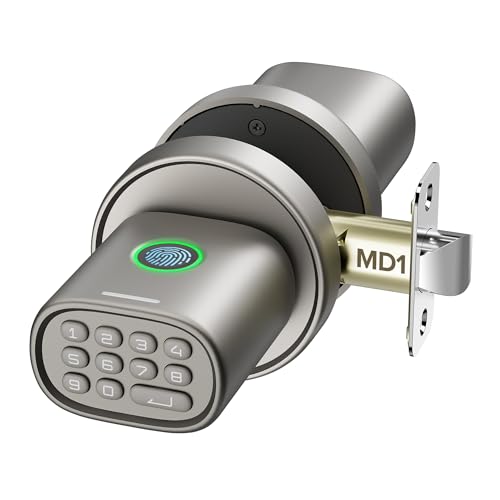
ThorBolt MD1 Fingerprint Door Knob Lock with Keypad
The Details Behind The Selections
This knob packs five entry methods into a single bedroom handle, which is unusual for the category. Fingerprint, keypad code, IC card, app control, and mechanical backup keys all live on one device, giving you redundancy if one method fails or if a finger is wet or dry.
Compared to simpler biometric knobs like the FDFDTO options later in this list, the DREMUSO model offers broader user capacity, making it well suited for shared homes, guest rooms, or rental properties. The included key fobs are a thoughtful touch for kids or older family members who struggle with fingerprint scanning.
A Strong Showing
- Five entry methods cover nearly every access preference
- Up to 100 fingerprints and 50 stored codes handle large households
- IC card option works for users whose fingerprints read inconsistently
- App control adds remote management for vacation rentals
Things To Consider
- More features can mean a steeper setup curve
- Battery life varies depending on how often the keypad is used
Feature Snapshot
Made For
Large families, multi-generational homes, and rental property owners who need flexible access control.
Consider Something Else When
Single users who only need basic fingerprint entry should look at the FDFDTO Smart Door Knob for a more streamlined experience.
The IRONZON 350K approaches the keyless bedroom door with privacy as the lead design principle. Fingerprint and app data stay stored locally rather than pushed to cloud servers, which matters to anyone wary of biometrics living on remote infrastructure.
Where the DREMUSO leans into raw user capacity, this knob balances that scale with cleaner data handling. For renters or shared-household scenarios, local storage means your fingerprint template doesn’t follow you across properties.
A Few Strong Suits
- Local biometric storage protects fingerprint data
- Supports up to 50 fingerprints and 100 passcodes
- App control works through a separate WiFi gateway add-on
- Backup keys provide mechanical failsafe access
Worth Noting
- App features require purchasing an extra gateway component
- Setup may feel involved for first-time smart lock owners
Right Fit For
Privacy-conscious renters and shared-housing residents who want keyless convenience without sending biometric data to external servers.
Skip It When
Those wanting the broadest feature set out of the box should consider the DREMUSO Fingerprint Door Lock instead.
The Huipuwei knob leans hard into the app experience, which sets it apart from more traditional keypad-and-fingerprint models. You can generate temporary codes for guests, set recurring codes for cleaning staff, and check unlock history from your phone.
For Airbnb hosts and anyone running a short-term rental from their bedroom door, this kind of control changes the workflow. You avoid the physical key handoff entirely, and periodic codes expire automatically so old guests can’t wander back in.
The Helpful Details
- Temporary and recurring codes generated remotely via app
- Unlock history log shows who entered and when
- Anti-peep keypad allows scrambled digit entries
- Five entry methods offer solid backup redundancy
Trade Offs
- App-dependent features may frustrate those wanting simpler operation
- Anti-peep entry is convenient but takes a beat longer than a straight code
Quick Facts
Built With In Mind
Short-term rental hosts, home office professionals, and households with frequent guests who need code-based access control.
Look Elsewhere When
Those wanting a simple fingerprint-only setup should consider the FDFDTO Smart Door Knob for less complexity.
Sometimes simpler is better, and this knob from FDFDTO strips the smart lock down to its essentials. The focus is squarely on fingerprint entry with mechanical key backup, no app ecosystem, no card readers.
For a single user who just wants their finger to open their bedroom door and nothing more, that minimalism is a feature. You spend less time on setup, fewer batteries drain, and there’s less surface area for things to go wrong.
Where It Helps
- Straightforward fingerprint-first operation
- Mechanical key backup when batteries run out
- Lower complexity suits single-user bedrooms
Room For Improvement
- Limited documentation available from the manufacturer
- Lacks app control for remote management
Whose Shelf It Belongs On
Solo dwellers and home office users who want fast fingerprint entry without managing apps or extra credentials.
A Better Fit Elsewhere
Rental hosts needing remote code generation will find the Huipuwei Smart Fingerprint Door Lock Knob a stronger match.
This FDFDTO model differentiates itself with battery stamina, a detail that often gets overlooked until you’re fumbling with a dead lock at midnight. The rechargeable battery is rated for extended standby, reducing how often you need to plug in.
Four entry methods keep the feature set tight: fingerprint, anti-peep keypad, app control, and backup keys. That trims complexity compared to five-method models while still covering the core scenarios most bedroom doors face daily.
What Helps Most
- Extended battery life reduces charging frequency
- Anti-peep keypad protects against code shoulder-surfing
- 0.2-second fingerprint recognition for quick entry
- Four methods balance features with simplicity
Points To Note
- Fewer entry methods than five-method competitors
- Rechargeable battery means occasional downtime while charging
Feature Card
Best Suited To
Busy households that want keyless entry without the maintenance headache of constant recharging.
Reach For A Different Pick When
Users wanting the broadest user capacity should consider the DREMUSO Fingerprint Door Lock.
The ThorBolt MD1 stands apart with automatic relocking, which closes a security gap many biometric knobs leave open. Five seconds after the door shuts, the deadbolt engages itself, so you never accidentally leave your bedroom unlocked while grabbing the mail.
The titanium finish gives it a noticeably different visual weight compared to the black plastic-dominant options earlier in this list. Anti-peep technology lets you bury your real code among random digits, useful in shared homes where someone might watch you type.
Useful Touches
- Automatic relock after inactivity for passive security
- Anti-peep scramble hides real passcode patterns
- Titanium finish offers a premium visual upgrade
- Three core entry methods keep operation simple
Less Ideal Details
- Only three entry methods compared to five-method rivals
- Auto-relock may feel slow for users who manually lock out of habit
Spec Overview
Who Should Grab It
Privacy-focused users in shared households who want passive security features doing the work for them.
Swap It Out When
Those needing app-based guest codes should look at the Huipuwei Smart Fingerprint Door Lock Knob instead.
What To Weigh Before Choosing A Bedroom Door Smart Lock
Access Methods That Match Your Routine
The number of entry methods matters less than whether they fit how you actually live. Fingerprint works for solo dwellers and steady households, but parents of young kids often appreciate IC cards because tiny fingerprints read inconsistently. App control adds value primarily if you host guests or rent out space. Mechanical backup keys are non-negotiable for most people; dead batteries will find you eventually.
User Capacity And Code Management
Count the people who need access before choosing. A 50-fingerprint capacity sounds generous until a family of four shares the bedroom door with in-laws, a cleaner, and a dog walker. For larger households, models like the DREMUSO with 100-fingerprint storage reduce the need to constantly delete and re-register users.
Installation And Door Compatibility
Most smart knobs fit standard door thicknesses and prep holes used for traditional knob sets. Before ordering, measure your door and confirm the backset matches the lock’s adjustable range. Battery type matters too; rechargeable units save money long-term but require periodic downtime, while standard AAA cells swap out in seconds.
Privacy And Data Handling
Biometric locks store fingerprint templates, and where those templates live matters. Local storage keeps data on the device itself, while cloud-connected systems may sync to manufacturer servers. For renters or anyone uneasy about biometric data leaving the home, locally stored options like the IRONZON model address that concern directly.
Key Considerations Across These Picks
Mistakes Worth Dodging
Overbuying features you won’t use inflates cost and complicates setup. Skipping mechanical key backup leaves you locked out when batteries die without warning. Ignoring door thickness measurements leads to a knob that doesn’t fit, forcing returns. Finally, choosing cloud-dependent models without checking your WiFi coverage at the bedroom door can cause frustrating connectivity drops right where you need reliable access most.
Where The Extra Money Goes
Higher-tier smart locks earn their premium through better fingerprint sensors that read wet or dry skin more reliably, longer battery life that stretches between charges, and sturdier finishes that hold up to daily grip and twist. Premium models also tend to support more users, which matters for larger families or rental scenarios. If your needs are modest and your door sees light use, a budget-friendly pick covers you well, but for a bedroom door you touch dozens of times daily, build quality and sensor accuracy pay back the difference quickly.
Frequently Asked Questions
Do smart locks for bedroom doors need WiFi to work?
No, most biometric door knobs function fully without WiFi. Fingerprint, keypad, and mechanical key entry all work offline. WiFi is only required if you want app-based remote control features.
How long do batteries typically last in these locks?
Battery life varies widely depending on usage and lock type, but most rechargeable models last several months on a single charge under typical daily use. Standard battery models can last even longer between swaps.
Can I install a smart bedroom lock myself?
Yes, most biometric knobs are designed for DIY installation with basic tools. They typically replace an existing knob using the same door prep, requiring only a screwdriver in most cases.
Are fingerprint door knobs secure for bedroom use?
Fingerprint storage on most models uses encrypted local storage rather than storing readable images. For bedroom doors, biometric locks generally offer security comparable to or better than standard keyed knobs.
What happens if the battery dies completely?
Every model in this roundup includes mechanical key backup, so you can always unlock the door with a physical key even when the electronics are completely powered down.
Wrap Up
Your bedroom door deserves a lock that matches how you actually live, whether that means keyless entry for a quiet home office or full app control for managing rental guests. Each pick here covers a different version of that need, and any of them will replace the jingling pocket-key routine for good. Take a minute to match the feature set to your household size and privacy preferences, and the right knob becomes obvious.
