

Smart sockets turn ordinary lamps, fans, and coffee makers into schedule-friendly helpers you can control from your phone or with a quick voice command. For renters, parents, and busy households, that small shift saves real friction: no more crawling behind the TV to unplug a glowing console, no more arriving home to a cold room. The nine picks below cover everyday indoor use, Apple households, dual-socket expanders, and weather-rated outdoor setups so you can match the right form factor to each room.
The Lineup, Simplified

Govee Dual Smart Plug 2 Pack, 15A WiFi Bluetooth Outlet

Kasa Smart Plug Ultra Mini 15A, EP10P4

Kasa Smart Plug Mini 15A, EP25P4, Apple HomeKit

WILAWELS Wireless Remote Control Outlet Plug

Kasa Outdoor Smart Plug EP40, 2 Sockets
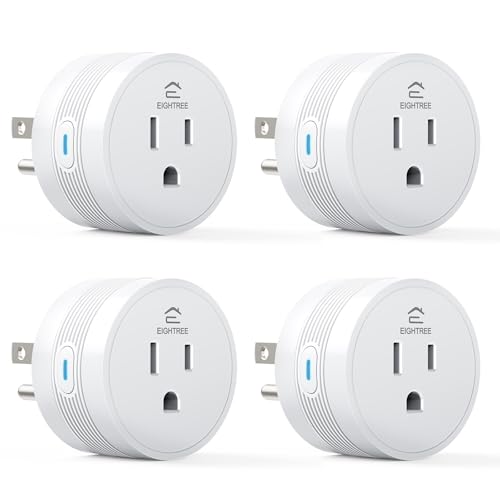
EIGHTREE 15A Smart Plug 4 Pack

EIGHTREE 5GHz Smart Plug, 4 Pack

EIGHTREE 5GHz Smart Plug 15A, 4 Pack

EIGHTREE Outdoor Smart Plug, 2 Independent Outlets
Taking A Closer Look At The Options
Where most indoor smart plugs take up both sockets on a standard wall outlet, this Govee unit sits sideways and exposes two independently controlled receptacles from a single plug. For renters working with a single outlet behind the couch, it sidesteps the usual standoff between “smart” and “still usable.”
Setup runs through the Govee Home app over 2.4GHz Wi-Fi (5GHz networks are not supported) or Bluetooth, and once paired, voice control works through Alexa and Google Assistant. The 15A rating covers most household lamps, heaters, and small kitchen gear without complaint.
Where It Excels
- Two horizontal outlets expand capacity without covering the second socket
- Bluetooth fallback helps when Wi-Fi drops in basements or garages
- Independent on/off per outlet means two schedules from one wall plate
- 15A load handles space heaters and window-unit fans safely
Things To Consider
- 5GHz-only routers will need a 2.4GHz network enabled for pairing
- App is required for initial setup; voice control alone cannot finish onboarding
Who It Suits Best
Apartment dwellers and renters who want four smart outlets from two wall plates, without buying a multi-pack of single plugs.
Where Another Pick Suits Better
For an Apple-centric home that wants per-outlet energy tracking, the Kasa Smart Plug Mini 15A, EP25P4, Apple HomeKit pairs more naturally with iOS automations.
The Ultra Mini earns its name by sitting almost flush against the wall, so the second outlet on a standard duplex stays open for a lamp or charger. Compared with the Govee dual unit in Pick 1, this one trades two controlled receptacles for a smaller footprint per plug, which matters behind nightstands.
It runs on the Kasa app over 2.4GHz Wi-Fi with no hub required, and the schedule engine is friendly enough that you can stagger a bedside lamp, a fan, and a white-noise machine from the same screen. The 15A ceiling covers most room gear short of hair dryers or kitchen ranges.
Notable Gains
- Side-mounted design keeps both outlets usable in tight wall plates
- App walkthrough makes sense for first-time smart-home shoppers
- Schedule and timer tools handle sunset-based lamp routines
Honest Caveats
- No energy monitoring, so you cannot see watts per outlet over time
- 2.4GHz only, which can be a snag on routers that push 5GHz as the priority band
Made For
Bedrooms and home offices where a single socket runs two plugs and you would rather not see a bulky brick.
Consider Something Else When
A garage or workshop that needs no-network control should reach for the WILAWELS Wireless Remote Control Outlet Plug instead.
The EP25P4 carries Apple HomeKit support alongside Alexa and Google compatibility, which closes the loop for households running iPhones, Apple TVs, or HomePods as their automation hub. Versus the simpler EP10P4 above, you trade a touch more setup friction for deeper ecosystem hooks and per-outlet energy reporting.
Energy monitoring tracks watts in real time and tallies over time, useful for spotting which appliance quietly adds to the utility bill. Setup leans on the Kasa app for initial pairing, then HomeKit takes over for scenes inside the Apple Home app.
A Strong Showing
- HomeKit support lets you fold plugs into iOS-based scenes and automations
- Per-outlet energy monitoring surfaces the wattage cost of each device
- Compact body keeps the second wall outlet available for other gear
Worth Noting
- Pairing requires scanning a HomeKit code, which adds a step versus non-HomeKit plugs
- Energy history is gated behind the Kasa app, so third-party dashboards see only on/off
Best Suited To
Apple households that want energy visibility per socket without buying a separate monitoring device.
Look Elsewhere When
If HomeKit is not part of the picture, the EIGHTREE 15A Smart Plug 4 Pack offers comparable scheduling at a multi-pack price.
Stepping away from Wi-Fi altogether, this WILAWELS kit pairs a single plug with two handheld remotes over radio frequency (RF), so a lamp in a garage or basement works without a router or app. The trade-off versus the app-driven plugs earlier in this list is no schedules and no voice control, but the simplicity has real merit in rooms where phones tend to wander.
RF range reaches roughly 100 feet line of sight and passes through interior doors and walls well enough for most single-story homes. The set arrives with one outlet and two remotes, useful for keeping one by the bed and one near the door.
Useful Highlights
- No Wi-Fi or app needed, so it works during outages and in detached spaces
- Two remotes ship with one outlet, handy for bedside and entryway control
- RF signal penetrates doors and walls better than typical Bluetooth remotes
Points To Keep In Mind
- No scheduling, sunrise timers, or voice-assistant integration
- Range drops through dense masonry, so basement-to-attic control may need a second outlet
Who Should Grab It
Anyone in a home with spotty Wi-Fi, plus seniors or guests who prefer a physical button over an app.
A Better Fit Elsewhere
Smart-home households wanting Alexa routines should reach for the Kasa Smart Plug Ultra Mini 15A, EP10P4 instead.
The EP40 moves the smart-socket idea outdoors with a weather-resistant shell and two independently addressable outlets, ideal for patio string lights plus a fountain pump. Compared with the indoor Kasa plugs above, it adds the sealing and cord management that exposed locations demand.
Setup lives in the Kasa app over 2.4GHz Wi-Fi, and sunrise/sunset offsetting helps schedule holiday lights and landscape fixtures without fiddling with seasonal calendar changes. The body hangs from a built-in hook or sits flat against an exterior outlet cover.
Practical Advantages
- Two outdoor-rated outlets expand what one exterior socket can run
- Sunrise and sunset offset handles holiday and landscape lighting on autopilot
- Independent control per outlet keeps porch lights and pumps on separate schedules
Some Limits To Know
- Wi-Fi range to a detached shed or far fence line may need a mesh extender
Right Fit For
Backyards and porches that already run a Kasa smart-home setup and want one outdoor box instead of two indoor-rated plugs daisy-chained.
Swap It Out When
Households that need per-socket scheduling plus a separate timer dial should consider the EIGHTREE Outdoor Smart Plug, 2 Independent Outlets, which adds a manual timer fallback.
This EIGHTREE pack leans into higher-draw appliances, rated at 15A and 1800W, which covers coffee makers, air fryers, and space heaters more confidently than basic smart plugs. It is also a 2.4GHz-only design, so households on newer dual-band routers should check their network naming.
Setup runs through the Smart Life app with Bluetooth-assisted pairing, and once online the plugs work with Alexa and Google Home routines. The four-pack form factor suits whole-home rollouts where you want consistent gear behind every TV or counter appliance.
Positive Takeaways
- 15A/1800W rating supports higher-draw kitchen and heating gear
- Bluetooth pairing smooths setup on phones that struggle to find 2.4GHz-only devices
- Four-pack pricing spreads the cost across a full-room rollout
Trade-Offs
- No 5GHz support, which is the snag on homes that have phased out 2.4GHz entirely
- Lacks energy monitoring, so you cannot compare appliance costs side by side
Whose Shelf It Belongs On
Kitchen counters and home offices running several higher-draw appliances from a single multi-pack.
Reach For A Different Pick When
Households on a 5GHz-heavy mesh should choose the EIGHTREE 5GHz Smart Plug, 4 Pack instead to avoid pairing friction.
The headline here is dual-band support, pairing 2.4GHz and 5GHz Wi-Fi so newer mesh systems do not have to switch bands just to onboard a plug. Compared with the 2.4GHz-only EIGHTREE pack in Pick 6, this one trades a higher per-pack price for far smoother pairing on modern networks.
Setup leans on Bluetooth to surface the plug inside the Smart Life app, then hands off to Wi-Fi for steady control. The compact body leaves the second wall socket open for another device, which matters in older homes where splitters are not an option.
A Favorable Mix
- Dual-band Wi-Fi avoids the most common setup complaint with older smart plugs
- Compact shell keeps the adjacent outlet usable
- Bluetooth pairing speeds up the initial app handshake
Room For Improvement
- Energy monitoring is missing, so this is not the pack for watt-watching
The Right Fit
New-build homes and mesh setups running mostly on 5GHz who do not want to debug old-style 2.4GHz onboarding.
Another Choice May Suit
If higher-draw appliances sit on the same wishlist, the EIGHTREE 5GHz Smart Plug 15A, 4 Pack covers heavier kitchen tools while keeping dual-band support.
This pack merges the two features that often pull shoppers in opposite directions: dual-band Wi-Fi for modern routers, and a 15A/1800W rating for higher-draw appliances like coffee makers and space heaters. It sits in the middle of the EIGHTREE lineup, stepping up from Pick 7’s lighter load ceiling.
Bluetooth-assisted pairing inside the Smart Life app feels quick, and the schedule engine handles per-plug timers without a hub. Routine-heavy households that want one consistent gear brand across rooms will appreciate keeping the same app across all four outlets.
What Helps Most
- Dual-band Wi-Fi handles modern mesh routers without band-switching tricks
- 15A/1800W rating covers kitchen and heating gear that basic plugs may not
- Four-pack pricing suits whole-home rollouts on a single app
Less-Strong Areas
- Per-outlet energy data is not part of the feature set
Best Suited To
Frequent smart-plug users running several higher-draw appliances across rooms and wanting one consistent brand and app.
Where A Sibling Pick Shines
Bedrooms and single-outlet spaces that do not need 15A overhead can save money with the standard EIGHTREE 5GHz Smart Plug, 4 Pack.
Like the Kasa EP40 in Pick 5, this EIGHTREE outdoor unit carries two sockets, but adds independent per-outlet control and a 15A load ceiling for pumps or inflatable hot tub heaters. The IP44 sealing handles rain and splashing without complaint, and you do not need to choose between lights and a fountain on the same schedule.
Setup runs through the Smart Life app over 2.4GHz Wi-Fi, with manual timer buttons on the body for those who prefer hardware control. Voice control works through Alexa and Google Home once paired.
What Pays Off
- Two independently scheduled outlets run landscape lighting and pumps on different timers
- IP44 sealing covers rain and splash in covered patio locations
- Manual timer buttons on the body provide a hardware fallback when the app is not handy
Potential Drawbacks
- 2.4GHz-only radios can struggle in far corners of large yards without a mesh extender
- IP44 is splash-rated, so fully exposed locations may need a covered outlet box
Perfect Match For
Backyards with multiple outdoor devices on separate schedules, especially where one circuit feeds a fountain plus string lights.
Not Your Match When
Households firmly in the Kasa ecosystem will find the Kasa Outdoor Smart Plug EP40, 2 Sockets easier to keep on one app.
What To Weigh Before Choosing Smart Sockets
Wi-Fi Band And Router Compatibility
The single biggest setup snag in this category is the 2.4GHz vs. 5GHz question. Older routers broadcast both, while newer mesh systems often push 5GHz or combine bands under a single name, which confuses older smart plugs that only listen on 2.4GHz. If the home runs a modern mesh network, a dual-band plug like the EIGHTREE 5GHz options keeps onboarding quick. For homes sticking with a single 2.4GHz network, a basic plug from Kasa or Govee works fine and saves a bit of money.
Load Rating And What You Plan To Plug In
Smart sockets carry a maximum amperage, and the safe rule is to stay under the printed ceiling. Lamps, fans, and phone chargers sip power well under 10A, so a basic plug handles those with margin. Coffee makers, air fryers, and space heaters pull harder, where a 15A rating gives breathing room and reduces the risk of nuisance shutoffs during a long cycle. Skipping this check is the most common reason smart plugs feel flaky after a few months.
Indoor Or Outdoor Form Factor
Outdoor plugs add weather sealing and typically two sockets, but the sealing level matters more than the marketing. IP44 handles splashing rain under an eave, while fully exposed outlets may need a cover box. Outdoor units also tend to be larger, so plan placement around the outlet housing rather than expecting an indoor-sized shell to fit on a porch.
App Ecosystem And Voice Assistant
Each brand leans on its own app (Kasa, Govee Home, Smart Life), and a household mixing brands ends up with several apps on the home screen. Picking one brand across rooms simplifies routines and scenes, even if a single feature varies slightly between models. Voice compatibility with Alexa and Google Assistant is nearly universal in this list, but Apple HomeKit support is rarer and worth checking before committing if iOS automations are central to the setup.
Key Considerations Across These Picks
Common Shopping Slip Ups
The most common slip is buying a 2.4GHz-only plug for a 5GHz-heavy mesh network, then blaming the device when onboarding stalls. Another is overloading a basic 10A plug behind a heater, which can cause nuisance cutoffs and shorten the plug’s life. Measure the actual draw of the appliance against the printed ceiling, and confirm the router’s band behavior before clicking through to the product page.
Where The Extra Money Goes
Spending more usually buys dual-band Wi-Fi, HomeKit support, or per-outlet energy monitoring. Dual-band saves real setup frustration in newer homes. HomeKit unlocks deeper iOS automations that cheaper Alexa-only plugs cannot match. Energy monitoring is the upgrade worth paying for when the goal is figuring out which appliance runs up the bill, not just turning it on and off from a phone.
Frequently Asked Questions
Do smart sockets work without internet?
Most Wi-Fi plugs lose remote control when the network drops, though manual buttons on the body still toggle power. The WILAWELS RF plug bypasses Wi-Fi entirely and uses handheld remotes, which suits garages and basements where the router signal is weak.
Can one plug run two devices at once?
Single-outlet plugs handle one device, while dual-outlet models like the Govee Dual Smart Plug run two on one wall plate. For higher-draw appliances, a 15A-rated plug is safer than stacking low-rated plugs behind a power strip.
What is the difference between 2.4GHz and 5GHz smart plugs?
2.4GHz plugs reach farther and penetrate walls better, while 5GHz plugs respond faster near the router. Dual-band models like the EIGHTREE 5GHz packs handle both, which is helpful on modern mesh systems that combine bands under one network name.
Are outdoor smart plugs safe in rain?
IP44-rated outdoor plugs handle splashing rain under an eave or porch roof. Fully exposed outlets benefit from a weatherproof cover box, since no smart plug is fully submersible, and standing water will eventually defeat the gasket.
How long do smart sockets typically last?
Most plugs in this category last several years under normal indoor use, with the typical cause of replacement being a Wi-Fi standard change rather than hardware failure. Outdoor units tend to need replacement sooner if exposed to constant sun and weather without cover.
Closing Remarks
Smart sockets are one of the few upgrades that change daily routines immediately: lamps that match your sunset, coffee makers that greet you, and outdoor lights that turn on before you pull into the driveway. Match the plug’s band, load, and form factor to each spot in your home, and the whole category becomes a quiet helper rather than a hassle. Start with one room, see how the routines settle in, then expand from there.
