

A Google Nest speaker is genuinely useful the moment it stops being a pretty desk object. Smart plugs that pair with Nest let your voice, a routine, or your phone control lamps, fans, coffee makers, and slow cookers across the house without rewiring anything. The list below focuses on plugs and related accessories that slot cleanly into a Nest-centered setup, including a few Matter-ready models for anyone already invested in the broader smart-home standard.
The Lineup, Simplified
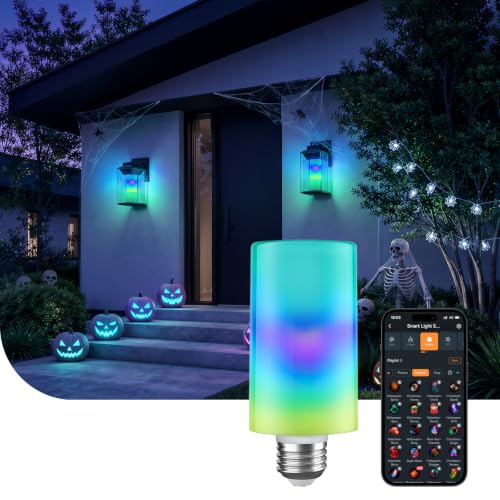
Linkind Smart Light Stick Color Bulb 850lm

Govee Smart Plug WiFi Outlet 4-Pack

Linkind Matter Smart Plug for Nest

Linkind Matter Smart Light Bulbs

PEF Outlet Wall Mount for Nest Mini

Kasa Smart Plug HS103P4 4-Pack

Linkind Matter Smart Plug 15A 1800W

Govee Smart Plug 15A 4-Pack

Govee Dual Smart Plug 4-Pack
The Strengths Of Each Pick
The Linkind Smart Light Stick is technically a bulb rather than a plug, but it earns its slot here because Nest users often want lighting they can dim or recolor by simply asking. The stick form factor (a long T19 tube instead of a round A19) fits fixtures where a traditional bulb would look awkward, like a tall floor lamp or a narrow sconce. The 850-lumen output sits in the same range as a 60W incandescent, which is enough to light a desk or reading nook without flooding the room.
For first-time Nest households who want one affordable piece of smart lighting to test voice control, this stick bulb makes a soft landing. Compared with the Govee plug earlier on this list, it skips the hub-style setup entirely and works on standard 2.4GHz Wi-Fi, which most routers still prioritize for smart devices.
Points In Its Favor
- E26 base fits most common lamp and fixture sockets, so no rewiring is needed.
- Color and tunable range create real ownership benefits: warm white for reading, cool white for focus, color for movie night, all from one bulb.
- Voice integration with Nest means hands-free dimming during cooking, working, or settling down for the night.
- Compact stick shape fits narrow fixtures where a round bulb would overhang or look awkward.
Things To Consider
- Only 2.4GHz Wi-Fi is supported, so dual-band routers should keep both bands enabled during setup.
- Owners commonly report that pairing with traditional dimmer switches can cause flicker, so a standard on/off switch is the safer install path.
Who It Suits Best
Readers who already own a Nest speaker or display and want one smart bulb as a low-commitment test drive of voice-controlled lighting.
A Better Fit Elsewhere
The Govee Smart Plug WiFi Outlet 4-Pack suits you better if your priority is controlling several existing lamps and appliances rather than swapping in a new fixture-ready light source.
Most people setting up a Nest-centered home want more than one smart outlet, and a four-pack keeps the per-plug cost down while letting you scatter plugs across rooms without rebuying packaging. Each unit connects over both Bluetooth and 2.4GHz Wi-Fi, which gives the setup a useful fallback when your router is rebooting or the Wi-Fi briefly drops.
Voice control through Google Assistant is the obvious draw, but the practical win is grouping lamps in a living room or kitchen so a single Nest command turns a whole scene on at once. Compared with the Linkind stick bulb above, this pack takes a different approach: instead of swapping bulbs, you leave existing lamps and fans alone and just plug them in.
A Favorable Mix
- Bluetooth fallback means fewer dropped connections during router hiccups.
- Four plugs cover a typical starter layout: living room, bedroom, kitchen counter, and home office.
- Voice integration through Google Assistant covers the common “turn off everything” scenario at bedtime.
- Scheduling in the companion app supports real ownership benefits, like a porch light that pops on at sunset.
Worth Noting
- Each plug is a single outlet, which can be limiting behind a tight entertainment center or in older two-socket wall plates.
- The companion app ecosystem is best treated as optional; daily control works fine from Nest routines alone.
Made For
First-time smart-home shoppers who want to convert several lamps or small appliances to voice control on day one.
Consider Something Else When
The Govee Dual Smart Plug 4-Pack suits you better if your wall outlets are already crowded and you need two controllable sockets per plug.
Matter is the new cross-ecosystem standard that lets one device talk to Apple Home, Alexa, Google Home, and SmartThings without juggling five logins. For a Nest household that also has a HomePod or Echo in the mix, this Linkind plug removes a common annoyance: the need to re-pair a device every time you switch primary apps.
You will still need a Matter-compatible hub such as a Nest Hub, HomePod, or Echo, so the plug is best for readers who already own one. Against the Govee 4-pack earlier, this is a single plug with broader ecosystem reach rather than a multi-pack.
Where It Excels
- Matter certification supports real ownership benefits: one device that follows you across apps and phones.
- Direct pairing through Google Home avoids the extra manufacturer-app hop for Nest-led routines.
- Compact single-outlet body keeps the second wall socket free for another plug or charger.
Honest Caveats
- A Matter hub is required, so this is not a true plug-and-play option for someone with only a phone and a Nest Mini.
- Only 2.4GHz Wi-Fi is supported, which is standard but worth flagging for owners of newer mesh systems.
Right Fit For
Households already using more than one voice platform (Nest plus HomePod or Echo) who want one plug that works everywhere.
Look Elsewhere When
The Kasa Smart Plug HS103P4 4-Pack fits better if you want a budget-friendly four-pack without committing to a Matter hub.
Where the earlier Linkind stick bulb is a single accent light, this pack focuses on whole-room coverage with Matter certification. For Nest users planning a multi-room lighting setup that may eventually move to Apple Home or SmartThings, Matter removes the “start over” risk that comes with proprietary-only bulbs.
The trade-off is the same as the previous Linkind pick: you need a Matter hub, such as a Nest Hub, to get the full cross-platform benefit. Compared with the Govee plug earlier, this option swaps in bulbs rather than controlling whatever is already plugged into the wall.
The Practical Payoff
- Matter support future-proofs the bulbs, supporting real ownership benefits if you change voice platforms later.
- Standard form factor drops into most table and ceiling fixtures.
- Voice control through Google Assistant handles dimming, color, and on/off through the same Nest speaker you already own.
- No dimmer switch required, since dimming happens through the app or voice.
Small Caveats
- Hub requirement means this is overkill for someone who only owns a Nest Mini without a display.
- Older fixtures with non-standard dimmer switches may need a bypass or rewiring for clean operation.
Best Suited To
Readers planning a coordinated lighting refresh across multiple rooms who already own a Nest Hub or another Matter hub.
Swap It Out When
The Linkind Smart Light Stick Color Bulb 850lm is the better pick if you only need one fixture upgraded right now.
This pick is not a plug but a small accessory that solves a common Nest problem: where to put the speaker so it stops hogging counter space. The PEF wall mount screws onto an existing outlet plate (no drilling required) and holds the Nest Mini or older Home Mini off the counter, with a built-in channel to hide the cable.
For renters or anyone who avoids wall damage, the no-screw install is the key selling point. The mount doubles as a gentle reminder that a tidy Nest ecosystem is about more than plugs; the speaker itself is part of the upgrade.
Where It Helps
- No-screw install protects rental walls and avoids drywall patching later.
- Cord channel hides the cable behind the mount, creating real ownership benefits: a clean visual line from speaker to outlet.
- Universal fit covers both Nest Mini and the older Home Mini, useful if you upgraded and kept the original.
A Few Limitations
- Only fits Google Mini speakers, so anyone with a Nest Audio or a Nest Hub needs a different mount.
- Requires a nearby outlet with a compatible wall plate; older metal or non-standard plates may not seat cleanly.
Who Will Love This
Renters and tidy-counter shoppers who want their Nest Mini elevated and out of the way without drilling holes.
Where Another Pick Suits Better
The Kasa Smart Plug HS103P4 4-Pack fits better if your priority is controlling appliances, not relocating the speaker itself.
Kasa’s HS103 has been a steady presence in the smart-plug market for years, and the 4-pack version is the most practical way to cover a typical home. Each plug is rated to 15 amps, which handles most lamps, fans, and small kitchen appliances, and the physical touch button on the side is genuinely useful when a phone is not nearby.
Setup is straightforward: a 2.4GHz Wi-Fi connection, no separate hub, and direct integration with Google Assistant. Against the Linkind Matter plug earlier, this pack trades ecosystem flexibility for the comfort of a long-established app and a familiar brand.
Practical Pluses
- Touch actuator means real ownership benefits: a physical tap turns off the lamp when the phone is in another room.
- No-hub-required setup keeps things simple for households that just want plugs that work.
- Compact body leaves the second outlet free in a standard duplex wall plate.
- Routines in the Kasa app integrate with Google Home for whole-house scenes.
Things To Weigh
- Only 2.4GHz Wi-Fi is supported, which is fine but not unusual.
- Each plug covers one outlet, so older homes that need to expand two-socket plates should look at the Govee Dual pack.
Perfect Match For
Households that want a proven four-pack of basic smart outlets for lamps, fans, and slow cookers, with no hub to manage.
Another Choice May Suit
The Linkind Matter Smart Plug for Nest is the better pick if you plan to add Apple Home or SmartThings later and want one device that travels between ecosystems.
This single-pack Linkind plug is the higher-wattage sibling of the earlier Matter pick, rated for 15 amps and up to 1800 watts. For Nest users who want to switch something heavier, like a window AC unit, a space heater, or a sizeable lamp with multiple bulbs, the higher ceiling removes the worry of tripping an internal fuse.
It still rides on Matter and 2.4GHz Wi-Fi only, so a hub is required for full cross-platform use. The trade-off for the higher watt rating is a slightly larger body that can crowd the second socket on a duplex plate.
Benefits That Matter
- 15A/1800W ceiling supports real ownership benefits: confidence in switching heavier appliances without tripping.
- Matter certification covers Apple Home, Alexa, Google Home, and SmartThings under one pairing.
- Schedules and timers run directly in Google Home routines.
Possible Compromises
- Larger footprint may block the second outlet on a duplex wall plate.
- Matter hub is still required, which adds setup friction for households without one.
Who Should Grab It
Shoppers planning to switch a heavier plug-in device such as a window AC, space heater, or large torchiere lamp.
Reach For A Different Pick When
The Govee Smart Plug 15A 4-Pack fits better if you want higher wattage across four outlets and a non-Matter setup.
Where the earlier Govee 4-pack was an entry-level option, this version steps up to a 15-amp rating and adds group control inside the Govee Home app. For Nest users who want to build room scenes, like “living room off at bedtime,” the grouping feature makes that routine much easier to assemble and edit.
Bluetooth plus 2.4GHz Wi-Fi keeps setup smooth, and the group control works alongside, not against, Google Assistant. Against the Linkind Matter plug earlier, this is a multi-pack without Matter, which keeps it simpler for Nest-only households.
Advantages To Know
- 15A rating handles heavier lamps, fans, and small kitchen appliances.
- Group control supports real ownership benefits: one tap or one voice command manages several plugs at once.
- Bluetooth fallback improves initial setup when Wi-Fi is congested.
- Schedule and timer functions live in the Govee app and mirror into Google Home routines.
Some Limits To Know
- One outlet per plug, which can still feel tight behind older wall plates.
- No Matter support, so cross-ecosystem flexibility is limited compared with the Linkind picks.
Built With In Mind
Nest households planning room scenes or whole-floor routines who want a higher-amperage four-pack without a hub.
Where A Sibling Pick Shines
The Govee Dual Smart Plug 4-Pack fits better if your wall outlets have only one usable socket and you need two controllable outlets per plug.
The Dual pack tackles a problem the other Govee packs do not: older homes with limited wall outlets. Each plug occupies one wall socket and exposes two independently controllable outlets, so a single duplex plate becomes four controllable endpoints across the pack.
For renters or anyone who cannot add outlets, that 2-in-1 design is the practical unlock. Compared with the single-outlet Kasa 4-pack earlier, the body is wider, so check that it fits behind your furniture before committing.
Useful Touches
- Two independently controlled outlets per plug support real ownership benefits: separate timers for a lamp and a fan in the same spot.
- 15A rating covers most household appliances safely.
- Bluetooth plus Wi-Fi setup keeps the initial pairing less stressful.
- Google Assistant voice control integrates with the rest of the lineup.
Potential Drawbacks
- Wider body may block the adjacent outlet on some tight wall plates.
- Four dual units cover eight controllable outlets, which may be more than a small apartment needs.
The Right Fit
Households with one or two usable sockets per wall and a need to control several devices from each outlet.
Skip It When
The Govee Smart Plug WiFi Outlet 4-Pack suits you better if your wall outlets are already plentiful and slim single plugs are preferable.
Picking Smart Plugs For Google Nest That Fit Your Home
Start with the Wi-Fi reality in your house. Most smart plugs rely on 2.4GHz Wi-Fi, the older and longer-range band that smart-home gear prefers for stability. Routers that combine 2.4 and 5GHz bands under one name usually work fine, but a quick check that both bands are broadcasting saves a common setup headache.
Next, decide whether you want a hub-free plug or a Matter-ready one. Hub-free plugs, like the Govee and Kasa options above, talk directly to your Wi-Fi and to Nest, which keeps setup simple. Matter-ready plugs add a hub requirement but pay you back with smoother cross-ecosystem use later, especially helpful if you ever add a HomePod or Echo.
Consider your wall outlets before you commit to a form factor. Single-outlet packs suit homes with plentiful wall plates, while dual-outlet packs rescue older homes with only one usable socket per plate. Higher-amperage plugs, typically rated 15A and around 1800W, handle heavier devices like window AC units and large space heaters, while standard plugs comfortably switch lamps, fans, and coffee makers. Finally, think about routines: a four-pack makes “bedtime” or “movie night” scenes easier to assemble, while single packs are right when you only need one or two switches.
Key Considerations Across These Picks
Where Shoppers Go Wrong
A common slip is buying a four-pack before confirming Wi-Fi coverage in the rooms where the plugs will live. Smart outlets mounted far from the router, especially in basements or behind thick walls, can struggle to stay connected. A quick phone-based Wi-Fi check in each target room catches this early.
Another trap is pairing the plugs to a secondary ecosystem account rather than your main Google Home setup. That makes voice control work, but it isolates scheduling and away-from-home control to the wrong app.
The Upgrade Payoff
Stepping up to Matter-ready or higher-amperage plugs costs a little more per outlet, but the difference shows up in three places. First, future flexibility: Matter plugs follow you if you ever add a HomePod or Echo. Second, headroom: 15A plugs handle heavier devices without tripping. Third, ecosystem consolidation: a single pairing path across apps removes a layer of friction in daily routines.
Frequently Asked Questions
Do smart plugs work with Google Nest without a hub?
Most do. Plugs like the Govee and Kasa options above connect directly to 2.4GHz Wi-Fi and pair with Google Home, so no separate hub is needed. Matter-certified plugs are the exception and do require a compatible hub such as a Nest Hub or HomePod.
Will these work with older Google Home Mini speakers?
Yes. Both Nest Mini and the older Home Mini share the same Google Assistant framework, so any plug or bulb that works with Google Home works with either speaker. The PEF wall mount in this list fits both form factors as well.
Can one plug run a heavy appliance like a space heater?
Only if the plug is rated for it. Standard 15A smart plugs handle up to around 1800W, which covers most space heaters, window AC units, and large lamps. Lower-rated plugs should stay on lamps, fans, and small electronics.
Do I need a 2.4GHz or 5GHz Wi-Fi network?
2.4GHz is the required band for nearly every smart plug on this list, including the Govee, Kasa, and Linkind options. Routers that broadcast both bands under a single network name usually work fine out of the box.
How many smart plugs can I add to one Google Home account?
The practical limit is high enough that you are unlikely to hit it. Most households run between five and twenty plugs, and Google Home handles that comfortably as long as the Wi-Fi network is stable.
Closing Remarks
A few well-chosen smart plugs turn a Nest speaker into a real command center for lamps, fans, and small appliances. Match the form factor to your outlets, pick Matter only if you plan to expand ecosystems, and lean on multi-packs when you want whole-room routines from day one.
