

Apple households run into a familiar wall: the Home app looks great on paper, yet the gear that actually plays nicely with it can feel scattered across different ecosystems. Matter, the cross-platform smart home standard, has quietly closed a lot of those gaps over the last year, and Matter-compatible accessories now join HomeKit with far less friction than they used to. This lineup leans into that shift. Each pick below either speaks Matter directly, ties into a system bridging Apple Home, or covers a specific job your Apple setup is likely missing. Read on for seven options that map cleanly onto the way an iPhone-led household actually lives, from a quiet night light to a water shutoff you can trigger from a park bench.
A Closer Look At The Lineup

EVC400-MW Bulldog Matter Over WiFi Starter Kit
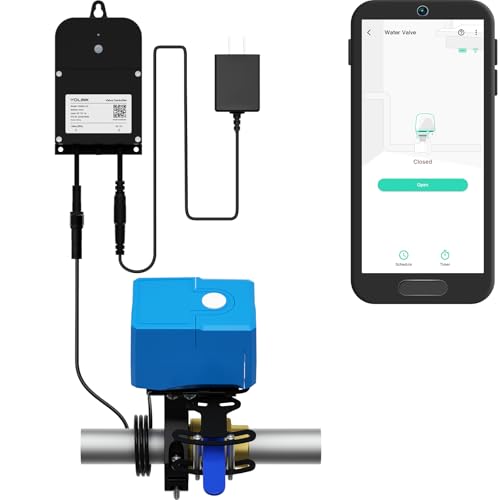
YoLink Smart Water Valve Controller 2
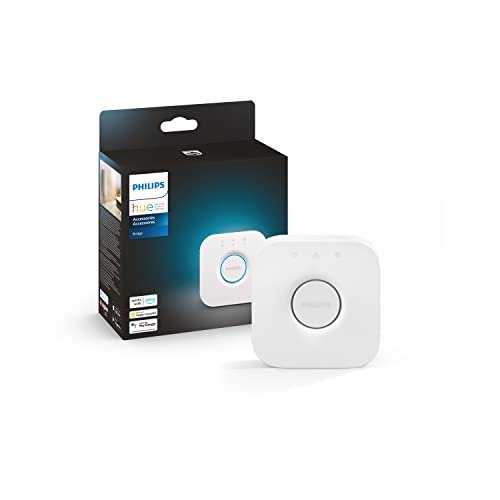
Philips Hue Bridge Smart Lighting Hub

eufy Security Motion Sensor 100° Coverage

YoLink SpeakerHub Smart Home Speaker Hub

YoLink Home Security 5-Piece Kit
THIRDREALITY Smart Color Night Light Matter
Taking A Closer Look At The Options
The Bulldog Starter Kit is built around a simple but often overlooked home risk: the slow leak under a sink or behind a washing machine that nobody notices until the floor is ruined. Matter, the cross-platform smart home protocol that lets accessories from different brands share one language, runs over WiFi here, so the hub side of the equation is essentially the home router you already own. Three leak sensors ship in the box, and the controller scales to roughly twenty, which is more than enough to wrap the typical kitchen, laundry, and bath zones in one Apple-friendly safety net.
Installation leans hard into “drop it and forget it” territory. The sensors sit directly on the floor, no plumbing modifications, no special tools, no fishing wires behind drywall. For an iPhone-led household, the practical win is that you get push alerts the moment moisture shows up where it should not, even if you are three time zones away.
Useful Highlights
- Three leak sensors in the starter box, so coverage begins on day one across multiple rooms
- Scales to about twenty sensors, letting you wrap the whole house in a single leak detection layer
- No plumbing modifications required, which keeps renters and condo owners firmly in scope
- Matter over WiFi means the controller fits cleanly into Apple Home alongside other compatible gear
- Floor-mounted sensor design makes placement changes a snap during cleaning or renovations
Things To Consider
- The Bulldog controller depends on your home WiFi, so a router outage temporarily silences remote alerts
- Sensor bodies sit on the floor, meaning they can get kicked or nudged in tight utility rooms
Right Fit For
Renters, condo owners, and anyone with a sump pump, water heater, or washing machine they want to keep an eye on without modifying plumbing.
A Better Fit Elsewhere
Shoppers who want automatic shutoff rather than just alerts should look at the YoLink Smart Water Valve Controller 2, which can actually stop the water.
Where the first pick warns you about water, this one actually does something about it. The YoLink Smart Water Valve Controller 2 pairs with a Bulldog-style manipulator that physically turns your existing shutoff valve. LoRa, a long-range, low-power radio protocol originally popular in agricultural sensors, handles the wireless link, with a stated open-air reach of about a quarter mile, so the controller can sit in a basement or utility closet far from your main router.
For an Apple household, the appeal is reach plus resilience. Three power modes are available, AC with battery backup, AC only, and battery only, and because LoRa does not rely on the home WiFi, the valve still responds when the network goes down. A YoLink Hub is required to bridge the system into Apple Home and other platforms.
The Case For It
- Quarter-mile LoRa range puts the controller in basements, garages, or detached spaces where WiFi struggles
- Three power modes, including battery only, keep the valve operational when household power drops
- Mechanical manipulator installs over existing valves, avoiding a plumber visit for most setups
- Device-to-device pairing lets the valve react to leak sensors without round-tripping through a phone
- Valve position feedback confirms whether the shutoff is open or closed, a real ownership benefit when away from home
Points To Note
- Requires a YoLink Hub, an extra purchase that some smart home systems competitors bundle
- Manipulator compatibility varies with valve type, so confirm your existing shutoff fits before committing
- LoRa is excellent at range but unfamiliar to households used to WiFi-only gear
Quick Facts
Who It Suits Best
Owners of older homes, multi-story houses, or properties with detached workshops who want automatic water shutoff that keeps working through a WiFi or power outage.
Skip It When
You only need leak detection without shutoff, in which case the EcoNet Bulldog Starter Kit covers the basics at lower cost and complexity.
Lighting is usually the first system Apple households try to grow, and the Philips Hue Bridge is the reason that growth does not stall. Zigbee, a low-power mesh radio standard widely used in smart lighting, lets the bridge talk to bulbs and fixtures without piling more devices onto your home WiFi. You keep responsive scenes, automations, and remote control through Apple Home, while the bridge quietly handles the radio side.
Matter support, voice control through Siri, Alexa, and Google Assistant, and out-of-home control from the Hue app all live inside one small white square. For households layering scenes across several rooms, that single piece of hardware turns a stack of loose bulbs into something that feels orchestrated.
Noteworthy Benefits
- Zigbee mesh keeps lighting responsive even when the home WiFi is congested or temporarily offline
- Bridges Hue bulbs into Apple Home, expanding your smart home setup with a proven lighting backbone
- Supports zones and automations, the practical ownership benefit being movie-night or bedtime scenes triggered from a single tap
- Matter compatibility broadens the bridge’s role as a hub alongside newer accessories
Trade Offs
- The bridge itself does nothing without Hue bulbs or compatible Zigbee fixtures, so the upfront cost grows quickly
- Best features, such as advanced automations, sit behind the Hue app alongside the Home app, which adds a second interface to learn
Made For
Apple households that want a reliable, scene-rich lighting system with smooth HomeKit integration and room to grow into Matter.
Look Elsewhere When
You want simple night-light behavior and nothing else, in which case the THIRDREALITY Smart Color Night Light covers a single room without the bridge requirement.
Motion sensors are the unglamorous workhorses of any security layer, and this eufy sensor covers a single room with a 100-degree field of view. That wide cone means one sensor can watch a hallway, a mudroom, or a living room corner without needing three narrow units pointed at different walls. For an Apple household running automations, the trigger is simple, motion in zone, lights on, recording starts, alert pops up on the iPhone.
Sensitivity is adjustable, so you can tune the sensor to ignore a cat wandering at floor level while still catching a person walking upright. The sensor is designed for indoor use and is not waterproof, so outdoor placements need a covered spot.
Everyday Advantages
- 100-degree field of view covers an entire room with a single unit, cutting down on hardware clutter
- Adjustable sensitivity helps the sensor ignore small pets while still catching adult-sized movement
- Pairs into broader eufy systems, the practical ownership benefit being one app coordinating sensors and cameras
- Compact housing fits unobtrusively in corners, above door frames, or along baseboards
Honest Caveats
- Not waterproof, so covered porches and garages need shelter
- Most useful inside an existing eufy ecosystem, which adds another account to manage alongside Apple Home
Feature Snapshot
Best Suited To
Households already running eufy cameras who need a wide-angle motion trigger to tie into scenes and alerts.
Not Your Match When
You want a full alarm bundle out of the box, in which case the YoLink Home Security 5-Piece Kit bundles the sensor with a hub and siren.
Apple Home is great at pushing notifications to your iPhone, yet a notification does nothing for the person standing in the kitchen. The YoLink SpeakerHub fills that gap with a small audio hub that plays tones, alarms, and custom text-to-speech messages when paired YoLink sensors trip. Think of it as a voice for the rest of the house, not just your pocket.
LoRa powers the same quarter-mile range mentioned earlier, so this hub can sit in a detached garage or workshop and still respond to events from sensors around the home. It needs WiFi to reach the internet for custom messaging, but the core alert tones work locally once paired.
Bright Spots
- Customizable tones and text-to-speech turn the hub into a driveway alert, door chime, leak alarm, or siren
- LoRa wireless gives the hub real reach, the practical ownership benefit being alerts in detached garages and outbuildings
- Pairs with many YoLink sensors, so the hub grows with the system rather than locking you in on day one
- Voice announcements cut through background noise better than a phone buzz in many real-life scenarios
Worth Bearing In Mind
- WiFi is required for text-to-speech and app features, which limits placement compared with LoRa-only gear
- Best used inside the YoLink ecosystem, so households committed to other brands may find it redundant
Who Should Grab It
Apple households with a detached garage, workshop, or long driveway who want spoken alerts where an iPhone notification cannot reach.
Reach For A Different Pick When
You need motion sensing and a door sensor in the same bundle, in which case the YoLink Home Security 5-Piece Kit pairs this speaker with complementary sensors.
The 5-Piece Kit is the closest thing on this list to a complete starter system, bundling the SpeakerHub, a door and window sensor, a motion sensor, and an AlarmFob remote. For an Apple household stepping into smart security for the first time, that mix hits the four jobs most people want covered: a chime, a perimeter sensor, a motion trigger, and a panic-style remote.
The AlarmFob supports arm-stay, arm-away, panic, and sleep states out of the box, and each button can be reassigned through the YoLink app for custom scenes. Alerts arrive through the app, email, and limited SMS, so you are not locked to one notification channel when something happens.
Useful Touches
- Five-piece bundle covers entry, motion, audible alert, and remote control in a single purchase
- AlarmFob buttons can trigger scenes or control other paired devices, the practical ownership benefit being bedtime routines from a bedside keychain
- App, email, and limited SMS alerts cover you when your iPhone is on silent or out of reach
- 2.4 GHz WiFi is the standard home network band, so most routers pair cleanly
Points To Keep In Mind
- Limited SMS coverage means heavy text-alert users may want a paid add-on or different alert strategy
- 2.4 GHz WiFi only, so households with mesh networks set to 5 GHz-only client bands may need to enable the legacy band
Perfect Match For
First-time smart home shoppers in apartments or starter homes who want a security base without committing to a wired system.
Another Choice May Suit
You only need a single, well-placed motion sensor, in which case the eufy Security Motion Sensor is a tighter, lower-cost fit.
Night lights usually do one job, glow softly when it is dark. THIRDREALITY folds three jobs into one plug-in device: a color night light, a motion sensor, and an illuminance sensor, all routed through Matter over WiFi. For Apple households, that last detail is the unlock, because the device joins Apple Home alongside SmartThings, Google Home, and Alexa without juggling extra apps.
The unit is powered by AC, the adapter ships in the box, and the Matter certification means it speaks to a Matter controller such as an Apple HomePod mini or Google Home device without a vendor cloud standing in the way. Local control within the LAN keeps the light responsive even when the broader internet goes down.
Positive Takeaways
- Three functions in one, so a single outlet covers lighting, motion, and ambient light sensing
- Matter certification pairs cleanly with Apple Home through a HomePod mini or similar Matter hub
- Local LAN communication keeps the device responsive when home internet drops
- Adjustable brightness and color, the practical ownership benefit being kids’ rooms, hallways, or bathrooms tuned to a comfortable level
Small Caveats
- Requires a Matter controller such as a HomePod mini, so households without one pay an additional upfront cost
- 2.4 GHz WiFi requirement means mesh systems set to 5 GHz-only need the legacy band enabled
- AC-powered only, so no option for closets or hallways without an outlet nearby
Whose Shelf It Belongs On
Apple households with a HomePod mini or other Matter controller who want a small, multi-function device for bedrooms, hallways, or bathrooms.
Swap It Out When
You need wide lighting control across the whole home, in which case the Philips Hue Bridge scales much further across rooms and scenes.
What To Weigh Before Buying Smart Home Systems For Apple
Apple Home Compatibility Comes First
Not every device that says “smart” joins Apple Home cleanly. Look for HomeKit support on the box or, increasingly, Matter certification with a Matter controller you already own, such as a HomePod mini, Apple TV, or recent iPad. The Matter path is the friendlier one for households mixing brands, since it lets one device show up in Apple Home alongside gear from other ecosystems.
Think About Power, Range, And The Outage Story
Smart home systems live or die on how they behave when the unexpected happens. Battery-backed hubs, like the YoLink Valve Controller 2, keep working through a power outage, while LoRa-based accessories reach basements and detached structures where WiFi struggles. AC-powered gear with WiFi only, such as the THIRDREALITY night light, is fine for everyday outlets but gives up some resilience during blackouts.
Match The Kit To Your Real Routine
A single motion sensor in a hallway is a different buy from a five-piece alarm bundle. Renters usually want peel-and-stick installs that come down clean at move-out, while owners of detached properties often care more about long-range radio and battery backup. Picking a kit that maps to your daily routine saves the frustration of ending up with hardware you never quite needed.
Honest Notes Before You Commit
Pitfalls Shoppers Hit
The most common mistake is buying a hub-free accessory that quietly needs a Matter controller you do not own yet. The THIRDREALITY night light is a textbook example: gorgeous on the spec sheet, but it really wants a HomePod mini or similar hub nearby. Another trap is buying WiFi-only sensors for spaces with weak signal, which leads to dropped events and silent failures. Check the radio protocol and the placement before committing.
Where The Extra Money Goes
Higher-tier kits bundle the hub, sensors, and a remote into one box, which is why the YoLink 5-Piece Kit costs more than a single motion sensor. The premium usually buys multi-radio resilience, battery backup, or a wider device ecosystem, all of which matter when the home grows. Spending up pays off most when you have multiple rooms, detached spaces, or a real need for shutoff rather than alerts alone.
Frequently Asked Questions
Do Matter devices work with Apple Home?
Yes, when you also have a Matter controller such as a HomePod mini, Apple TV, or recent iPad on the same network. The accessory then appears in Apple Home alongside your other devices.
Is a Matter controller the same as a smart home hub?
They overlap heavily. A Matter controller is the smart home hub that speaks Matter to your accessories, and Apple leans on HomePod mini and Apple TV for that role.
Can I mix brands in Apple Home through Matter?
That is the whole point of Matter. A Matter-certified sensor from one brand can sit in Apple Home next to a Matter-certified bulb from a different brand, with one automation running across both.
Do I need internet for Matter devices to work?
You need it for setup, and the LAN keeps things working once configured. Out-of-home access and cloud features need internet, while core on/off and sensor triggers usually keep going locally.
Are battery-powered smart home sensors worth it?
For most households, yes, because they place sensors in spots power outlets cannot reach. The trade-off is that batteries need periodic replacement, so plan a quick check every six to twelve months.
Closing Remarks
Your iPhone is already a capable smart home remote, so the right pick is the one that quietly fills a gap rather than doubling up on what you own. Lighting households tend to find their footing with the Hue Bridge, leak-focused shoppers lean toward the Bulldog and YoLink valve combo, and smaller rooms get a quick win from the THIRDREALITY night light. Pick the system that matches the actual routine of your home, and Apple Home stops feeling scattered and starts feeling orchestrated.
