

Your iPhone already handles a dozen daily tasks, so pairing it with the right screen should feel just as effortless. AirPlay, FaceTime, the App Store library, and iCloud Photos all work differently depending on whether the display is Apple-native, AirPlay-friendly, or a third-party panel that needs a workaround. The wrong combination means dropped frames during a movie night, a remote you never want to touch, or features that only work half the time. The right one turns the TV into a quiet extension of the phone you already carry everywhere.
Your Options, Compared
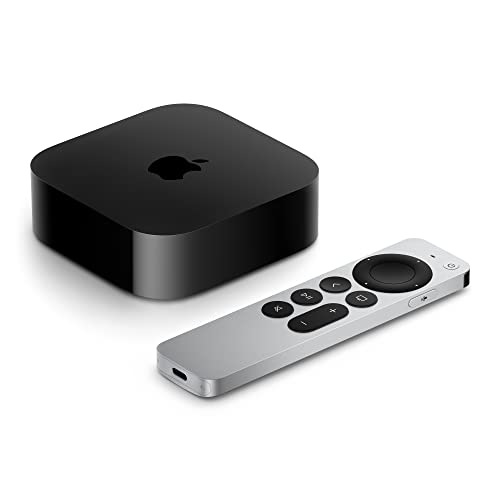
Apple TV 4K Wi‑Fi with 64GB Storage (3rd Generation)

ReliaMount Premium Mount for Apple TV
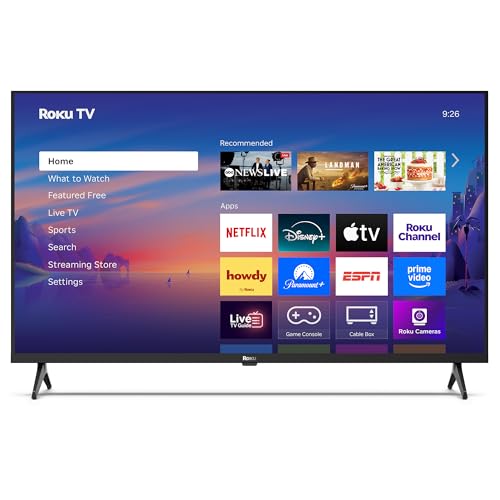
Roku 40-Inch Select Series 1080p Smart TV

Apple TV 4K 64GB Wi-Fi (3rd Gen) Renewed

Westinghouse 24-Inch Roku TV with AirPlay

Anytrox Wireless HDMI Extender 4K/1080p (Black)

Anytrox Wireless HDMI Extender 4K/1080p (White)

Sony X800H 65-Inch 4K HDR Smart LED TV
Anytrox Wireless HDMI Display Adapter Dongle
A Closer Look At Each Pick
The Apple TV 4K sits at the center of any iPhone-first living room, and the third-generation model makes that connection feel almost invisible. AirPlay routes photos, videos, and entire screen sessions from an iPhone in seconds, while the A15 Bionic chip keeps menus responsive even when several apps run in the background.
Dolby Vision and HDR10+ handle the picture side, and Dolby Atmos (a surround-sound format that places audio in three-dimensional space) shapes the audio, so content from Apple TV+ or shared iCloud libraries looks and sounds the way it was meant to. The Siri Remote’s touch-enabled clickpad makes scrubbing through a long video a one-finger job, which matters more than spec sheets suggest.
What Pays Off
- AirPlay 2 support delivers low-friction iPhone mirroring for photos, apps, and FaceTime calls.
- A15 Bionic chip keeps the interface quick under multitasking, including Apple Arcade titles.
- Dolby Vision and HDR10+ (two competing HDR formats that expand contrast and color) cover the major HDR content libraries.
- 64GB of local storage holds a solid game and app library without constant cleanup.
- Compact chassis fits neatly next to a soundbar or mounts cleanly with the ReliaMount below.
Things To Consider
- Wi-Fi-only model lacks an Ethernet port for hardwired network stability in busy households.
- Apple TV+ and most premium apps require separate subscriptions on top of the hardware cost.
Key Specs
Who It Suits Best
Shoppers already invested in the iPhone and iPad ecosystem who want one box that handles AirPlay, Apple Arcade, and Apple TV+ without compromise.
Consider Something Else When
The 40-inch Roku Select Series is a better match if you mainly need a simple AirPlay display and don’t want the extra cost of a streaming box.
ReliaMount solves a problem most shoppers forget until the Apple TV box is already open: where to put the thing. The mount sticks directly to the back of any TV and cradles every Apple TV generation, including the 4K Wi-Fi and 4K Wi-Fi + Ethernet models, so the streaming box disappears behind the panel.
For iPhone-first households, that means the AirPlay workflow stays clean. The TV remote still does the basics, the Apple TV stays hidden, and the iPhone keeps acting as the second screen, music remote, or photo source. Mounting hardware comes in the box, so installation is a one-tool job in most cases.
Notable Upsides
- Universal compatibility across every Apple TV generation saves guesswork when upgrading.
- Mounts behind the TV to keep AV furniture free of boxes and visible cables.
- Included hardware means no extra trip for screws or adhesive pads.
Worth Noting
- Attaching to the back of the TV means the Apple TV runs slightly warmer than on an open shelf.
- Owners of heavier older Apple TVs should double-check adhesive strength on textured TV backs.
Built With In Mind
Anyone with a wall-mounted TV or a minimalist media console who wants the Apple TV hidden but accessible for AirPlay sessions.
Look Elsewhere When
The Westinghouse 24-inch Roku TV is a better choice for someone starting from scratch who doesn’t yet own an Apple TV.
Roku’s 40-inch Select Series keeps things uncomplicated, which is exactly what a lot of iPhone users want. AirPlay sends content straight from the phone, the included voice remote handles app search, and the 1080p panel (a full-HD resolution of 1920 by 1080 pixels) is plenty for a bedroom or small living space.
The home screen pulls free live TV and a large app library, and for most iPhone households that means less time fiddling with input menus. Auto speech clarity and night mode help dialogue stay intelligible without blasting the volume during late-night viewing.
What It Does Well
- AirPlay compatibility for iPhone and iPad screen mirroring without extra hardware.
- Voice remote for searching across apps hands-free.
- Compact 40-inch footprint suits bedrooms, offices, and small living rooms.
Trade Offs
- 1080p resolution looks softer next to a 4K display at the same size.
- Voice control leans on a compatible Alexa device for full smart-home routines.
- Casual owners commonly report the built-in speakers are fine for news but thin for movies.
Made For
Casual viewers who want a simple AirPlay-ready display for a second room without paying for a 4K panel.
Reach For A Different Pick When
The Sony X800H fits better when movie nights happen on a bigger screen with full 4K HDR content.
Renewed units of the third-generation Apple TV 4K deliver the same AirPlay and tvOS experience as a brand-new box, which is the point. For iPhone households that want Dolby Vision and Atmos without paying the full retail price, a refurbished unit can be a sensible middle ground.
The seller side of a renewed purchase matters more than usual. Reliable delivery and responsive customer support from the marketplace seller determine how smooth the experience actually is, and that varies more than the hardware itself.
Practical Advantages
- Same A15 Bionic, Dolby Vision, and HDR10+ pipeline as a new Apple TV 4K.
- Lower entry cost makes the full Apple TV+ and AirPlay workflow more accessible.
- 64GB storage is enough for a typical app and game loadout.
Points To Keep In Mind
- Condition, packaging, and included accessories vary by seller.
- No Ethernet port on this Wi-Fi-only configuration.
- Warranty length is typically shorter than on a new unit.
Best Suited To
Cost-conscious Apple loyalists who want the full AirPlay and Apple TV+ workflow but don’t mind pre-owned hardware.
Swap It Out When
The new Apple TV 4K makes more sense for shoppers who prefer a longer warranty and untouched packaging.
Sometimes the right screen for an iPhone is a small one. The 24-inch Westinghouse Roku TV fits on a kitchen counter, a workshop bench, or a dorm-room desk, and it ships with AirPlay baked in. Send a recipe video from the phone while cooking, or queue up a YouTube clip from the couch without grabbing a second remote.
Wi-Fi and Bluetooth handle the wireless side, and the mobile app turns the phone into a fully featured remote. For a phone-first user, the TV mostly fades into the background, which is the goal.
Where It Helps
- AirPlay support means an iPhone becomes the controller, library, and casting source.
- 24-inch size slips into tight spots a 40-inch or 65-inch panel can’t.
- Bluetooth audio output routes to headphones or a small speaker without a cable.
A Few Limitations
- 720p native resolution looks soft compared to 1080p and 4K panels.
- Smaller speakers struggle in noisy kitchens with open layouts.
Right Fit For
Anyone outfitting a secondary space, like a kitchen, garage, or dorm, who wants AirPlay without a full home theater setup.
Not Your Match When
The Sony X800H is the smarter choice if the priority is a primary living room display with room-filling picture quality.
Older TVs often lack AirPlay, but the Anytrox wireless HDMI extender bridges that gap. Plug the transmitter into a laptop or streaming source, the receiver into the TV, and the dual-band 2.4 and 5GHz radios (two Wi-Fi frequency bands; 5GHz is faster but shorter-range, 2.4GHz reaches further through walls) handle the rest. It works particularly well for iPhone users who mirror through a Mac or use AirPlay-receiving apps on a connected device.
For most living rooms, the link stays stable, though a crowded Wi-Fi environment can nudge latency. That trade-off is fair given how portable and quick to set up the kit is.
Where It Excels
- Plug-and-play setup avoids fiddling with router settings or app pairing.
- Dual-band wireless support adapts to congested networks.
- Compact form factor makes it easy to relocate between rooms or take on trips.
Softer Spots
- Outputs at 1080p even when the source is 4K, so fine detail is reduced.
- Crowded wireless environments can introduce visible lag during fast motion.
Who Will Love This
Shoppers with an older non-smart TV who want iPhone content on a bigger screen without replacing the panel.
Skip It When
The Westinghouse 24-inch Roku TV is the better fit if the existing TV is small enough that a direct replacement is simpler than adding accessories.
The white version of the Anytrox extender delivers the same wireless HDMI performance as the black model, with a finish that blends into bright rooms and minimalist setups. For iPhone users who mirror content often, the white chassis reads as less intrusive near a light-colored wall or media console.
You may find the setup process feels familiar if you’ve used any plug-and-play HDMI accessory before, since the workflow is identical. In a quiet room with a clear line of sight, latency stays low enough for casual video playback.
Notable Gains
- White finish pairs well with light walls, white soundbars, and clean AV furniture.
- Same dual-band wireless reliability as the black model for steady streaming.
- Compact dongles hide behind the TV without drawing attention.
Honest Caveats
- White plastic can show dust and smudges more than darker finishes.
- Output is locked to 1080p regardless of source resolution.
Perfect Match For
iPhone households with light-toned decor who use their TV for frequent wireless casting from a phone or laptop.
A Better Fit Elsewhere
The black Anytrox extender is the smarter pick in darker rooms where the white finish would stand out.
The Sony X800H is a 2020 model that still holds up as a primary living room screen, especially for iPhone households sharing content with a group. The 4K HDR processor X1 sharpens detail across streaming apps, and the Triluminos display (Sony’s color technology that widens the visible color range) keeps skin tones and landscapes looking natural during shared movie nights.
Alexa compatibility adds hands-free control, though for iPhone-first households the more natural pairing is AirPlay from the phone to the Sony’s built-in apps. App support and firmware updates vary by region, so it’s worth confirming the app lineup still meets your needs before buying a 2020-era panel.
The Case For It
- 65-inch 4K panel gives movie and sports content room to breathe.
- 4K HDR processor X1 upscales lower-resolution content cleanly.
- Triluminos display produces a wider, more accurate color range.
- Alexa voice control works for hands-free search and playback.
Where It Is Less Suited
- 2020 model year means some newer app features may be missing.
- No dedicated gaming-focused HDMI 2.1 ports for next-gen console features.
Key Specs
Who Should Grab It
Families who gather around a big screen for shared viewing and want 4K HDR without chasing the newest model year.
Where A Sibling Pick Shines
The Apple TV 4K pairs better with an existing older TV when the goal is upgrading the smart side rather than the panel.
The Anytrox dongle is built for one specific moment: plugging into a TV you’ve never used before and casting from your iPhone in seconds. No apps to install, no Bluetooth pairing, and no shared Wi-Fi required, which makes it ideal for hotel rooms, conference setups, and short-stay rentals where the in-room screen might be older or unfamiliar.
It supports H.265 decoding (a video compression standard that squeezes 4K video into smaller files while preserving quality) and outputs 1080p at 60Hz, which is enough for streaming, casual gaming, and most presentations. Assuming the TV has a free HDMI port and a USB power source nearby, the whole setup is genuinely a one-cable affair.
Useful Highlights
- Zero-setup workflow skips app downloads and Bluetooth pairing entirely.
- 5GHz dual-band support keeps the wireless link steady in most environments.
- Compact dongle slips into a laptop bag or carry-on pocket.
Possible Compromises
- Needs a free HDMI port and a USB power source on the display.
- 1080p output won’t fully match a 4K TV’s native resolution.
Right Fit For
Travelers and remote workers who need a fast iPhone-to-TV link in unfamiliar rooms.
Skip It When
The Apple TV 4K is a better permanent home setup, since the dongle shines for short-term use rather than daily driving.
What To Weigh Before Picking A Screen For Your iPhone
AirPlay support is the most important attribute to confirm first. Without it, screen mirroring requires third-party apps that add lag and friction. Native AirPlay support, as found on the Apple TV 4K and modern Roku TVs, means the iPhone shows up in the screen menu the moment it’s nearby, which mirrors the way most people already share content.
Resolution and panel size depend on the room. A 24-inch 720p Westinghouse is fine for a kitchen counter, where a recipe video fills the screen and viewers stand a few feet away. A 65-inch 4K Sony earns its place in a living room where movie nights justify the larger canvas and finer detail. Picking the right size for the distance you actually sit avoids overspending on a panel that gets downscaled by viewing habits.
For households that stream heavily, HDR support makes a real difference. Dolby Vision and HDR10+ (the two main competing HDR formats) push brighter highlights and deeper shadows, which is most visible on a 4K screen with 4K content. On smaller HD panels, HDR gains are subtle and rarely worth prioritizing over panel size.
If you travel or present often, a wireless HDMI dongle like the Anytrox adapter sidesteps the variability of unknown TVs in hotels and offices. For permanent home setups, a smart TV or streaming box is the more reliable long-term bet, since firmware updates keep app compatibility fresh over time.
Key Considerations Across These Picks
Pitfalls Shoppers Hit
The most common mistake is buying a TV without confirming AirPlay support, then layering on a casting app that never quite feels native. Checking the listing for AirPlay 2 (Apple’s wireless streaming protocol) before purchase saves the headache later. Another slip is choosing a panel size based on sale price rather than viewing distance: a 65-inch screen in a small bedroom often looks worse than a 40-inch in the same space. Finally, ignoring Wi-Fi band support leads to stuttering streams on congested networks, especially in apartments where neighboring routers compete for the same channels.
When Paying More Pays Off
Stepping up to the Apple TV 4K or the 65-inch Sony X800H buys two things: better HDR handling and longer software support. Both pay off over years of use, since firmware updates keep apps working long after budget panels stop receiving them. For shoppers who replace TVs every five to seven years, the extra upfront cost spreads out across a much longer ownership window, and the daily experience stays smoother in the meantime.
Frequently Asked Questions
Do all smart TVs work with iPhone AirPlay?
No, only models that list AirPlay or AirPlay 2 support will mirror an iPhone natively. Roku TVs, recent Sony Android TVs, and the Apple TV 4K all support it, while older or budget panels may require a casting app or a wireless HDMI adapter instead.
Is a streaming box necessary if the TV already has apps?
For most iPhone households, no. Modern smart TVs cover the major streaming apps, and AirPlay handles the phone-to-screen handoff. A streaming box like the Apple TV 4K earns its place when you want faster updates, more consistent HDR handling, and tighter integration with Apple services.
What’s the simplest way to mirror an iPhone to a non-smart TV?
A wireless HDMI adapter like the Anytrox dongle plugs into the TV’s HDMI port and mirrors the iPhone without any app installation. The trade-off is reduced output resolution and occasional latency, but for casual use it works well.
Do these TVs need an internet connection for AirPlay?
Yes, AirPlay relies on the same Wi-Fi network for both the iPhone and the TV or streaming box. Without a shared network connection, the phone can’t discover the display and mirroring won’t start.
Can a TV be too old for iPhone screen sharing?
In practice, any TV with an HDMI input can be paired with a wireless HDMI adapter, even very old models. The limitation is usually the absence of a free HDMI port or a USB power source for the adapter, not the age of the TV itself.
Bottom Line
A smart TV that works with your iPhone should feel invisible, the way AirPlay already does on the phone itself. Match the panel size to the room, confirm AirPlay support up front, and decide whether a streaming box, a casting dongle, or a built-in smart platform fits your daily routine. The right combination turns the TV into a quiet partner for everything the iPhone already does well.
