

A video call freezes on the slide you’re presenting, or a file upload crawls to a halt right before a deadline. Your home internet setup is doing its job on weekends, but remote work days demand more. The right modem and router combo turns your home office into a space where meetings stay clear, large files move fast, and the household can stream or game without choking your video feed.
The Essentials At A Glance
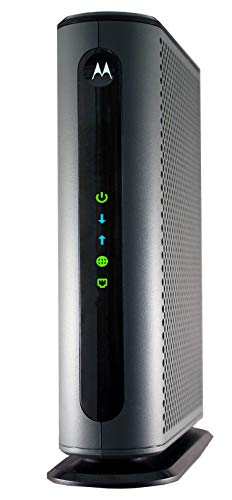
Motorola MB8600 DOCSIS 3.1 Gigabit Cable Modem

TP-Link AC1900 Smart WiFi Router (Archer A8)

Tenda AC1200 Dual Band Gigabit Router (AC10)

Tenda AC1200 Gigabit WiFi Router (AC8)

ASUS RT-AX86U (AX5700) WiFi 6 Router

Mikrotik hEX RB750Gr3 5-Port Gigabit Router

Tenda WiFi 7 Router BE7200 (BE12Pro)
More On The Choices That Made The List
If your home office runs on cable internet, the Motorola MB8600 is the type of modem that quietly disappears into the background. Built on DOCSIS 3.1, the current cable standard that supports multi-gigabit tiers, it handles service plans up to roughly 1000 Mbps and pairs with most major providers including Comcast Xfinity, Cox, and Charter Spectrum.
You get a single 1 Gbps Ethernet port on the back, which keeps cable runs simple and stable. Compared to older DOCSIS 3.0 units, the MB8600 should deliver more consistent throughput during peak hours when the neighborhood is online, which matters when you have a 10 a.m. standup and a shared deck to push.
Practical Pluses
- DOCSIS 3.1 means headroom for future speed tiers your provider may roll out, so the modem doesn’t bottleneck the plan
- Approval with Comcast Xfinity, Cox, and Charter Spectrum takes the guesswork out of activation for most households
- One-gigabit Ethernet port gives a clean wired handoff to any mesh base or prosumer router
- For remote workers paying monthly equipment fees, owning a modem of this class usually pays back the cost in well under a year
- Active queue management helps keep latency in check on video calls when several devices are active
Things To Consider
- Only one Ethernet port, so you’ll still need a separate router for WiFi and additional wired jacks
- Cable-only, so fiber and DSL households will want a different option
- Owners commonly report that ISP self-activation occasionally needs a quick chat with support, especially when swapping an old modem
Who Will Love This
Remote employees on Comcast, Cox, or Spectrum with gigabit-class cable plans who want a stable, no-fuss modem they own outright.
Look Elsewhere When
You need integrated WiFi; in that case the TP-Link AC1900 Smart WiFi Router (Archer A8) is a better fit for solo remote work without the ISP rental fee.
Plenty of remote workers only need a router that covers a small apartment, and the TP-Link Archer A8 fits that brief. It’s a Wave 2 dual-band router (a wireless standard that lets multiple devices stream at once through MU-MIMO, a feature that talks to several devices in parallel rather than one at a time) with combined speeds up to 1900 Mbps across its 2.4 GHz and 5 GHz bands.
Beamforming focuses the signal toward active devices instead of broadcasting evenly into the room, which helps in a one-bedroom or studio where your desk sits a wall away from the router. You also get guest network support, handy when a partner is on a video call and a roommate wants to hop on a separate stream without clogging the work side of the network.
The Value In It
- Beamforming helps maintain a steady link at typical apartment distances, so calls stay connected at the kitchen table
- Guest WiFi segment keeps work devices on a clean subnet when visitors or smart TVs are pulling bandwidth
- TP-Link’s app-based setup walks first-time remote workers through configuration without requiring a deep menu dive
Points To Keep In Mind
- No USB port for shared storage or printers, unlike some higher-end TP-Link siblings
- No native VPN support, so users routing through a work VPN server will need to verify compatibility with their specific setup
- Dust tends to gather on top of the ventilated housing; a quick monthly wipe keeps it cool under load
Feature Snapshot
Right Fit For
Solo remote employees in a small apartment who want solid WiFi 5 coverage without paying for features they won’t touch.
Another Choice May Suit
Larger homes with thick walls should consider the Tenda AC1200 Gigabit WiFi Router (AC8) and its four high-gain antennas.
First time setting up a home office network? The Tenda AC10 is built for that moment. It’s a dual-band AC1200 router (1.2 Gbps combined) with four full gigabit Ethernet ports, so your work laptop, a docking station, a VoIP phone, and a printer can all sit on a wired backbone without buying a switch.
MU-MIMO and beamforming handle multiple devices streaming or calling at once, which helps when family members hop online in the evening. Parental controls and a guest network are tucked into the same Tenda app, and IPv6 support keeps the router ready as ISPs continue to roll out the newer address standard.
Bright Spots
- Four gigabit Ethernet ports let a small home office skip the extra switch entirely
- Beamforming plus MU-MIMO keeps the connection steady when video calls share airtime with downloads
- The Tenda app cuts the setup process down to a few taps for non-technical users
Soft Spots
- Top wireless speed tops out below gigabit, so the WAN-to-wireless link may not match plans above 600 Mbps
- Plastic shell and four fixed antennas suggest keeping it in open air rather than tucked behind a TV
Whose Shelf It Belongs On
Remote workers new to networking who want a wired-first setup with simple app-based controls.
Reach For A Different Pick When
You want stronger wireless punch through dense walls; the Tenda AC1200 Gigabit WiFi Router (AC8) was tuned for that scenario.
The Tenda AC8 leans into one specific problem: getting usable WiFi through the brick and plaster of older buildings. Four 6 dBi high-gain antennas (rated higher than the usual 5 dBi, which is the unit used to measure how focused an antenna’s signal is) push the signal harder than typical budget routers, and dual-band AC1200 throughput keeps video calls in working order across a floor or two.
You also get three gigabit WAN/LAN ports that auto-detect the uplink, which keeps cabling simple when your modem and a desktop both need a wired seat at the table. AP mode lets the AC8 join an existing network as a wireless extender, useful if your household already has a router in another room and you just need better coverage at the desk.
Good Reasons To Consider
- Four 6 dBi antennas help the signal reach further and through denser walls, cutting the dead zones in older apartments
- AP mode turns the AC8 into a wireless extension point if the household router isn’t strong enough on its own
- Three gigabit ports that auto-detect WAN or LAN cut down on cable-swapping mistakes during install
Trade Offs
- Same AC1200 ceiling as the Tenda AC10, so it won’t unlock multi-gig fiber tiers
- Taller antenna array can look bulky in a minimalist living space, depending on where it needs to sit
Quick Facts
Best Suited To
Remote workers in older multi-room apartments with thick walls where a standard router leaves a dead zone at the desk.
Swap It Out When
Your household needs higher throughput for 4K video or large file transfers; the ASUS RT-AX86U (AX5700) is the step up.
For remote work where the network is the livelihood, the ASUS RT-AX86U brings meaningful headroom. It’s a WiFi 6 (802.11ax) dual-band router with combined throughput up to 5700 Mbps, and it includes a 2.5 Gbps WAN port so you can actually use multi-gig fiber or cable plans instead of bottlenecking at gigabit.
Subscription-free network security with AiProtection and a dedicated gaming port for low-latency devices come built in, along with VPN support and AiMesh compatibility for whole-home expansion. The Mobile Game Mode is a nice bonus for breaks between meetings, reducing jitter on phone-based play.
Useful Strengths
- 2.5 Gbps WAN port finally matches the speed of modern multi-gig internet plans without throttling the line
- WiFi 6 handles dense device environments, so a smart-home full of bulbs and speakers doesn’t squeeze the laptop
- Built-in security and VPN features keep remote work traffic protected without paying for a separate suite
Where It Is Less Suited
- Higher price tier than the budget picks above, which may not pencil out for one-person households
- Larger footprint and external antennas need a more deliberate spot on a shelf or desk for best signal
Key Product Details
Made For
Power remote workers with multi-gig fiber or cable service who run several video calls, cloud backups, and downloads in parallel.
Where A Sibling Pick Shines
Users chasing the very latest wireless standard and a private IoT network should look at the Tenda WiFi 7 Router BE7200 (BE12Pro).
The Mikrotik hEX is a wired-only five-port gigabit router with a full-size USB port and a dual-core 880 MHz CPU paired with 256 MB of RAM. There’s no WiFi built in, which is the point. It targets users who already own a wireless access point or mesh system and want a small, configurable router to sit between the modem and the rest of the network.
Powered by RouterOS, the same operating system used across Mikrotik’s prosumer and ISP-grade lineup, the hEX supports VPN, firewall rules, VLANs (virtual networks that segment traffic on a single physical cable), and bandwidth shaping for those who like to tune their setup. In a small home office, it usually lives near the modem in a closet or under a desk.
What It Does Well
- Five gigabit ports let a homelab branch into multiple wired segments without a separate switch
- USB port supports storage or a 4G modem for failover when the primary line drops mid-meeting
- Small form factor fits in a wiring closet where a louder prosumer router wouldn’t
Less Ideal Details
- No WiFi means you’ll need a separate access point for laptops and phones
- RouterOS has a learning curve; configuration through the web interface rewards patience and reading
- Plastic shell benefits from a ventilated spot, since it runs warm under sustained routing load
Who Should Grab It
Tech-savvy remote workers running a small office, homelab, or segmented network who already use a dedicated wireless access point.
Skip It When
You want WiFi in the same box; the Tenda AC1200 Dual Band Gigabit Router (AC10) is friendlier for that scenario.
The Tenda BE12Pro lands at the forward edge of home networking. As a WiFi 7 (802.11be) dual-band router with combined throughput around 7200 Mbps, it brings Multi-Link Operation (MLO), a feature that lets a device use the 2.4 GHz and 5 GHz bands at the same time, so latency drops and bandwidth grows when several streams are active.
Two 2.5 Gbps ports cover the WAN side and a fast wired link, and a quad-core CPU drives VPN and security features. A private IoT network keeps smart bulbs, thermostats, and doorbells on a separate segment from your work laptop, which is a quiet but real security upgrade for any home office.
Strengths Worth Knowing
- WiFi 7 and MLO give meaningful headroom for households stacking 4K streams, cloud backups, and meetings on the same day
- Private IoT network isolates smart-home gear from work devices, shrinking the attack surface on the laptop
- Two 2.5 Gbps ports cover both the WAN and a high-speed wired link, like a NAS (network-attached storage) or workstation
Worth Bearing In Mind
- Real-world WiFi 7 gains depend on having WiFi 7 client devices, so older laptops won’t see the full benefit
- OpenWRT support is listed, but the out-of-the-box experience already covers most households
Feature Rundown
Perfect Match For
Remote workers with newer devices, multi-gig internet, and a smart home who want one box to anchor both work and play traffic.
Consider Something Else When
You’re on a tighter budget or older client hardware; the TP-Link AC1900 Smart WiFi Router (Archer A8) is the simpler way to cover a small space.
What To Weigh Before Picking Modems For Working From Home
Match The Modem To The Service Tier
DOCSIS 3.1 modems like the Motorola MB8600 are the current standard for cable internet above 300 Mbps, and they keep your options open as providers push gigabit and multi-gig tiers. If your plan is closer to 100 or 200 Mbps, an older DOCSIS 3.0 modem will technically work, but the 3.1 headroom tends to age better. Fiber subscribers should skip modems entirely and look at routers with a 2.5 Gbps WAN port, like the ASUS RT-AX86U.
WiFi 5 vs WiFi 6 vs WiFi 7 In Daily Use
WiFi 5 (802.11ac) still does the job for a one-room setup with a few devices. WiFi 6 (802.11ax) is the sweet spot for most homes because it handles dense device environments, like a household with smart speakers, TVs, and laptops all active. WiFi 7 (802.11be) is the future-facing pick; MLO and higher throughput help when you have WiFi 7 client devices and multi-gig service, though older devices won’t see the full benefit.
Port Count And Wired Backbone
Even with strong WiFi, a wired connection remains the most reliable anchor for a work laptop. Look for at least three gigabit Ethernet ports, with one set as a dedicated WAN port. The Mikrotik hEX shows what a five-port wired-first router can do for segmented home offices, and the Tenda AC10 gives four gigabit LAN ports in a more beginner-friendly shell.
Coverage, Antennas, And Apartment Layouts
Antenna gain, measured in dBi, hints at how far the signal can push. The Tenda AC8’s four 6 dBi antennas outclass typical 5 dBi designs, which helps in older buildings with thick walls. For very large homes, a single router is rarely enough, and AiMesh-compatible units like the ASUS RT-AX86U can pair with a second node to extend coverage without rebuilding the network.
Key Considerations Across These Picks
Where Shoppers Go Wrong
A common slip is buying the cheapest DOCSIS 3.0 modem for a gigabit plan, which throttles the line the moment it’s installed. Another is pairing a budget WiFi 5 router with multi-gig fiber, leaving gigabit-plus speeds stranded at the WAN port. Verify the modem is approved for your ISP and that the router’s WAN port speed matches your plan before anything leaves the cart.
The Upgrade Payoff
Premium picks like the ASUS RT-AX86U and the Tenda BE12Pro earn their price through three things: faster WAN ports that match multi-gig service, more CPU horsepower for VPN and security work, and stronger WiFi 6 or WiFi 7 radios that stay fast in dense homes. The upgrade pays off when you run parallel video calls and cloud backups, or when your household is full of streaming and smart-home devices. For a one-person studio on a 200 Mbps plan, the value picks are the more honest spend.
Frequently Asked Questions
Do I Need A Separate Modem And Router?
Most cable and DSL providers still hand out combo units, but using a separate modem and router usually gives better performance and easier upgrades. The Motorola MB8600 plus a router of your choice is a typical pairing. Fiber gateways often include a router, so a separate router is optional unless you want stronger WiFi.
Is WiFi 6 Worth It Over WiFi 5?
For most remote workers in 2026, yes. WiFi 6 handles more simultaneous devices with less congestion, which matters as smart-home gear multiplies. The ASUS RT-AX86U is a strong middle-ground pick. WiFi 5 still works for very small apartments with few devices.
Will A Better Modem Make My Internet Faster?
Only up to the speed tier you pay your ISP for. A DOCSIS 3.1 modem on a 300 Mbps plan won’t make the line faster, but it will let the plan run at full speed without bottlenecks. To unlock gigabit-plus service, the modem and router both need to support it, which is where picks like the Motorola MB8600 and the ASUS RT-AX86U pair well.
How Long Do Home Modems And Routers Last?
Most modern units run reliably for four to six years, though ISP standards and WiFi generations shift faster than the hardware fails. Owners commonly report that the first sign of aging is dropped connections under load, which is a cue to check for firmware updates before replacing anything. Upgrading to current WiFi or DOCSIS standards every five years keeps the network competitive.
Can I Use My Own Equipment With Major ISPs?
Comcast Xfinity, Cox, and Charter Spectrum all allow customer-owned modems on most plans, and they publish approved lists. The Motorola MB8600 appears on those lists for gigabit service. Activation is usually self-service, with a quick ISP support call needed only when swapping an existing rental unit.
Final Verdict
Match the modem to your ISP plan, match the router to the size of your home, and make sure the two work well together. The Motorola MB8600 and a router from this list will anchor most remote work setups without much fuss. If your home is dense with devices or you’re on multi-gig service, lean toward the ASUS RT-AX86U or the Tenda BE12Pro. Whatever you choose, owning the hardware usually pays for itself in less than a year of skipped rental fees.




