

Picking the right indoor camera changes how a home actually feels day to day. You get a quiet eye on the front entry, the nursery, the kitchen, or the home office without rerouting your routine. The seven models below span wired and wireless setups, single-lens and fisheye, casual monitoring and full NVR (network video recorder) bundles, so there is something here whether you want a plug-and-go pet check-in or a multi-camera system with local storage.
An Overview Of The Picks

REOLINK PoE Fisheye Camera 6MP with RLN8 Bundle

REOLINK E1 Zoom 8MP PTZ Indoor Camera 2-Pack

REOLINK E1 Pro 5MP Indoor Security Camera 2-Pack

REOLINK E1 Pro 3K Dual-Band WiFi Indoor Camera

REOLINK E1 Zoom 4K Indoor Camera with WiFi 6

REOLINK E1 Pro with Home Hub Pro 2TB Bundle
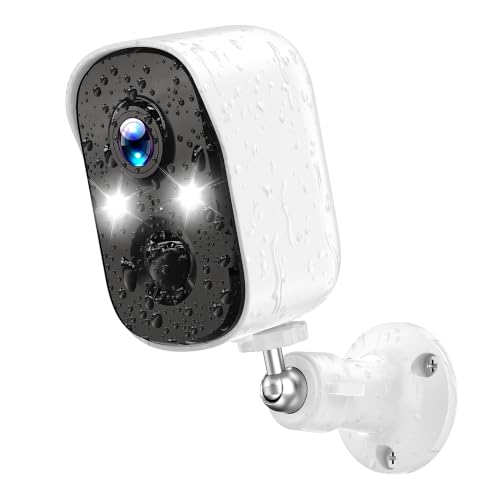
4MP Wireless Outdoor Security Camera
Taking A Closer Look At The Options
Where most of the picks in this roundup lean on WiFi, this one runs over PoE (Power over Ethernet, meaning a single network cable carries both data and power). That single-cable approach keeps installation tidy in a finished home and means no flaky router dropouts mid-stream. The bundle ships with two FE-P white fisheye lenses and an RLN8-410 NVR (network video recorder) carrying a 2TB HDD (hard disk drive) inside, so you record locally without paying monthly cloud fees.
The fisheye lens renders a full 360-degree view from a single mount point, which works beautifully in open-plan living areas, retail floors, or a large home office. You also get multiple panoramic display views in the app, so a wide ceiling-mounted lens can be split into flat, corridor, or quad-screen layouts depending on the scene. For shoppers who want a more plug-and-go option, the E1 Zoom models below skip the cable run entirely.
Key Advantages
- Local 2TB recording through the included NVR means no recurring cloud subscription
- Single PoE cable per camera simplifies install in attics, basements, or retrofit rooms
- 360-degree fisheye with multiple display modes covers wide rooms from one mount
- Six-megapixel sensor holds detail even when zoomed into one quadrant of the panoramic view
- Stable wired connection suits spaces where WiFi congestion is a known headache
Worth Noting
- Running Ethernet cable through walls takes more planning than a plug-in WiFi cam
- Fisheye geometry can look distorted at the edges in the flat unwrap mode
Key Product Details
Who It Suits Best
Owners planning a permanent, wired whole-home system and comfortable running Ethernet through crawl spaces or conduit.
Consider Something Else When
Renters who cannot drill or run cable should look at the wireless REOLINK E1 Zoom 4K Indoor Camera with WiFi 6 instead.
The E1 Zoom 2-Pack is the workhorse for parents and pet owners who want to follow a subject around a room rather than stare at one corner. The PTZ mechanism (pan, tilt, and zoom in a motorized head) physically rotates to track a person or pet, while 3x optical zoom keeps faces legible from across a living room without losing clarity the way digital zoom does. You get an 8MP sensor on each unit, which is genuinely useful when zooming into a crib or a dog crate.
Dual-band WiFi (2.4GHz and 5GHz) lets you pick the band that works best in your space. Use 5GHz near the router for smoother streaming, or switch to 2.4GHz when the camera sits at the far end of the house. Two-way audio and Google Home support round it out for quick check-ins from a smart display.
A Few Highlights
- 3x optical zoom keeps faces clear at distance, unlike digital crop zoom
- Auto-tracking follows toddlers and pets between rooms on its own
- Dual-band WiFi adapts to crowded apartment networks
Points To Note
- Motorized PTZ parts wear over years of constant rotation in high-traffic rooms
- Two-way audio is fine for a quick hello but not a substitute for a baby monitor
Made For
Pet parents and parents of mobile toddlers who want the camera to follow the action across a single large room.
Skip It When
Households planning a wired multi-room build should look at the REOLINK PoE Fisheye Camera 6MP with RLN8 Bundle instead.
Two E1 Pro cameras in one box make this the easiest multi-room starter kit on the list. Set one in the living room and one in the hallway, and you cover a typical apartment floor plan without juggling separate orders. Each unit delivers 5MP resolution (commonly labeled 3K), which holds up well when you need to read a label on a package or see who is at the door through the peephole cam.
The motorized head auto-tracks motion, so the camera follows a dog wandering between sofa and kitchen. Person and pet detection cut down on pointless alerts from ceiling fans or shifting curtains. Local storage support via microSD keeps everything on-device, which keeps recurring fees out of the picture.
Useful Highlights
- Two-camera bundle covers a typical small home on day one
- Auto-tracking keeps the subject framed without manual nudging
- Local microSD storage avoids monthly cloud charges
- Night vision rated for darker rooms
Trade Offs
- No optical zoom, so far-room details rely on digital crop
- Two-way audio is workable but tinny compared to dedicated baby monitors
Quick Facts
Right Fit For
Small households and apartments that want two-camera coverage out of one box without paying for cloud tiers.
Look Elsewhere When
Anyone wanting stronger optical zoom for far-room detail should pick the REOLINK E1 Zoom 8MP PTZ Indoor Camera 2-Pack instead.
The single E1 Pro 3K is the right answer when you only need one camera but still want a real upgrade from a basic 1080p webcam. Its 5MP sensor pushes 2880×1616 footage, which holds up well on a phone screen and even better on a tablet. The F1.6 lens aperture (a measure of how wide the lens opens to let light in) helps in dim rooms, so a darker nursery still reads cleanly at night.
Dual-band WiFi gives you flexibility on where you place it, and Bluetooth pairing trims setup time during the first install. For parents or remote workers wanting one quiet, reliable eye in a single room, this is a tidy fit.
Why It Works Well
- 3K resolution stays sharp on large phones and tablets
- F1.6 lens aperture helps in dimly lit rooms without extra lighting
- Bluetooth-assisted pairing cuts initial setup friction
Some Limits To Know
- No optical zoom, so cropping reduces clarity at distance
- Single-camera kit means buying another unit if coverage expands
Best Suited To
A single-room owner (home office, nursery, or small studio) wanting one sharp, no-fuss camera without committing to a multi-pack.
A Better Fit Elsewhere
Households covering two or three rooms from day one should grab the REOLINK E1 Pro 5MP Indoor Security Camera 2-Pack for better value.
When you want the sharpest indoor footage available without going wired, the E1 Zoom 4K is the natural step up. The 4K sensor combined with 3x optical zoom makes a real difference when you need to read a serial number off a box across the room or confirm a face from a doorway camera angle. WiFi 6 support (the latest wireless standard, designed to handle more devices at once with less congestion) keeps streaming smooth even on busy home networks.
Auto-tracking follows the action, and the motorized head pans and tilts to cover the full 360-degree field. The F1.6 lens aperture also helps when lights are off, so a hallway at midnight still reads cleanly. For shoppers focused purely on image quality and zoom reach, this is the indoor pick to beat.
Noteworthy Benefits
- 4K resolution paired with 3x optical zoom keeps detail intact at distance
- WiFi 6 support reduces lag and stutter on crowded networks
- Auto-tracking pairs with PTZ motion for true room coverage
- Wide-aperture lens improves low-light performance
What To Weigh
- Premium sensor comes at a noticeably higher cost than 5MP siblings
- Requires a modern WiFi 6 router to fully benefit from the wireless standard
Feature Snapshot
Who Should Grab It
Detail-focused shoppers who want maximum zoom clarity and have a modern router to pair with WiFi 6.
Reach For A Different Pick When
Anyone wanting a full local-recording bundle out of the box should pick the REOLINK E1 Pro with Home Hub Pro 2TB Bundle instead.
Privacy-focused households tend to dislike the idea of footage leaving the home, and that is exactly what the Home Hub Pro bundle is designed around. The hub sits on your network with a 2TB HDD inside, and recordings stay local rather than riding off to a cloud server. The included E1 Pro cameras still deliver the same 5MP clarity and dual-band WiFi as the standalone model above.
Bluetooth-assisted setup makes the first pairing faster than wrestling with QR codes. You also get a clean path to expand later, since the hub accepts additional compatible cameras without forcing you to swap out what you already own. Compared to the fisheye bundle at the top of this list, the approach here is hub-based rather than PoE-wired.
The Upside
- Local 2TB hub storage avoids cloud subscriptions entirely
- Bluetooth pairing shortens initial setup
- Hub is expandable for future camera additions
- Keeps sensitive footage inside the home network
Possible Compromises
- Hub adds an extra box to place near the router and keep powered
- Higher upfront cost than a single-camera kit
Feature Card
Whose Shelf It Belongs On
Privacy-leaning households that want footage stored locally and a clean expansion path later.
Swap It Out When
Anyone wanting a wired backbone over Cat5/Cat6 cable should grab the REOLINK PoE Fisheye Camera 6MP with RLN8 Bundle instead.
The list leans indoor so far, but a real home setup usually needs eyes on the porch, the driveway, or the side gate too. This Nikoglly 4MP bullet camera (a traditional cylindrical camera shape suited to outdoor mounting) is fully wireless, so you mount it where the router signal reaches and skip the cable run. Its 2560×1440 resolution captures faces and license plates cleanly, which matters most on an outdoor camera.
H.265 encoding (a video compression standard) cuts storage needs in half compared to the older H.264, so your card or cloud holds roughly twice the footage for the same capacity. Flexible storage means you can pick microSD, NVR, or cloud depending on what fits the rest of your setup. For shoppers adding a single outdoor eye to an indoor system, this is the natural outdoor companion to the REOLINK models above.
What Pays Off
- Wireless install reaches porches and gates without trenching cable
- H.265 compression doubles recording time on the same storage
- 4MP clarity captures faces and plates at typical entry distance
- Works indoors too, useful for garage or basement spots
Where It Is Less Suited
- Wireless signal can falter at far corners of large properties
- Outdoor mounting may require a ladder and weatherproof sealing around any cable entry
Built With In Mind
Shoppers wanting one or two outdoor cameras for a porch, driveway, or side entry without running Ethernet.
Another Choice May Suit
Anyone building a fully wired multi-camera security system should instead choose the REOLINK PoE Fisheye Camera 6MP with RLN8 Bundle.
Picking The Right Indoor Camera Without Overbuying
Start With The Network You Already Have
Wired PoE systems deliver rock-solid reliability but require running Ethernet cable, which most renters and many homeowners want to avoid. WiFi cameras mount in minutes and pair through a phone app, but stream quality depends on router placement and how many devices already compete for bandwidth. Homes with a recent WiFi 6 router can lean confidently on wireless picks, while older routers may push you toward the PoE bundle.
Match Resolution And Zoom To The Room Size
A 5MP sensor covers most nurseries, home offices, and kitchens beautifully, while 4K and optical zoom earn their keep in larger living rooms where you genuinely need to read detail across the room. Smaller rooms rarely benefit from 4K, and the extra cost often goes unnoticed on a phone screen.
Decide How Recordings Should Be Stored
Local storage on a microSD card or a hub keeps footage at home and avoids subscription fees, which suits privacy-focused households. Cloud tiers add remote access and off-site backup but cost monthly. The REOLINK Home Hub Pro bundle is built around the local-first approach, while many standalone WiFi cameras lean cloud by default.
Think About Alerts And False Triggers
Person and pet detection cuts down on pointless notifications from ceiling fans or shifting shadows. Auto-tracking is a real convenience when you want the camera to follow a toddler or dog across a room rather than staring at an empty corner. Look for these features when alerts feel like a chore on simpler cameras.
Key Considerations Across These Picks
Pitfalls Shoppers Hit
A common stumble is choosing a high-resolution camera and mounting it on a weak WiFi signal, which produces choppy footage that wastes the extra pixels. Another trap is buying a single fixed camera for a large open-plan space and expecting it to cover everything, when a PTZ (pan/tilt/zoom) or fisheye design would actually fit the room. Finally, overlooking storage type leads to surprise subscription fees a year later, so confirm the recording path before checking out.
When Paying More Pays Off
Higher-tier models earn their premium through optical zoom (which preserves clarity at distance), WiFi 6 (smoother streaming on busy networks), and local hubs (no recurring fees). The jump makes sense in larger homes, busy networks, or households that want footage to stay private. For a single small room on a budget router, a mid-range pick usually delivers everything you actually need.
Frequently Asked Questions
Do indoor cameras need WiFi to work?
Most modern indoor cameras stream live view and send alerts over WiFi, but several models in this list support local recording to a microSD card or hub so footage still saves even if the internet drops. Wired PoE (Power over Ethernet) cameras in particular keep recording locally without any WiFi at all.
How many cameras does a typical home need?
A small apartment usually needs one or two cameras, while a single-family home often starts with three to four covering main entry points and shared rooms. Adding more later is normal once you see what each camera actually captures.
Is 4K resolution worth it for indoor use?
For most rooms, 5MP (3K) is plenty sharp on phones and tablets, and 4K earns its keep mainly when you also want optical zoom to identify faces across a larger room. Smaller nurseries and offices rarely benefit from the extra resolution.
Can these cameras work without a subscription?
Yes, every model here supports some form of local recording on a microSD card, a hub, or an NVR. Cloud subscriptions are optional add-ons for off-site backup or extended history, not requirements.
Are indoor cameras safe from hacking?
Keeping cameras on a strong WPA2 or WPA3 WiFi password, updating firmware when prompted, and choosing local-storage models all reduce risk. Cameras that never connect to third-party cloud servers limit exposure by design.
Wrap Up
The right indoor camera comes down to your space, your network, and how you want footage stored. Start with the room you care about most, pick the resolution and zoom that match its size, and decide whether local or cloud storage fits your comfort level. Any of the seven picks here will do the job well; the differences come down to the specifics of your home.




