

You want a clear view of what’s happening at home, but the camera aisle pulls in every direction: tiny nanny-cam-style units, indoor pan-tilt models, outdoor floodlight hybrids, and dedicated baby monitors. This list sorts nine solid picks by use case so a quick check on the couch or a porch with no existing wiring both have a sensible option.
Your Options, Compared
JEWKTTONS Mini WiFi Security Camera, 1080P 2-Pack

Ring Indoor Cam (2nd Gen) with Pet Tag

Ring Floodlight Cam Wired Plus

Ring Indoor Cam 2-Pack (Black)

GoodBaby 5″ Baby Monitor (No WiFi)

GoodBaby Baby Monitor (No WiFi)
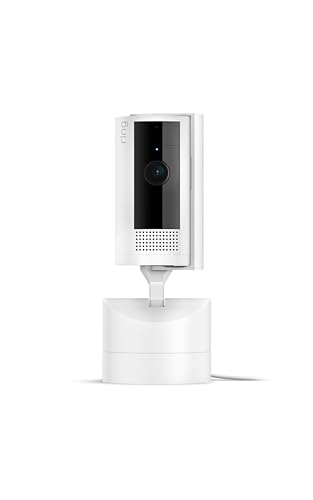
Ring Pan-Tilt Indoor Cam
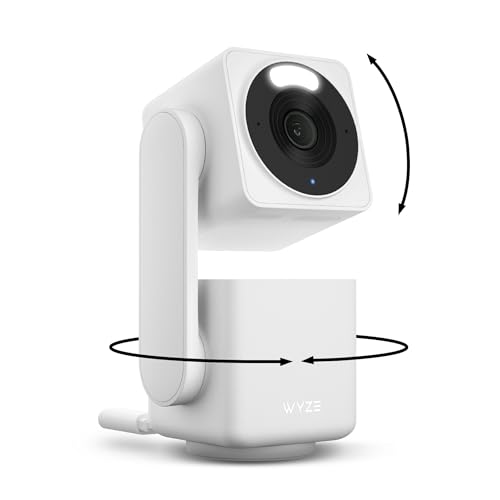
WYZE Cam Pan v4 4K
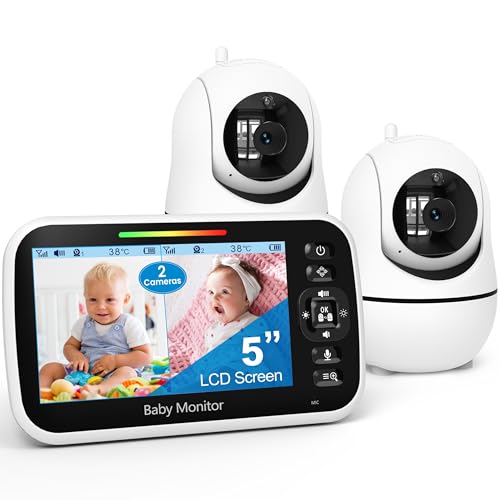
GoodBaby 5″ Split Screen Monitor
The Picks, Examined More Closely
Small enough to tuck on a bookshelf or a kitchen counter, this two-pack leans on a 1080P sensor and a 150° wide-angle lens to cover broad stretches of a room. It runs on the 2.4GHz Wi-Fi band, which is the longer-range, more wall-penetrating of the two common Wi-Fi frequencies and the one most home routers still broadcast strongly.
Owners commonly use one unit as a baby or pet cam and the second as an entryway check. For shoppers who want a low-key starter without an ecosystem lock-in, the form factor is the draw here.
The Practical Payoff
- Dual-camera bundle covers more square footage on day one, useful for open apartments and small offices.
- 150° lens keeps a single unit from missing corners when you can’t mount it on a wall.
- Motion-triggered auto-record runs in the background so a quick glance later still shows what happened.
- 2.4GHz Wi-Fi compatibility means it usually pairs with older routers without extra hardware.
Things To Consider
- 2.4GHz-only support can feel slower on crowded networks than dual-band models like the WYZE Cam Pan v4.
- Compact housings collect dust quickly in kitchens; a quick wipe-down every couple of weeks keeps the lens clear.
- No pan-tilt motor, so repositioning means physically moving the unit rather than swiping on a phone.
Quick Facts
Best Suited To
First-time shoppers setting up a multi-room starter system on a tight budget who don’t need pan-tilt control.
Skip It When
The Ring Pan-Tilt Indoor Cam suits shoppers who want app-driven 360° coverage from a single mounted unit.
This bundle pairs a second-generation Ring Indoor Cam with a small Ring Pet Tag, a Bluetooth-tracked accessory designed to help locate a lost pet. The camera itself runs on a 10-foot power cable, which gives you enough slack to mount it on high shelves or tuck it into corners where the closest outlet is awkward.
For renters and pet households, the appeal is the integrated ecosystem rather than raw specs. You manage alerts, motion zones, and the Pet Tag from the same Ring app.
A Favorable Mix
- The 10-foot cable adds placement freedom over shorter stock cords on competing indoor units.
- The bundled Pet Tag covers two needs in one order: an indoor cam and a finder for a curious cat or dog.
- Customizable motion zones let you silence alerts from a hallway while keeping an eye on a crate.
- Mounts on a flat surface, wall, or ceiling without extra hardware.
Worth Noting
- This 2nd Gen cam is incompatible with 1st Gen accessories, so anyone upgrading needs new mounts.
- Tethered to the Ring app for advanced features, which means smartphone reliance during setup.
Who It Suits Best
Renters with one or two pets who want a tidy, app-managed setup and don’t mind wired power.
Consider Something Else When
The GoodBaby 5″ Baby Monitor (No WiFi) is a calmer fit for parents who prefer a closed-network monitor over smartphone alerts.
This hardwired floodlight cam replaces an existing outdoor light fixture, so installation requires a junction box and a standard 100-120V AC line. In return you get motion-activated floodlights plus 1080p video and a 105dB siren, the kind of layered deterrent that suits a driveway, a side yard, or a back deck.
Unlike the indoor-only units earlier in this list, it operates in weather-resistant conditions from roughly 5°F up to 122°F. For homeowners with existing outdoor wiring, the all-in-one design removes the need to mount a separate light.
Features That Help
- Motion-activated floodlights double as a security cue and a practical porch light for late arrivals.
- Hardwired power means no battery swaps in cold months, an issue with many outdoor cams.
- Wide operating temperature range suits most U.S. climates without weatherproofing add-ons.
- Customizable motion zones reduce false alerts from passing cars or sidewalk foot traffic.
Room For Improvement
- Requires existing junction-box wiring; installation is more involved than a plug-in indoor unit.
- 1080p resolution is solid but trails the 4K output of the WYZE Cam Pan v4 for distant detail.
Quick Facts
Built With In Mind
Homeowners with existing outdoor wiring who want a deterrent-grade floodlight plus camera in one fixture.
Look Elsewhere When
The WYZE Cam Pan v4 fits shoppers wanting a single indoor/outdoor cam without rewiring a junction box.
Two 1080p indoor cams in black, run through the same Ring app as the floodlight and doorbell lines, which makes this a natural add-on for anyone already in that ecosystem. Each unit ships with the same 10-foot cable as the smaller white bundle, which sounds minor but solves the “where’s the outlet” problem for most living rooms.
Compared with the JEWKTTONS 2-pack earlier, the appeal here is unified software and a known app experience rather than a different hardware package.
What Pays Off
- Two-camera pack covers a living room and a hallway from a single order, an efficient starter for new homeowners.
- Unified Ring app means alerts and motion zones are tuned in one place across cams.
- Long power cable simplifies shelf or ceiling placement in older homes with awkward outlets.
Points To Note
- No pan-tilt motor on either unit; coverage is fixed once mounted.
- Same 2nd Gen compatibility caveat as the white bundle: 1st Gen Ring accessories don’t carry over.
- Indoor-only, so this doesn’t address a garage or backyard.
Right Fit For
Shoppers building a wider indoor Ring setup who already use the app for a doorbell or outdoor cam.
Swap It Out When
The Ring Pan-Tilt Indoor Cam is a smarter single-cam pick when one 360° unit beats two fixed-angle cams in an open space.
A dedicated 5-inch parent unit pairs with a nursery camera over a closed radio link rather than your home Wi-Fi, which keeps video off the internet entirely. The camera supports 355° pan and 120° tilt from the parent unit, with roughly 1,000 feet of open-air range for moving between floors.
For parents wary of any internet-connected camera in a nursery, the closed network design is the headline feature here. Setup is plug-in-and-go.
Well-Handled Touches
- No Wi-Fi means no app, no accounts, and no cloud uploads from the nursery.
- 355° pan and 120° tilt let you follow a rolling baby without entering the room.
- 1,000-foot range handles most two-story homes with the parent unit downstairs.
- 2x zoom pulls in closer views of a crib without disturbing the baby.
Trade Offs
- Parent unit is the only screen; no smartphone streaming from a date night out.
- Single-camera kit, so a second room requires the split-screen model reviewed later.
Feature Snapshot
Made For
Privacy-first parents who want a dedicated screen and no cloud connection in the nursery.
Where Another Pick Suits Better
The GoodBaby 5″ Split Screen Monitor fits households managing two rooms from a single parent unit.
Closely related to the prior GoodBaby pick, this single-camera closed-network monitor trims a few extras while keeping the same 355° pan, 120° tilt, 2x zoom, and roughly 1,000-foot range. The 3500mAh rechargeable battery inside the parent unit runs for up to 30 hours in audio-only VOX mode (a power-saving feature that wakes the screen only when the nursery camera picks up sound).
For one-room setups, this is the simpler sibling of the split-screen option reviewed last.
What Stands Out
- 30-hour VOX battery life covers overnight stretches without a charge.
- Closed-network design keeps the feed off home Wi-Fi entirely.
- Full pan-tilt means one camera covers a nursery from any corner.
- 5-inch screen is large enough to read a sleeping face from across a room.
Minor Gripes
- Single camera only; expanding to two rooms requires the split-screen bundle.
- VOX mode silences the screen during quiet stretches, which can mask subtle breathing changes.
Whose Shelf It Belongs On
Single-nursery households that value battery life and want a clutter-free closed-network monitor.
Reach For A Different Pick When
The WYZE Cam Pan v4 fits a household that wants pan-tilt plus app access rather than a dedicated parent unit.
The pan-tilt mount on this indoor Ring cam rotates 360° horizontally, so a single shelf-mounted unit can sweep an entire open-plan living room or studio. Two-Way Talk turns the parent unit into a quick intercom for telling a dog to get off the couch, and color night vision gives the feed usable contrast after lights out.
For households that prefer one well-placed cam over multiple fixed-angle units, this sits between the static Indoor Cam 2-pack and the broader-coverage WYZE.
Notable Gains
- 360° app-controlled pan means a single unit covers what two static cams would in an open room.
- Two-Way Talk handles quick corrections for pets or kids without entering the room.
- Color night vision keeps the feed readable in low light, unlike older black-and-white night modes.
- Integrates with other Ring devices for shared app alerts.
Honest Caveats
- Mechanical pan-tilt adds moving parts that may wear faster than static housings.
- Best paired with the Ring app for full functionality; standalone use is limited.
Perfect Match For
Open-plan living spaces where one well-placed pan-tilt cam replaces multiple fixed units.
A Better Fit Elsewhere
The Ring Floodlight Cam Wired Plus suits outdoor coverage needs where this indoor unit stops at the wall.
Where most home cams stick to 1080p, this unit pushes 4K resolution and pairs it with 360° horizontal pan plus 180° vertical tilt. The IP65 weather rating, a standard measure of dust and water resistance, lets it live outdoors under an eave, which is rare for a pan-tilt body. Dual-band Wi-Fi (2.4GHz plus 5GHz) handles the higher bandwidth that 4K video demands.
It’s the most versatile single unit on this list, the kind of cam that moves between an entryway and a patio without buying a second device.
Useful Touches
- 4K resolution captures detail at distance, useful for license plates and porch faces.
- IP65 weather rating means indoor or outdoor placement without a separate housing.
- 8x digital zoom lets you crop into a region without losing the wider pan-tilt view.
- Dual-band Wi-Fi support keeps the 4K stream steady on a modern router.
- Works with Alexa and Google Assistant for voice-driven live views on a smart display.
Small Caveats
- 4K streams demand more storage and bandwidth than 1080p units, so a memory card fills faster.
- Mechanical pan-tilt housing is bulkier than static indoor cams like the JEWKTTONS mini.
Who Should Grab It
Shoppers who want one cam that swings between indoor and outdoor duty without sacrificing image detail.
Not Your Match When
The GoodBaby 5″ Baby Monitor (No WiFi) is a calmer nursery fit that keeps the feed off your home network entirely.
For two-room nurseries, a single 5-inch parent unit displays both cameras side by side. Audio focus stays on one camera while a SCAN mode rotates the audio feed every 15 seconds, so you hear sound from each room in turn. The system expands to four cameras on one parent unit for larger homes or sibling setups.
Compared with the single-camera GoodBaby earlier, this trades the extra runtime of a simpler kit for the second room view that a growing family actually needs.
Positive Points
- Split-screen view lets you watch two rooms without swapping feeds manually.
- SCAN mode alternates audio every 15 seconds so quiet rooms still get heard.
- Expandable to four cameras on one parent unit, useful for a sibling move or a playroom add-on.
- Closed-network design keeps video off the home internet.
Worth Bearing In Mind
- Audio focus stays on one camera, so simultaneous audio monitoring isn’t possible.
- Battery life runs shorter than the single-camera kit when both feeds are active.
Built With In Mind
Parents with two nursery-aged kids who want one parent unit instead of juggling multiple screens.
Where A Sibling Pick Shines
The WYZE Cam Pan v4 works better for older households wanting app-driven pan-tilt across rooms.
What Matters Most Before Choosing Home Monitoring Cameras
Start with where the camera will live. Indoor units are lighter and quieter, but outdoor models need weather resistance and hardwired or weather-tolerant power. A porch or driveway with existing wiring opens up floodlight options; an apartment with renters’ rules usually pushes you toward plug-in indoor units.
Resolution is the next filter. 1080p is fine for face identification within a room. For driveways or larger yards, 4K captures license plates and farther detail, though it chews through storage faster.
Connectivity matters more than people expect. Dual-band Wi-Fi (2.4GHz and 5GHz) handles bandwidth-heavy streams; 2.4GHz-only models travel farther through walls but can feel sluggish on crowded networks. Closed-network monitors skip Wi-Fi entirely, which trades app access for stronger privacy.
Finally, decide whether you need pan-tilt. A single pan-tilt unit can replace two fixed cameras in an open room, while fixed-angle units usually deliver sharper detail per dollar in smaller spaces.
Pitfalls Shoppers Hit and Where The Extra Money Goes
Mistakes Worth Dodging
Buying an outdoor cam without checking the power source is the most common slip. A floodlight cam that needs a junction box won’t work where there’s only an outlet, and a plug-in unit won’t survive a covered patio as well as a hardwired one. Match the install to the home, not the other way around.
The second pitfall is assuming more megapixels solve every problem. A 4K cam with bad Wi-Fi produces a stuttering feed that’s harder to review than a steady 1080p one. Test the signal strength at the mount location before committing.
The Upgrade Payoff
Higher-tier picks usually buy three things: better sensors for low-light clarity, weatherproofing for outdoor placement, and pan-tilt mechanics for wider coverage. The jump is most worth it for households that want one well-placed unit to cover an open-plan space, rather than stacking multiple fixed-angle cams.
Frequently Asked Questions
Do I need Wi-Fi for a home monitoring camera?
Not always. Closed-network baby monitors like the GoodBaby 5″ pair the camera and parent unit over a private radio link, which keeps video off your home internet entirely.
Can indoor cameras go outside?
Generally no. Indoor units lack the IP rating (the standardized Ingress Protection score for dust and water resistance) to handle rain or temperature swings, so an outdoor-rated model is the safer pick for any exterior surface.
How important is resolution for home monitoring cameras?
1080p covers most indoor room sizes well. 4K earns its place in larger outdoor spaces where you need to read detail at a distance, like a driveway or backyard gate.
What is pan-tilt on a security camera?
Pan-tilt is a motorized mount that rotates the camera horizontally and vertically, so a single unit can sweep an entire room from one corner rather than relying on a wide-angle lens alone.
Are wireless home monitoring cameras battery-powered?
Some are, but most mains-powered units use a long cable for steady recording. Battery models trade runtime for placement flexibility, and most need recharging every few weeks depending on activity.
Bottom Line
The right pick depends on the room, the wiring, and how much you want to fiddle with an app. A closed-network monitor handles a single nursery with zero privacy concerns, a pan-tilt indoor cam covers open living areas, and a hardwired floodlight unit watches the perimeter. Pick the constraint that matters most, then match the cam to it.




