

A front door does more work than any other entry point, and the lock on it quietly shapes daily life: fumbling for keys with full hands, passing a code to a dog walker, handing out temporary access to a contractor. The picks below run from a traditional keyed entry set with SmartKey re-keying, through keypad deadbolts with auto-lock, all the way to app-driven locks with fingerprint readers and WiFi. Mechanical reliability and digital convenience both matter here, so each item gets weighed on what it actually delivers for the way real households use a door.
A Quick View Of The Lineup

Kwikset Tustin Front Door Lock Set with SmartKey

Kwikset 83223-514 Deadbolt Strike Iron Black

Smart Door Lock with Video Doorbell and Fingerprint

Kwikset SmartCode 270 Touchpad Deadbolt (Satin Nickel)

Kwikset SmartCode 260 Keypad Deadbolt (Matte Black)

Kwikset SmartCode 260 Keypad Deadbolt (Satin Nickel)
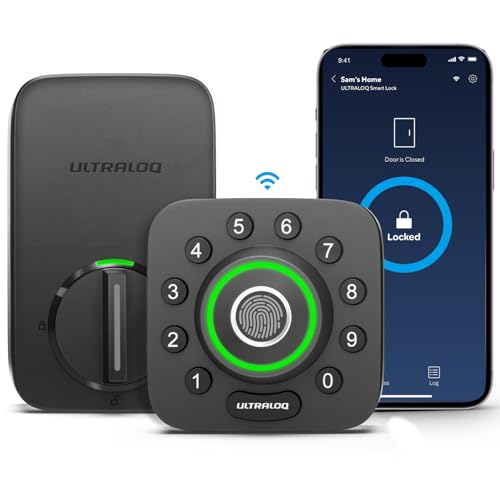
ULTRALOQ U-Bolt Pro WiFi Smart Lock

ULTRALOQ Bolt SE Wi-Fi Smart Lock (Matter)
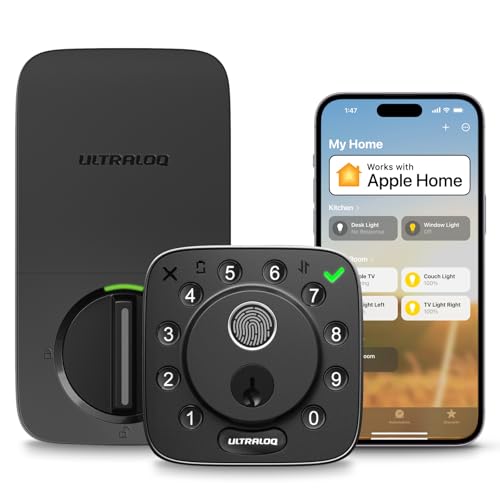
ULTRALOQ Bolt Fingerprint WiFi Smart Lock
More On The Choices That Made The List
For households that prefer a familiar keyed approach but still want a modern security upgrade, the Tustin pair lands as a solid front-door anchor. The satin nickel finish reads neutral against most exterior trim, and the set combines a keyed entry lever with a single-cylinder deadbolt. SmartKey re-keying is the practical standout: you can re-key the cylinder to match an existing Kwikset key without removing the lock from the door.
Install is approachable for anyone comfortable with a screwdriver, and the lever feels sturdy in hand. For comparison to the deadbolt strike plate covered later, this set is a complete lock, not a replacement part. The hardware suits homeowners outfitting a primary entry where a full keyless retrofit is unnecessary.
Standout Benefits
- SmartKey re-keying lets you reset the lock to a new key without taking the hardware apart
- Satin nickel finish blends with most exterior hardware palettes
- Keyed entry lever paired with a single-cylinder deadbolt covers a complete front-door setup
- Mechanical reliability keeps access working during power or battery issues
Trade-Offs To Consider
- No electronic entry, so handing out access still means handing out a physical key
- Door prep matters: measure your backset, cross bore, and thickness before ordering to avoid fit headaches
Whose Door It Belongs On
Owners upgrading an older front door who want a complete, traditional mechanical set with convenient re-keying.
A Better Fit Elsewhere When
Anyone wanting keyless daily access will get more from the Kwikset SmartCode 270, which adds a touchpad without giving up Kwikset’s core hardware.
This piece sits in a different category from the rest of the lineup: it is a replacement strike plate, not a lock. The 3-5/8 inch radius and iron black finish are designed for Kwikset-style deadbolts, and the small footprint makes it a useful repair or upgrade component for door frames that have shifted or stripped out over time.
Homeowners tackling a security refresh without replacing the whole lock often overlook the strike plate, and that is where forced entry frequently succeeds. Swapping in a fresh iron strike with proper long screws can meaningfully reinforce a weak frame.
Practical Advantages
- Reinforces the door jamb where deadbolts typically fail under forced entry
- Compact 4.0 by 2.5 inch footprint fits standard Kwikset deadbolt cutouts
- Useful as a low-cost repair piece when an old strike has loosened
- Iron black finish hides scuffs on dark door frames
Honest Caveats
- This is a single component, so it only helps if your existing deadbolt is in good working order
- Proper installation requires long screws and accurate alignment, which DIYers may find fiddly
Made For
Anyone repairing a loose deadbolt or hardening a door frame as a complement to a full lock replacement.
Consider Something Else When
You need a complete front-door solution; the Kwikset Tustin pair is a better one-stop answer for a full lock upgrade.
The wrydao lock is the most feature-heavy option in this lineup, bundling five entry methods into one unit. Fingerprint, passcode, IC card, app remote control, and a backup key cover the bases, and the integrated doorbell-triggered video adds a layer of verification at the threshold. For households that want a single device handling access and visitor awareness, this consolidation is appealing.
Compared to the keypad-only Kwikset SmartCode models reviewed next, this lock trades the simpler install for app-driven flexibility. Owners should expect some setup time pairing the unit with their home network and registering fingerprints, and battery life depends heavily on how often the video and remote features activate.
The Helpful Details
- Five entry methods give every household member a preferred way in
- Video doorbell integration lets you see who is at the door before granting remote unlock
- Backup key slot protects you against dead batteries or forgotten codes
- IC card option works for kids or guests who do not want to use the app
Worth Bearing In Mind
- Battery drain accelerates with frequent video streaming and remote unlocks
- More setup steps than a basic keypad, so non-technical owners may need patience on day one
Best Suited To
Households that want access and entry awareness combined in one device and are comfortable with app setup.
Skip It When
You want the simplest possible keyless setup; the Kwikset SmartCode 260 in matte black keeps things straightforward with keypad-only entry.
Compared to the wrydao all-in-one unit, the SmartCode 270 keeps things lean and reliable. The light-up touchpad guides entry after dark, and 50 customizable user codes mean every family member, dog walker, or short-term guest can have their own. Auto-lock adds peace of mind for anyone who has ever left the house wondering whether they remembered the deadbolt.
Grade 2 BHMA certification gives this deadbolt more bite than a basic Grade 3 lock, with Kwikset positioning the SmartCode 270 as up to 2.5 times stronger than lower grades. The satin nickel traditional styling suits entryways that lean classic, and the electronics run on standard batteries so there is no wiring to chase inside the door.
What Makes Sense
- Auto-lock secures the door after a set interval, helpful for forgetful mornings
- 50 user codes cover everyone from kids to short-term guests without sharing a single PIN
- Light-up touchpad keeps entry smooth in low-light conditions
- Grade 2 BHMA rating delivers stronger resistance than entry-level deadbolts
Points To Keep In Mind
- No remote or app control, so granting access from afar still requires sharing a code in advance
- Battery replacement is the only ongoing maintenance, and you may want a backup key on hand
Feature Snapshot
Perfect Match For
Families upgrading from keyed entry who want reliable keyless convenience without managing an app.
Reach For A Different Pick When
Remote control matters to you; the ULTRALOQ U-Bolt Pro adds app and WiFi control to a similar footprint.
The 260 in matte black trades the 270’s traditional lines for a contemporary silhouette, which matters on a door where hardware reads as part of the design. Same 50-code capacity, same auto-lock, same Grade 2 BHMA certification, but the keypad styling leans clean and modern.
For anyone whose front door pulls double duty as a design statement, the matte finish pairs well with dark paint, natural wood, and minimalist trim. Functionally, it works the same as the satin nickel sibling, so the choice here is mostly aesthetic. Owners commonly report the matte surface showing fingerprints less than polished finishes, which is a small daily bonus.
Positive Takeaways
- Matte black finish pairs with modern exterior palettes and dark paint colors
- Same reliable 50-code capacity and auto-lock as the broader SmartCode family
- Grade 2 BHMA security rating carries over from the 270
- Keypad design keeps entry simple without an app or hub
Some Limits To Know
- No remote access, so plan ahead when granting entry to someone away from the door
- Matte finish can show dust and water spots in exposed entries, requiring occasional wipe-downs
Right Fit For
Style-conscious homeowners who want keyless entry with hardware that complements modern exterior design.
Where A Sibling Pick Shines
Anyone preferring a lighter, traditional finish should look at the Kwikset SmartCode 260 in satin nickel instead.
This satin nickel version of the SmartCode 260 is the same lock in a different finish, aimed at entryways with lighter trim, white doors, or traditional interior palettes. Compared to the matte black sibling, it reads softer against classic exteriors while keeping all the same functional benefits.
One-touch locking motorized deadbolt operation makes daily use straightforward, and the illuminated keypad helps during late-night entries. Kwikset positions the Signature Series line as a step up in design from standard hardware, which shows in the lever feel and finish consistency.
Useful Touches
- One-touch locking button lights up for visibility and locks with a single press
- Satin nickel contemporary finish suits traditional and transitional doors
- Programmable codes support up to 50 users for family and trusted visitors
- Motorized deadbolt operation removes manual key turning on the inside
Less Ideal Details
- Still no app control, so remote access requires sharing a code ahead of time
- Programming changes are easier with the door open during initial setup, which can confuse first-time users
Quick Facts
Who Should Grab It
Anyone outfitting a classic or transitional entryway who wants keypad convenience without a connected app.
Look Elsewhere When
You want fingerprint or WiFi; the ULTRALOQ Bolt SE adds both in a similar price neighborhood.
Stepping up from the Kwikset keypad-only models, the U-Bolt Pro brings the full smart-lock toolkit to the door. Built-in WiFi means no separate hub, which simplifies installation for anyone who does not want another box on the network. Connectivity sits on 2.4 GHz WiFi (802.11 b/g/n), which matches most home routers but may rule out 5 GHz-only networks.
The eight-in-one entry system is genuinely versatile, with fingerprint, passcode, smartphone app, and traditional key all covered. The door sensor adds a layer of state awareness, telling you whether the door is actually closed and not just whether the bolt is thrown. Compared to the wrydao lock reviewed earlier, this unit skips the integrated video doorbell and focuses on access control.
Positive Points
- Built-in WiFi removes the need for an extra hub or bridge
- Eight entry methods cover fingerprint, codes, app, and physical key
- Door sensor reports whether the door is closed, not just locked
- App log tracks who entered and when, useful for households with multiple users
Where It May Fall Short
- 2.4 GHz WiFi only, so 5 GHz networks will not connect directly
- More features than the Kwikset keypads, which also means more settings to learn
Feature Card
Who It Suits Best
Smart-home enthusiasts who want app-first control without buying a separate bridge.
Swap It Out When
Apple Home is your primary ecosystem; the ULTRALOQ Bolt Fingerprint WiFi Smart Lock is built for that path.
The Bolt SE adds something its siblings do not advertise as loudly: Matter over Thread support, a smart-home standard designed to make devices play nicely across ecosystems. Matter is a recent interoperability protocol that lets locks, lights, and hubs from different brands talk to each other without custom integrations, which future-proofs the door for anyone planning to mix platforms.
Seven-in-one entry covers fingerprint, codes, app, web portal, eKey sharing, voice control, and two mechanical keys. Up to 50 fingerprints and 50 passcodes support family and frequent visitors. Compared to the U-Bolt Pro, this model leans further into the standards-based smart-home conversation while keeping the everyday access tools intact.
Noteworthy Benefits
- Matter over Thread support enables cross-platform smart-home integration
- Voice control compatibility opens hands-free entry through major assistants
- Up to 50 fingerprints and 50 passcodes cover most household sizes
- Web portal management gives you control from a laptop when the phone is not handy
What To Weigh
- Matter setup can be more involved than a single-app configuration, depending on your hub
- Thread border router requirement varies by ecosystem, which adds a small piece to research
The Numbers That Matter
The Right Fit
Smart-home builders mixing ecosystems who want a lock that travels with them across platforms.
Another Choice May Suit
All-Apple households will find tighter integration in the ULTRALOQ Bolt Fingerprint WiFi Smart Lock.
ULTRALOQ’s first lock fully integrated with Apple Home sits at the top of this list for iPhone-first households. Unlock from the Apple Home app on iPhone or Apple Watch, share access with family and guests, and add a HomePod or Apple TV as a home hub to unlock automations, remote control, and Siri voice commands. For shoppers already in the Apple ecosystem, that native feel is hard to replicate with a third-party app.
Compared to the Bolt SE, this model skips Matter to focus on deep Apple integration, which makes the choice a platform decision rather than a feature count. The fingerprint reader adds a fast physical fallback for guests without an iPhone. You may find Apple Home setup smoothest on a recent iOS version with two-factor authentication enabled.
Where It Helps
- Native Apple Home integration lets you unlock with iPhone or Apple Watch
- Remote control and automations work once a HomePod or Apple TV is set as a hub
- Fingerprint reader offers a fast physical option for non-iPhone users
- Door sensor confirms actual door position, not just lock status
Points To Note
- Best experience depends on Apple ecosystem accessories you may not already own
- Android users will see less benefit from the Apple-first design
Key Attributes
Built With In Mind
Households running iPhones, Apple Watches, and HomePods who want the lock to feel native to that setup.
Not Your Match When
Your home is cross-platform; the ULTRALOQ Bolt SE with Matter over Thread travels better between ecosystems.
What Matters Most Before Choosing Smart Locks For Home
Entry Method And Daily Use
Start with how you actually want to enter. Keyed entry suits households attached to physical keys, while keypad and fingerprint models suit anyone juggling kids, guests, or a busy morning routine. Consider who else uses the door: a keypad with 50 user codes accommodates almost any household size, and app-driven locks add remote access for situations like letting in a contractor while you are at work.
Connectivity And Ecosystem Fit
Smart locks split into standalone keypad models, WiFi-direct units, and ecosystem-integrated locks. WiFi-direct models skip the hub but typically use the 2.4 GHz band, which is fine for most routers. Ecosystem-integrated locks like the Apple Home-certified ULTRALOQ deliver the smoothest experience inside their platform, so matching the lock to your existing devices pays off daily.
Power, Battery Life, And Maintenance
Battery-powered locks dominate this category, and runtime depends on usage patterns. Frequent app unlocks and video streaming drain cells faster than occasional keypad use. Plan to keep a backup key accessible, and check whether the manufacturer uses standard batteries or a proprietary pack, since proprietary packs can be pricier to replace.
Build Quality And Door Prep
BHMA grading helps compare mechanical strength, with Grade 2 stronger than Grade 3. Door prep is the most common DIY hiccup, so measuring your backset, cross bore, and thickness before ordering saves real headaches. For older frames, a reinforced strike plate like the Kwikset 83223-014 strengthens the install without replacing the lock.
Key Considerations Across These Picks
Wrong Turns To Avoid
Skipping the door measurement step is the most common regret, and it leads to faceplate misalignment or a bolt that does not reach the strike. Another frequent slip is choosing a WiFi lock when your router only broadcasts on 5 GHz, since most smart locks use 2.4 GHz. Finally, picking an ecosystem-first lock like the Apple Home model without owning the supporting hardware leaves features stranded.
Where The Extra Money Goes
Higher-tier smart locks earn their position through fingerprint sensors, door state awareness, and ecosystem integration. The ULTRALOQ Bolt Fingerprint and Bolt SE sit at the top because they add protocols like Matter or deep Apple Home support on top of the basics. If you only need keypad convenience, a mid-tier Kwikset SmartCode covers daily use without the higher price, and the savings can go toward a stronger strike plate.
Frequently Asked Questions
Do smart locks work during a power outage?
Battery-powered smart locks keep working through a home power outage, since they run on batteries independent of household electricity. WiFi-dependent features may go offline until your router restarts, but the keypad or fingerprint reader keeps functioning locally.
Can I install a smart lock myself?
Most keypad and fingerprint deadbolts are designed for DIY installation with a screwdriver and the included template. You should expect to remove the existing deadbolt, fit the new one into the standard 2-1/8 inch bore, and run wiring for the interior assembly.
Are smart locks safe for front doors?
Look for Grade 2 or higher BHMA certification for exterior doors, which gives meaningful resistance against forced entry. Pair the lock with a reinforced strike plate and long screws for the strongest DIY result.
How many user codes do I really need?
A household of four rarely needs more than 10 codes, but locks with 50 codes let you assign a unique PIN to a dog walker, house cleaner, or short-term guest without sharing your own.
What is Matter, and does it matter for a lock?
Matter is a smart-home standard that lets devices from different brands work together through a compatible hub. For locks, it matters most in mixed ecosystems, where you want one protocol to bridge Apple, Google, and other platforms.
Closing Remarks
A smart lock should make daily life feel lighter, not heavier, so match the entry method, ecosystem, and finish to your door and your routine. The picks above run from a reliable keyed set with re-keying convenience to app-driven locks with fingerprint and protocol flexibility. Pick the level of connectivity you will actually use, and the rest of the choice follows naturally.
