

You don’t need a corporate budget to get a sit-stand desk that actually moves, holds steady, and fits a real laptop-and-monitor setup. The catch is figuring out which ones feel solid at full extension and which ones wobble the second you bump the keyboard tray. This shortlist gathers ten affordable standing desks worth a serious look, from compact mobile carts to wide L-shaped surfaces for triple-monitor workflows. Each pick is mapped to a real use case, so you can match your room, your gear, and your work style without overpaying for things you won’t use.
The Shortlist At A Glance

Desktronic HomeOne Standing Desk 60×30 (Dual Motor)

Vari Classic Electric Standing Desk 72×30 (Reclaimed Wood)

Desktronic HomePro Standing Desk 60×30 (352 lb Capacity)

VIVO DESK-V130EB Black Electric Corner 3-Leg Standing Desk Frame

Vari ComfortEdge Electric Standing Desk 72×30 (Butcher Block)

Vari Ergo Electric Standing Desk 54×26 (Espresso/Slate)

Vari ComfortEdge L-Shape Standing Desk 80×60 (Reclaimed Wood)

Marsail Mobile Standing Desk with Lockable Wheels (Walnut)
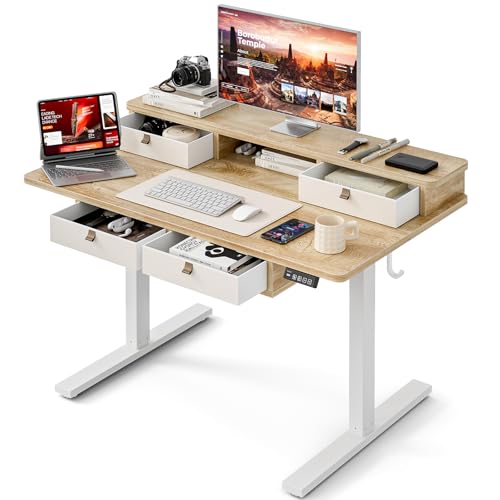
Grandder Electric Standing Desk with Four Drawers (Oak)

OffiGo 55 Inch U-Shape Standing Desk with Keyboard Tray (Black)
More Details On Our Top Picks
The Desktronic HomeOne lands at the top of this shortlist because it covers the everyday home-office case without obvious weak spots. Its 60-by-30-inch top fits a 27-inch monitor, a laptop dock, and a keyboard without crowding, and the dual-motor lift raises and lowers the surface smoothly at roughly two inches per second.
Built in Europe with a reinforced steel frame, the HomeOne is rated to hold around 264 pounds, so dual-monitor arm setups and under-desk cable trays sit comfortably within spec. The integrated USB and USB-C charging ports on the front edge are a real perk for anyone who plugs in a phone or wireless headset throughout the day. The touchscreen controller with three memory presets makes switching between sitting and standing a one-tap affair, and you may find yourself using the third preset more than you expected for an afternoon reading or video-call height.
Positive Takeaways
- Dual synchronized motors keep the surface level at any height, even with a heavy monitor arm mounted off-center.
- USB and USB-C charging on the front rail removes the need for a separate hub on the desktop.
- Three memory presets save the exact heights you use for sitting, standing, and a middle “lean-in” position.
- 60-by-30-inch work surface accommodates two monitors or a laptop plus external display without cramping.
Things To Weigh Up
- European assembly adds a small chance of longer shipping windows for some shoppers.
- Three presets run light compared with desks offering four or more, so shared households may need to compromise on memory slots.
Made For
Remote workers running a single-monitor or dual-monitor setup who want a quiet, stable surface and don’t need an oversized top.
Consider Something Else When
You run three or more monitors or need a wraparound shape, in which case the Vari ComfortEdge L-Shape Standing Desk 80×60 gives you the real estate.
The Vari Classic earns its spot for shoppers who care about how the desk looks as much as how it moves. The reclaimed-wood top with a slate accent gives any room a warmer, more finished feel than the standard laminate, and the 72-by-30-inch surface is genuinely wide.
Compared with the Desktronic HomeOne reviewed just above, the Vari Classic trades a smaller height-adjustment envelope for a longer worktop, so two large monitors or a triple-monitor row fit comfortably side by side. The patented quick-attach frame and slide-and-lock legs are built so two people can complete the unbox-to-standing build in roughly ten minutes, depending on your experience with flat-pack furniture. For home offices that double as the living-room background during video calls, the reclaimed-wood finish reads more like furniture than office equipment.
Strengths Worth Knowing
- 72-inch surface accommodates dual 27-inch monitors with room to spare for a laptop, notebook, and desk plant.
- Reclaimed-wood finish elevates the look for rooms visible on camera or to guests.
- Slide-and-lock legs and pre-installed frame keep first-time assembly under an hour for most people.
- Sturdy frame design keeps the surface steady when typing firmly, even at standing height.
Trade Offs
- Reclaimed-wood top tends to scratch more easily than laminate, so a desk pad is wise for keyboard-heavy use.
- 72-inch length won’t fit shorter walls or alcove setups without careful room measurement.
Feature Snapshot
Whose Shelf It Belongs On
Home-office shoppers who want a desk that doubles as a furniture statement piece and have a wide wall or open room to place it.
A Better Fit Elsewhere
You want a wraparound layout for creative tools and paperwork, in which case the Vari ComfortEdge L-Shape Standing Desk 80×60 makes the corner usable on both sides.
Desktronic’s HomePro is the obvious upgrade pick for anyone loading the desktop with serious gear. Rated to lift roughly 352 pounds, it handles dual-monitor arms, a desktop tower, a printer, and a battery backup without the motor straining at full extension.
Like the HomeOne reviewed earlier, the HomePro uses dual synchronized motors, a touchscreen controller, three memory presets, and front-mounted USB and USB-C charging ports, so the day-to-day feel is familiar. The difference shows up under load: where budget frames sometimes drift sideways as they rise, the HomePro’s synchronized motors keep the surface level even with weight concentrated on one corner. Depending on your monitor-arm choice, you may find the HomePro is one of the few budget-tier desks that won’t complain under a heavy ultrawide plus a second display.
The Practical Payoff
- 352-pound lift capacity covers triple monitors, a desktop tower, and a printer without strain.
- Dual synchronized motors keep the surface level even with off-center weight from a heavy monitor arm.
- Three memory presets and a touchscreen controller make height changes a one-tap move.
- USB and USB-C ports on the front eliminate a separate charging hub on most desks.
Honest Caveats
- Same 60-by-30-inch top as the HomeOne, so shoppers needing more surface should look at Vari’s wider options.
- Higher weight rating means the frame is heavier, so moving the desk after assembly is a two-person job.
Right Fit For
Power users running loaded multi-monitor setups, small studios, or anyone whose gear tends to outweigh the desk they bought it for.
Not Your Match When
Your setup is a single laptop and you don’t need the extra lift margin, in which case the Desktronic HomeOne Standing Desk 60×30 covers the case at a lighter footprint.
The VIVO DESK-V130EB is the pick for shoppers who want the L-shape layout without paying for a complete desk bundle. As a frame-only product, it ships without a desktop, which means you pair it with a butcher-block slab, a laminate panel, or even a reclaimed-wood top you’ve sourced separately.
Recommended tabletops run from 43.5 to 94 inches long for the main desk and 29.8 to 75.3 inches for the return, so you have room to customize the proportions to your corner. Compared with the pre-built Vari desks covered earlier, VIVO’s frame asks for more planning, but it pays off if you want a specific wood or color that bundled desks don’t offer. Pairing it with a 3/4-inch or thicker top is the commonly recommended approach for stability.
Good Reasons To Consider
- Frame-only design lets you choose your own desktop material, thickness, and finish.
- Three-leg layout supports a true L-shape that handles a primary monitor plus a side reference screen.
- Electric height range covers most seated-to-standing transitions for users between roughly 5’2″ and 6’4″.
- Modular components are easier to replace individually if a motor or controller ever fails.
Some Limits To Know
- Desktop is sold separately, so total cost climbs once you add a quality top of the right size.
- Assembly takes longer than a packaged desk because you fit and fasten your own tabletop to the frame.
- Wiring management isn’t included, so owners commonly add their own under-desk trays or raceways.
Best Suited To
DIYers and shoppers matching the desk to an existing room aesthetic who don’t mind sourcing a separate tabletop.
Reach For A Different Pick When
You want an all-in-one solution that arrives ready to assemble as a single unit, in which case the Vari ComfortEdge L-Shape Standing Desk 80×60 comes preconfigured.
The ComfortEdge tackles a problem most desks ignore: wrist and forearm pressure after hours of typing. Its sloped front edge angles down toward the user, which means your wrists rest at a flatter angle against the surface instead of bending up to meet a hard square edge.
Underneath, the dual-motor lift system runs quietly through a 25-to-50.5-inch range, and four programmable presets let you store a sit height, a stand height, and two extras for video calls or laptop-only sessions. The 72-by-30-inch butcher-block top gives the same wide workspace as the Vari Classic reviewed earlier, but the wood tone reads warmer and more residential. If your wrists ache by mid-afternoon or you type for a living, the slope is the kind of detail that pays off every single day.
The Upside
- Sloped front edge reduces wrist pressure during long typing sessions and video calls.
- Four programmable presets store sitting, standing, and two alternate heights for different tasks.
- Wide 72-by-30-inch surface accommodates dual monitors with space for notebooks and a desk plant.
- Butcher-block finish reads like furniture in a dining-room-converted office.
Practical Considerations
- Butcher block needs periodic conditioning to prevent drying or staining from spills.
- Sloped edge reduces usable flat depth right where some users rest notebooks or tablets.
Quick Facts
Perfect Match For
Writers, developers, and anyone who types through most of the workday and notices wrist fatigue on flat-edge desks.
Skip It When
You keep a keyboard tray or wrist rest and rarely rest your wrists directly on the desktop, in which case the Vari Classic Electric Standing Desk 72×30 with a flat reclaimed-wood top works fine.
The Vari Ergo is the small-space answer for shoppers who can’t fit a 60-inch or 72-inch top against their wall. At 54 by 26 inches, it slips into studio apartments, alcoves, and converted bedrooms without dominating the room, while still giving you room for a 24-inch monitor, a laptop, and a keyboard.
The rounded waterfall front edge supports better posture by letting your forearms rest at a more natural angle, which is the same ergonomic idea behind the ComfortEdge’s slope, just curved instead of angled. The quiet electric lift covers a 25-to-50.5-inch range, and four programmable memory presets suit users from petite to tall. The espresso-and-slate color pairing looks grown-up rather than office-generic, so it blends with darker furniture and warm wood floors.
A Favorable Mix
- Compact 54-by-26-inch footprint fits studio apartments, guest rooms, and narrow walls.
- Curved waterfall edge supports forearms in a natural angle during long work sessions.
- Four memory presets store sitting, standing, and two custom heights for different tasks.
- Espresso and slate finish reads warmer than the usual black-and-silver office look.
Worth Bearing In Mind
- 26-inch depth limits monitor size; ultrawide 34-inch displays can crowd the keyboard area.
- Single 24-inch monitor is the realistic max, so dual-monitor shoppers should step up to the 72-inch Vari Classic.
Who Should Grab It
Studio dwellers, first apartment buyers, and anyone setting up a single-monitor workstation in a tight corner.
Look Elsewhere When
You want to run dual 27-inch monitors, in which case the Vari Classic Electric Standing Desk 72×30 gives you the workspace you need.
The Vari ComfortEdge L-Shape is the largest desk in this roundup, and it earns that footprint by giving power users real room to work. The 80-by-60-inch wraparound surface handles a triple-monitor row across the main span, with the return side reserved for a laptop, paperwork, or a second workstation.
Three ultra-quiet motors handle the lift for the entire L-shape and support up to 200 pounds of gear without strain. Four programmable presets store the heights you actually use, and the ComfortEdge sloped front reduces the same wrist pressure that makes the 72-inch ComfortEdge a writer favorite. The reclaimed-wood finish with the slate accent carries the warmer look across both wings of the L, which keeps the room cohesive instead of looking like two mismatched desks pushed together.
Positive Points
- Wraparound 80-by-60-inch surface fits dual or triple monitors plus a side reference screen.
- Three synchronized motors lift up to 200 pounds smoothly across the full L-shape.
- Sloped ComfortEdge front edge reduces wrist fatigue during long typing sessions.
- Four memory presets cover sit, stand, and two alternate heights without manual adjustment.
Where It Is Less Suited
- Footprint demands a full corner of a room, so small apartments won’t accommodate the wraparound.
- Two tops and a corner seam mean owners commonly add a cable channel to keep wiring tidy across the joint.
- Larger box means a longer assembly time than single-top desks.
Feature Card
Who Will Love This
Creative professionals, traders, and power users running triple-monitor setups who can dedicate a real room corner to their desk.
Swap It Out When
Your workspace is a small bedroom or alcove, in which case the Vari Ergo Electric Standing Desk 54×26 fits where the L-shape simply won’t.
The Marsail Mobile Standing Desk solves a problem most standing desks ignore entirely: you don’t always sit at the same desk. Its pneumatic lift handle adjusts the height from roughly 28.5 to 46.1 inches with a single squeeze, and four 360-degree lockable casters let you roll the whole unit between rooms.
Unlike the electric desks reviewed above, the Marsail uses a manual pneumatic mechanism, so it works anywhere without needing an outlet. That makes it a strong fit for shared spaces, classroom podiums, kitchen-counter overflow during busy weeks, or anywhere the desk needs to follow you rather than stay bolted to a wall. The walnut finish reads warmer than typical office-cart plastic, and the wider top accommodates a 15-inch laptop plus a notebook comfortably. If your work happens in more than one room, the rolling design pays for itself quickly.
A Few Strong Suits
- Lockable 360-degree casters roll smoothly and stay put once you set the desk down.
- Pneumatic height adjustment needs no outlet, so the desk works in any room or temporary setup.
- Wider-than-typical mobile top fits a 15-inch laptop plus notebook or tablet.
- Walnut finish looks more like a piece of furniture than a typical rolling cart.
Less-Strong Areas
- Pneumatic lift requires standing pressure on the handle, so it isn’t a one-finger tap like electric desks.
- Smaller footprint than stationary desks, so dual-monitor setups don’t fit.
Built With In Mind
Teachers, hybrid professionals, and shared-space workers who need their desk to move with them between rooms or buildings.
Another Choice May Suit
You want a stationary electric surface with full sit-stand memory presets, in which case the Desktronic HomeOne Standing Desk 60×30 stays put and lifts at the touch of a button.
The Grandder Electric Standing Desk with Four Drawers is the pick for shoppers who don’t have a separate filing cabinet or side shelf. Four built-in drawers and an under-top storage shelf keep notebooks, chargers, and small office supplies in reach without piling onto the work surface.
The industrial-grade steel frame supports up to 220 pounds, and the T-shaped leg design keeps the desk steady at full standing height. Compared with the Desktronic HomeOne reviewed earlier, the Grandder trades a USB charging hub and touchscreen presets for physical storage, which matters more for paperwork-heavy workflows than for tech-heavy ones. The 47-by-28-inch top is the most compact in this roundup after the Vari Ergo, so it suits smaller rooms where drawers matter more than monitor real estate.
Real-World Strengths
- Four drawers plus a storage shelf remove the need for a separate filing cabinet in small rooms.
- 220-pound frame rating covers dual monitors and a desktop tower with room to spare.
- T-shaped leg design keeps the surface stable at full standing height.
- Compact 47-by-28-inch top fits narrow walls and bedroom corners.
Trade-Offs To Consider
- Smaller top means 24-inch monitors fit, but dual 27-inch displays crowd the workspace.
- Drawers reduce knee clearance at seated height for taller users, depending on chair and body geometry.
- No built-in USB charging ports, so a separate hub is needed for phone and headset charging.
Right Fit For
Home-office shoppers with paperwork, school supplies, or small tools to keep organized without buying a separate cabinet.
A Better Fit Elsewhere
Your workflow is mostly digital and you want front-edge USB-C charging, in which case the Desktronic HomeOne Standing Desk 60×30 covers the modern laptop-first setup.
The OffiGo U-Shape Standing Desk takes a different angle on the wraparound idea. Instead of a wide L, the two-corner U-shape gives you a primary work surface plus a side wing and a built-in keyboard tray, which together add roughly 15 percent more usable desktop than a comparable rectangular top.
Two desktop drawers keep notebooks, pens, and small electronics within arm’s reach, and the keyboard tray slides under the main surface when you want a clear desktop. The black finish keeps the look neutral for darker rooms and gaming setups, and the 55-inch span is more approachable in a small bedroom than the 80-by-60-inch Vari L-shape reviewed above. For shoppers who want wraparound ergonomics without giving up a whole room, the U-shape hits a useful middle ground.
What Stands Out
- U-shape design adds roughly 15 percent more usable desktop area than a comparable rectangular surface.
- Built-in keyboard tray slides under the main top when not in use.
- Two desktop drawers keep small supplies organized and the desktop clear.
- 55-inch span fits smaller rooms where a full L-shape won’t.
Points To Keep In Mind
- Keyboard tray adds a fixed typing position, so ergonomic users who swap between split and standard keyboards may want a freestanding tray instead.
- Smaller per-wing depth than the Vari L-shape means ultrawide monitors fit only on the main span.
- Two corners mean more seams to manage for cable routing.
Made For
Gamers, students, and multi-device workers who want a wraparound feel in a smaller room than a full L-shape demands.
Not Your Match When
You run a triple-monitor array across the wraparound, in which case the Vari ComfortEdge L-Shape Standing Desk 80×60 has the dedicated surface area you need.
What Actually Matters When Shopping For Budget Standing Desks
Frame Construction And Lift Type
The frame is the part of a standing desk that fails first, so the material and motor count matter more than the top finish. Steel-reinforced frames with dual synchronized motors handle heavy loads without drifting sideways at full extension. Single-motor desks work for lighter laptop setups, but two-motor frames stay level when you load one side with a heavy monitor arm. Pneumatic carts like the Marsail trade electric convenience for true portability, which is a different category altogether.
Surface Size And Shape
A 60-by-30-inch top fits a single monitor and a laptop comfortably. Step up to 72 inches for dual 27-inch displays or a triple-monitor row, and go L-shape or U-shape when you want a side wing for paperwork, a second laptop, or reference monitors. For studio apartments and tight corners, the 54-by-26-inch Vari Ergo or the 47-by-28-inch Grandder keep the footprint manageable. Measure the wall and the corner depth before you commit, because return-window headaches aren’t worth a slightly bigger top.
Height Range And Memory Presets
Standard electric desks lift from roughly 25 to 50 inches, which covers most adults between 5’0″ and 6’4″. Memory presets save the exact heights you use, so a sit-stand transition becomes a one-tap move instead of holding a button. Three presets are enough for solo users, but households sharing a desk should look for four to avoid manual adjustment.
Real-World Comfort Touches
Sloped or curved front edges reduce wrist pressure during long typing sessions, which is why the ComfortEdge profile shows up on two picks in this roundup. Built-in USB and USB-C charging removes a hub from your desktop, and integrated drawers keep small supplies in reach without a separate cabinet. These details are easy to overlook but they shape how the desk feels six months after you unbox it.
Key Considerations Across These Picks
Mistakes Worth Dodging
Underestimating the top size is the most common slip, and the fix is a quick measurement of your monitors plus keyboard plus any side accessories. Another trap is choosing a single-motor frame for a heavy dual-monitor arm, which causes drift and motor strain over time. Buyers also tend to skip cable management planning, so before you commit, picture where power strips, monitor-arm clamps, and under-desk trays will route. Depending on your room layout, you may find that a frame-only desk like the VIVO DESK-V130EB needs an extra evening of planning compared with a packaged desk.
When Paying More Pays Off
The jump from budget to mid-tier in this category usually buys a dual-motor frame, a heavier weight rating, and a wider or wraparound top. The Desktronic HomePro’s 352-pound capacity, the Vari ComfortEdge L-Shape’s three-motor wraparound lift, and the reclaimed-wood finishes across the Vari lineup are the kinds of upgrades that show up every single workday. Premium matters most when your setup is heavy, your room is on camera, or your wrists remind you about ergonomics by mid-afternoon. For single-monitor laptop users in a small room, the budget tier holds up just fine.




